Unity Catalog commits: Make your managed delta layer safer and more performant
I see confusion about what catalog commits mean and about catalog-commit-enabled tables. It also looks really boring, but it is actually that boring stuff that makes everything work correctly.
What catalog commits actually do
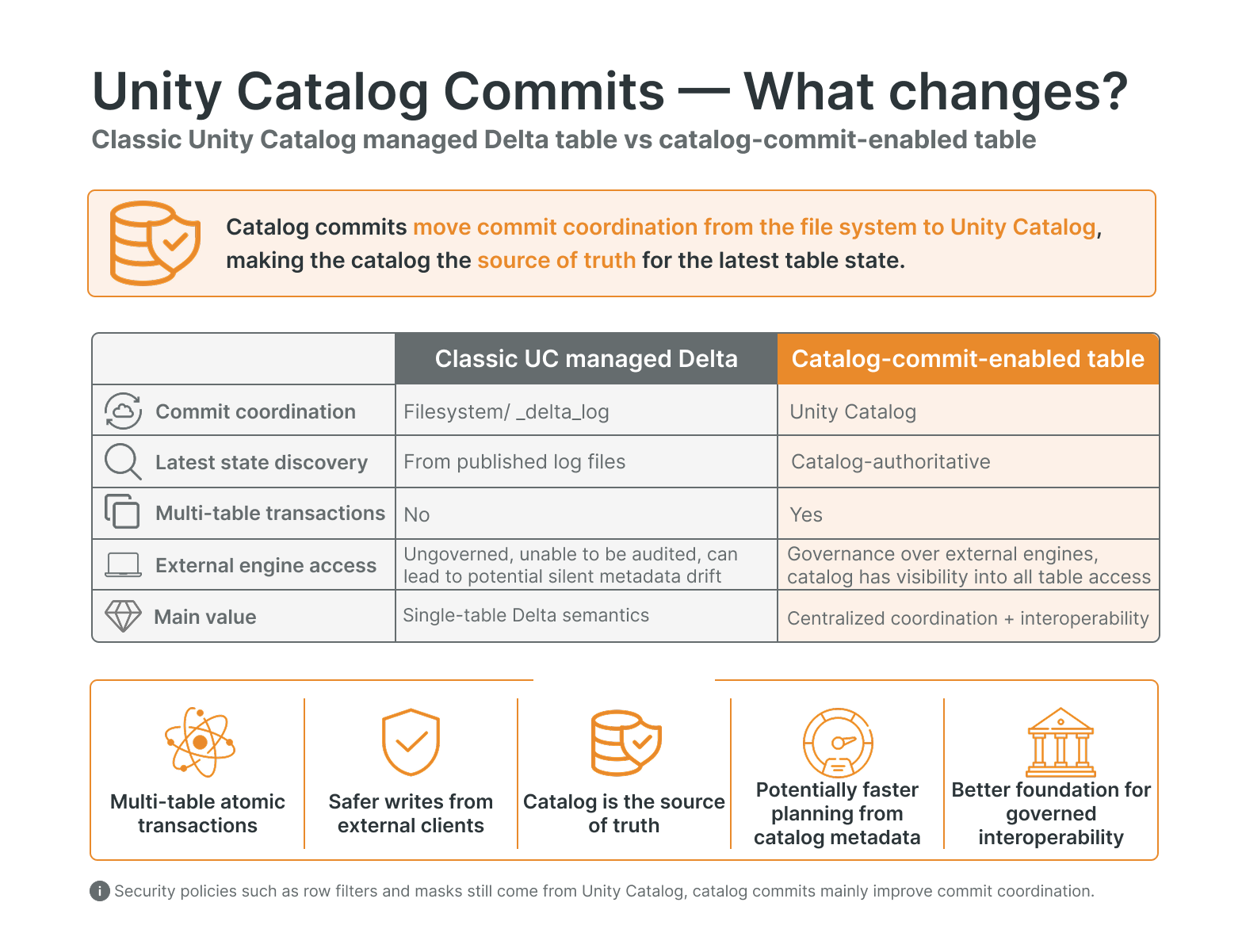
In short, with catalog commits enabled, supported readers and writers resolve table state through Unity Catalog instead of directly against the filesystem. The data itself stays exactly where it was: in open Delta format on cloud storage. What changes is the commit coordination, moving from filesystem-only coordination to Unity Catalog as central authority.
In short, with catalog commits, supported readers and writers resolve table state through Unity Catalog. The data still lives in open Delta format on cloud storage, but commit coordination moves from filesystem-only coordination to Unity Catalog.
Catalog commits help with:
Concurrency Control: Unity Catalog coordinates the winning commit when multiple writers compete.
Governance: supported clients resolve table state through Unity Catalog
Lays the foundation for stronger read performance, because some commit metadata can be served from Unity Catalog
New functionalities, like multi-statement, multi-table transactions
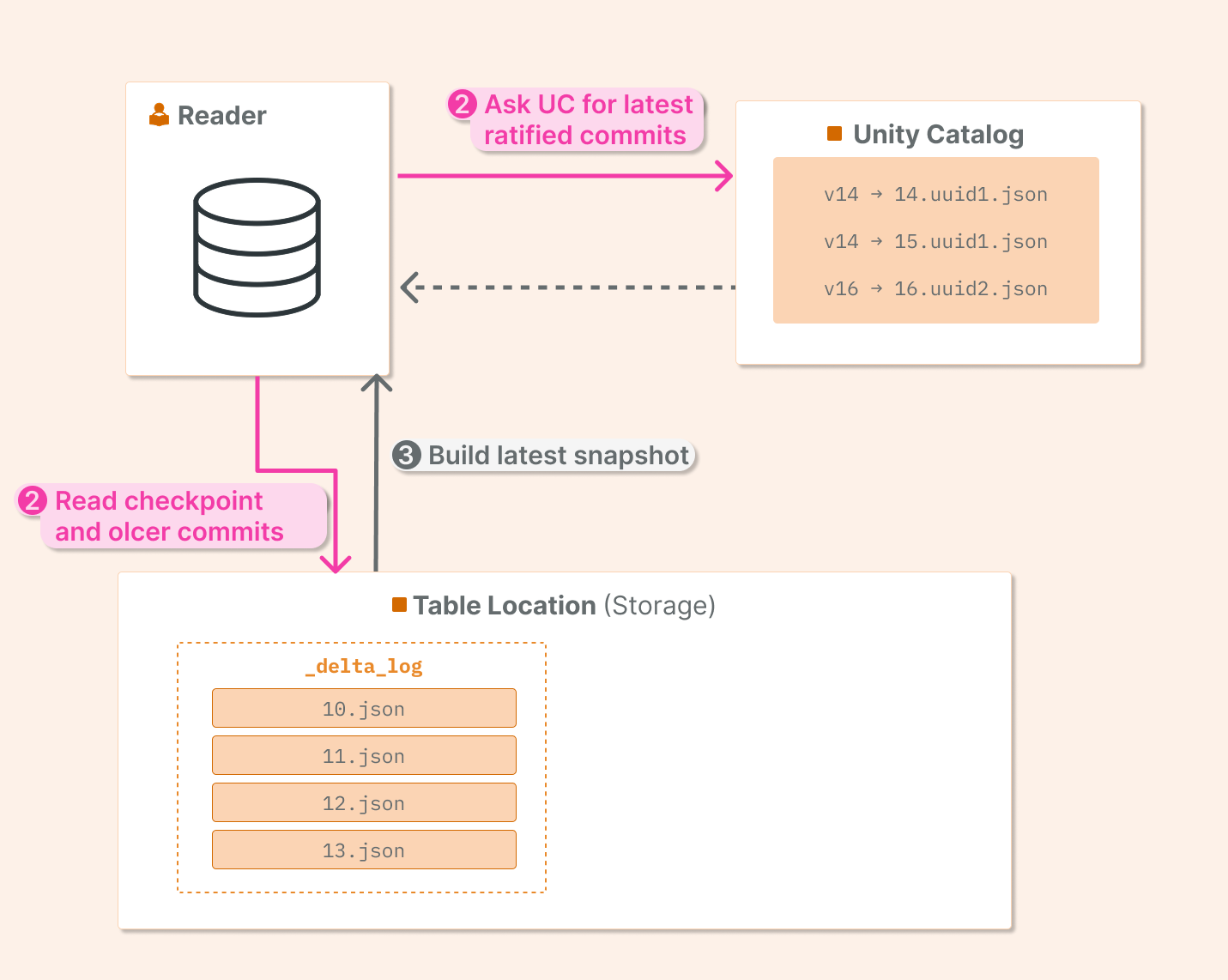
Unity Catalog as the source of truth: UC holds the authoritative view of the latest Delta table state.
Your data is still in open format on storage; just read/write operations are controlled and coordinated by Unity Catalog. Let’s look at the benefits and also see that in detail.
Technical details: commits
Let’s create a Unity Catalog-managed Delta table with catalog commits enabled (by setting TBLPROPERTIES):
CREATE TABLE catalog_commits.default.managed_catalog_commits (
  id BIGINT,
  batch_id INT,
  ...
)
TBLPROPERTIES (
  'delta.feature.catalogManaged' = 'supported'
);
Let’s do some inserts to generate commits.
Let’s validate that commits are stored in Unity Catalog. We can use the Unity Catalog Rest API /api/2.1/unity-catalog/delta/preview/commits endpoint to check which commits are stored in Unity Catalog (endpoint will soon change).
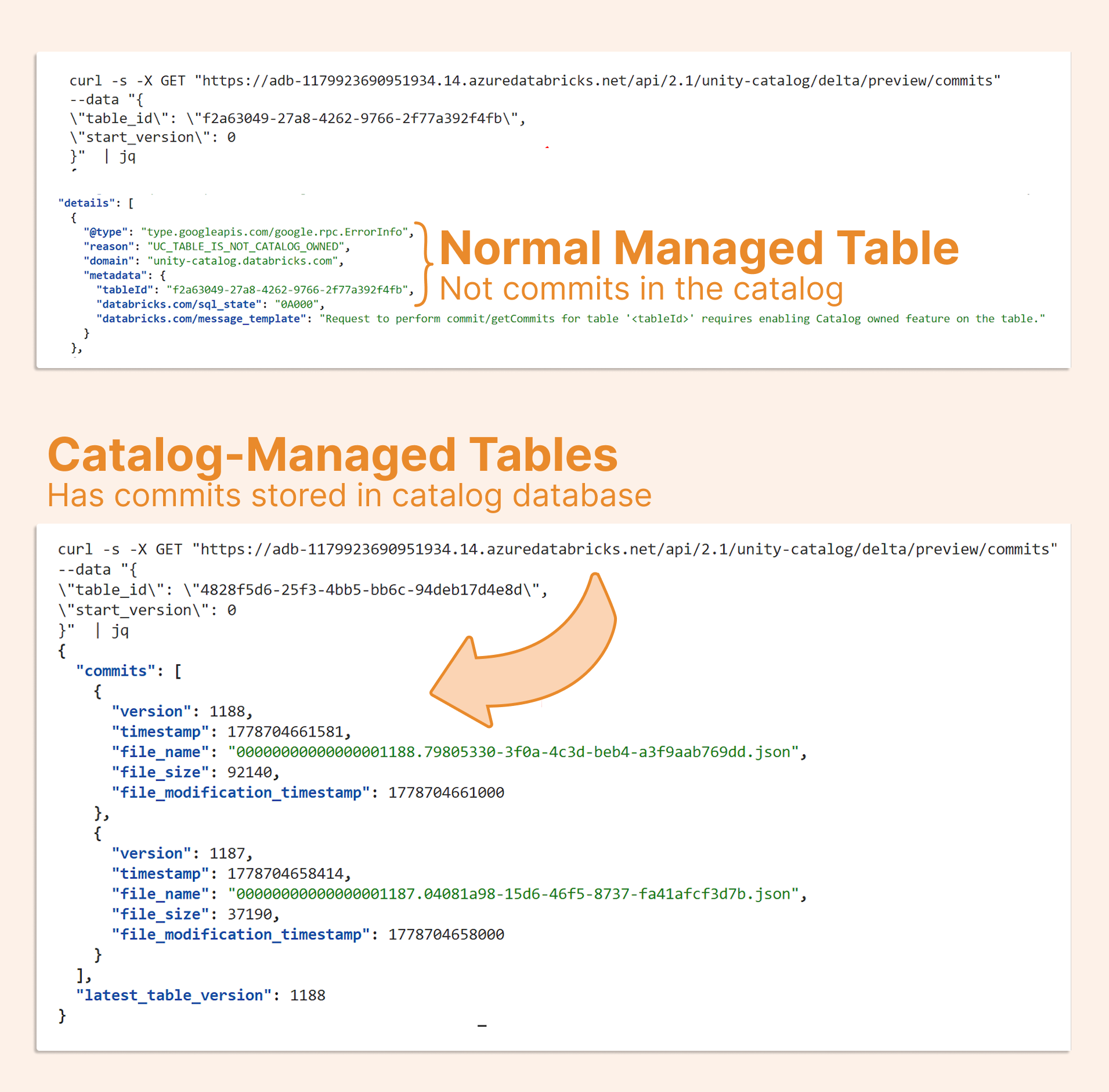
For a standard managed table, this endpoint does not return catalog commits because the table does not have the catalogManaged feature enabled.
For a catalog-commit-enabled table, the endpoint returns catalog-ratified commit information.
Technical details: staged commits
If we look at the Delta in the storage, we can see _delta_log/staged_commits, a folder for commits coordinated by the catalog. It is a feature about which we wrote in the article The Lakehouse Finally Has Real Transactions
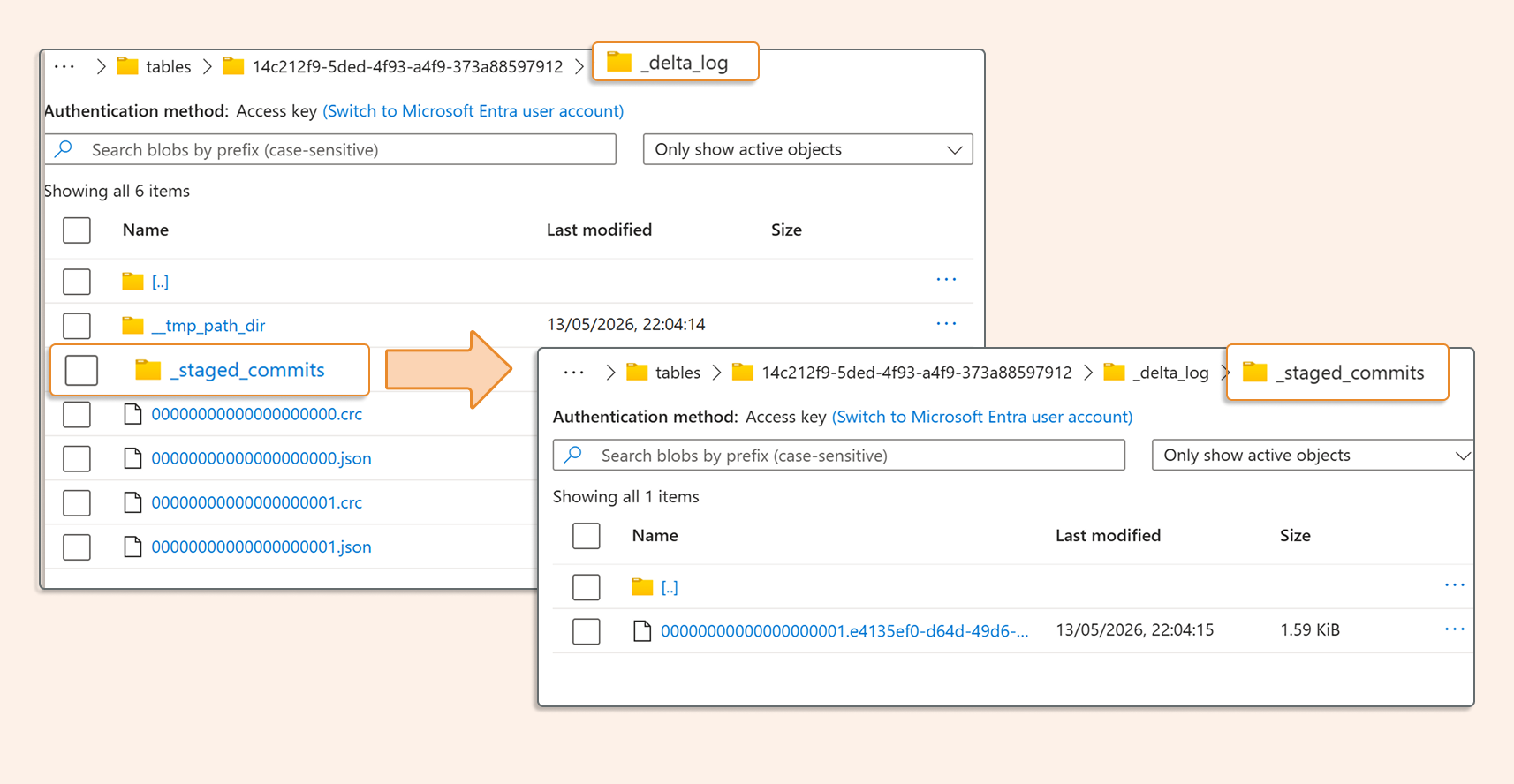
Catalog commits are required for multi-statement, multi-table transactions. The staged commits folder is part of commit coordination and is also super useful when multiple clients (including external ones) are writing to the same Delta table.
The write process
Here's the four-step sequence for a catalog-commit-enabled write:
Writer stages a commit in deltalog/_staged_commits
Writer proposes the commit to Unity Catalog.
Unity Catalog validates the proposal and returns the winning commit.
The approved commit is published to _delta_log
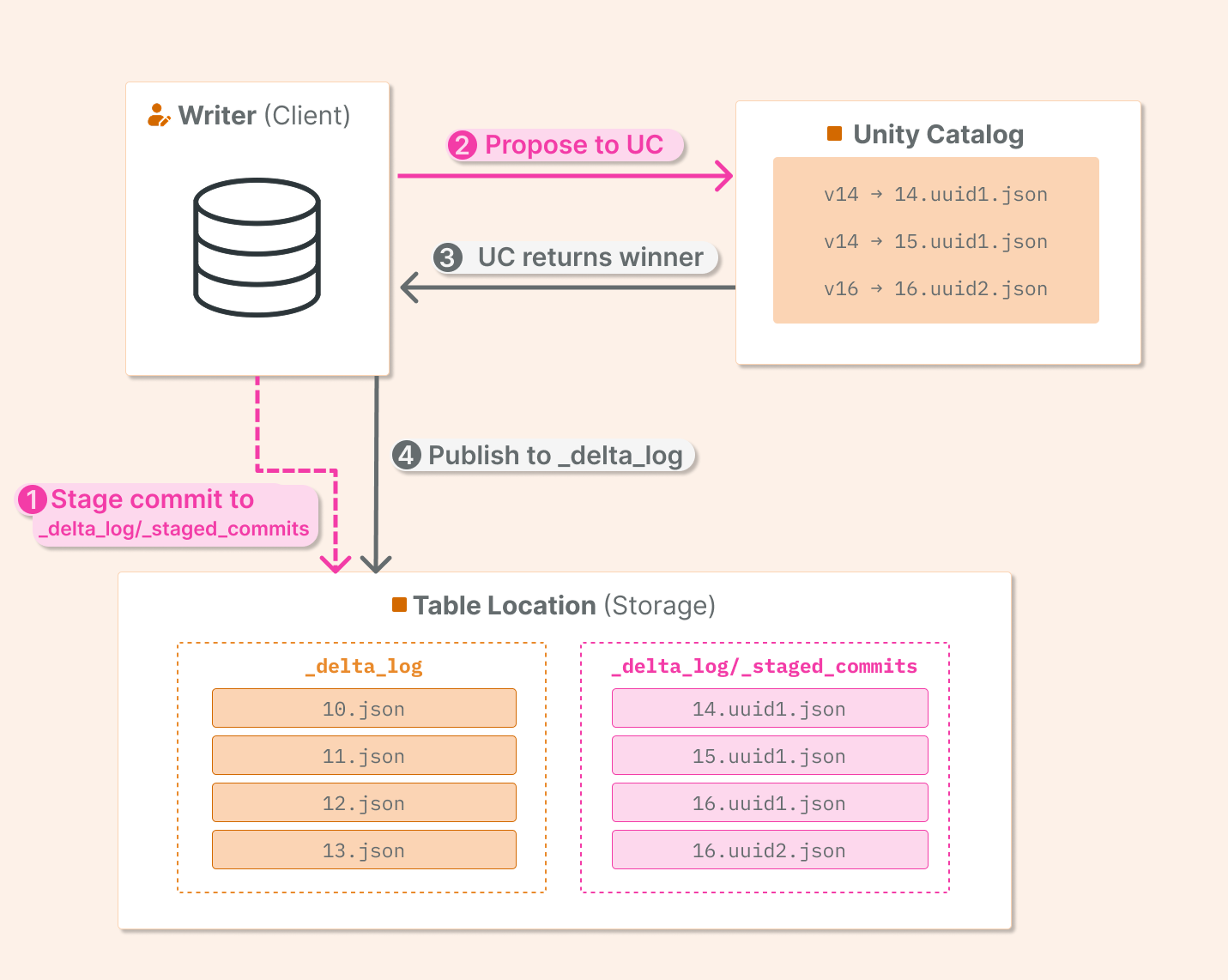
This process enables strict concurrency control, security control, and schema control, as the schema is now primarily managed by UC, not Delta.
Performance read
During reads, I noticed that the amount of data read in the query plan for the same table, with catalog commits, is slightly lower and usually faster, especially when we have many commits (unoptimized tables) and multiple small Delta log files to process.
Catalog Commits lays the foundation for stronger performance, since table information is stored in UC's database. This table information can be served to engines directly, rather than fetching individual JSONs from the Delta log
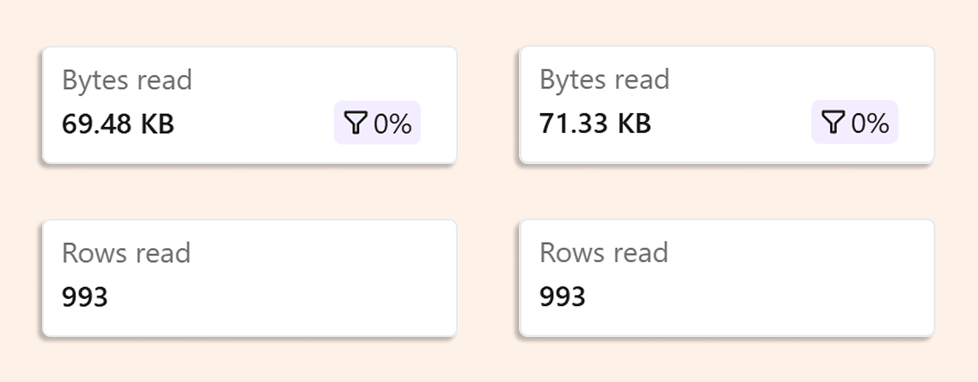
Smaller read size for Catalog Managed Commits Table
UC is acting as a database (cache). Prior to catalog Commits, when using Databricks on AWS, DynamoDB was used to guarantee Delta ACID on S3 buckets. Now that the functionality has been moved to Unity Catalog.
External access
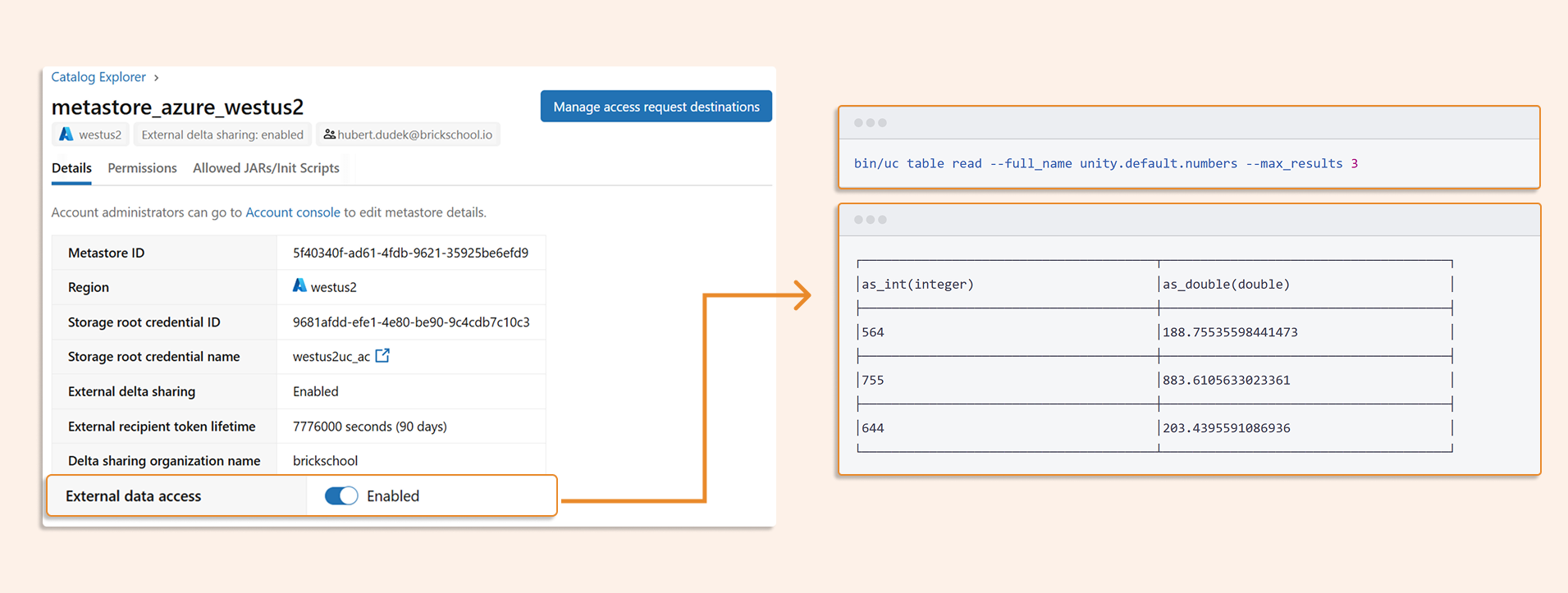
Catalog commits enable safer, governed integration of external engines with Unity Catalog. When multiple engines write to UC-managed tables, we need a shared place to coordinate those writes. Instead of each engine writing directly to storage independently, the external engine should first coordinate with the catalog and check whether it is allowed to commit the change. This makes Unity Catalog the control point for external writes and helps avoid ungoverned writes, silent metadata drift, and inconsistent table state.
After writes are coordinated through the catalog, the same model also improves governance for external reads. Catalog commits help external engines integrate with Unity Catalog policies, including attribute-based access controls (ABAC). This enables fine-grained enforcement of row- and column-level ABAC policies when UC-managed tables are read from external engines.
Example of setting external access below with open source Unity Catalog installed on my laptop, reading from Databricks Unity Catalog :
Unity Catalog as the source of truth
Catalog commits are not just another Delta table property. They move commit coordination into Unity Catalog, which makes the catalog authoritative.
For a single Databricks writer, the difference may look small. The value compounds when you have:
Multi-table transactions that span more than one Delta table
Concurrent writers from multiple engines or teams
External clients reading and writing UC-managed tables with fine-grained access requirements
Catalog commits make those governed access patterns easier to coordinate because Unity Catalog becomes the central place where table state, commit approval, and external access meet.