The Lakehouse Finally Has Real Transactions
Co-writer Benjamin Mathew
Multi‑statement, multi-table transactions (often referred to as “Transactions” shortened to MSTs) refer to something very practical: grouping multiple SQL statements into one “all‑or‑nothing” unit. This translates into partial updates across multiple tables never leaking to downstream consumers. Databricks is now the first lakehouse to support multi-statement, multi-table transactions on both Delta and Iceberg, unlocking mission-critical warehousing workloads on the lakehouse.
Benjamin Mathew, Product Manager at Databricks, shared his excitement about the feature:
“We’ve already seen many customers use transactions on the lakehouse to run foundational ETL workloads and simplify migrations from legacy warehouses. Native transactions on the lakehouse remove the need for brittle workarounds, allowing teams to apply familiar warehouse patterns and focus on delivering outcomes.”
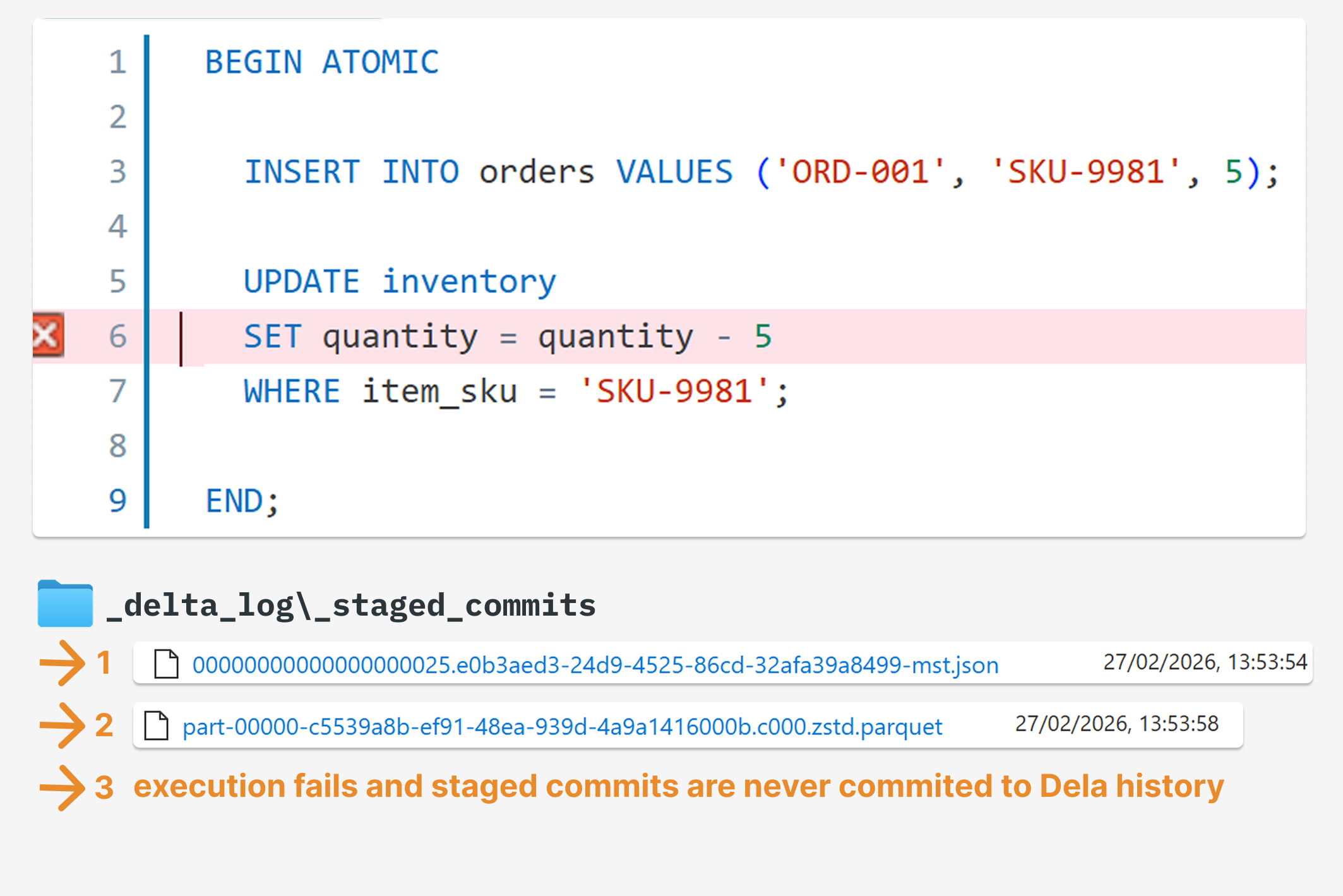
For example, in the code below, if the second UPDATE fails, the INSERTwill never be committed to the Delta history.
BEGIN ATOMIC

	INSERT INTO sandbox_mst.orders VALUES ('ORD-001', 'SKU-9981', 4);

	UPDATE sandbox_mst.inventory
	SET quantity_in_stock = quantity_in_stock - 4
	WHERE item_sku = 'SKU-9981';

END;
Lakehouse systems have always offered strong single-table guarantees — each Delta table commit is atomic — but there was never a general way to coordinate a longer unit of work across multiple tables. Until now.
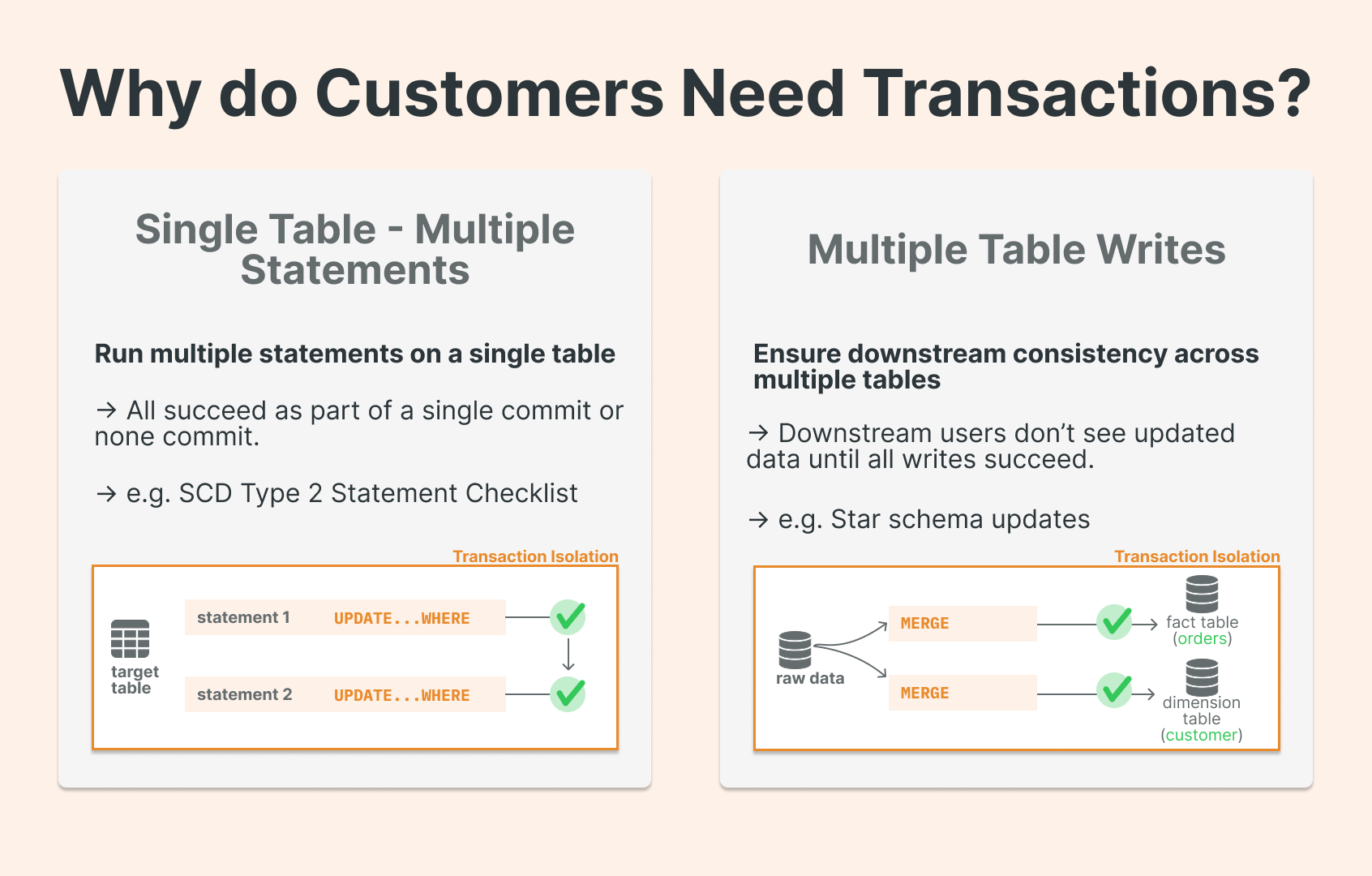
What multi-statement, multi-table transactions mean on Databricks
Think in familiar database terms, scoped to lakehouse realities.
What you get (conceptually):
Atomicity across statements: either the whole block succeeds, or none of it does.
Multi‑table atomic updates: one logical unit of work can update N tables without intermediate states being visible to downstream consumers.
Commit/rollback control from connectors (Python SQL connector, JDBC): disable autocommit, execute multiple statements, then commit or rollback.
To execute multiple SQL statements atomically, you use SQL scripting syntax inside BEGIN ATOMIC ... END blocks.
How it works under the hood: Unity Catalog and catalog‑managed commits
The big implementation idea is changing “who coordinates the commit.” The key primitive: catalog‑managed commits
Catalog-managed commits is an open-source Delta table feature that shifts transaction coordination from the filesystem to the catalog, making the catalog both the broker of table access and the source of truth for the table’s latest state. Unity Catalog is the first open lakehouse catalog to support catalog-managed tables, extending unified governance across any format. Catalog‑managed commits are an open-source feature that shifts transaction coordination from the filesystem to the catalog, making the catalog the broker of table access as well as the source of truth for the table’s latest metadata and commits, the “single source of truth” for table state.
Catalog-managed commits unlock multi-statement, multi-table transactions because Databricks explicitly ties this to multi‑table transactions: moving coordination to the catalog “also allows Unity Catalog to orchestrate commits across multiple tables within a single transaction boundary while maintaining Delta Lake's ACID guarantees.”
That is the “why SQL in prod” moment for engineers: the safest way to express a unit of work is now a SQL transaction block, because the lakehouse platform can coordinate these multi-table changes atomically, everything at the catalog layer.
Seeing it in action
Imagine a classic scenario: insert a new order, then decrease inventory.
One prerequisite — the table must be managed, and you need to enable catalog-managed commits (not yet the default):
ALTER TABLE orders SET
TBLPROPERTIES ('delta.feature.catalogManaged' = 'supported')
Success path
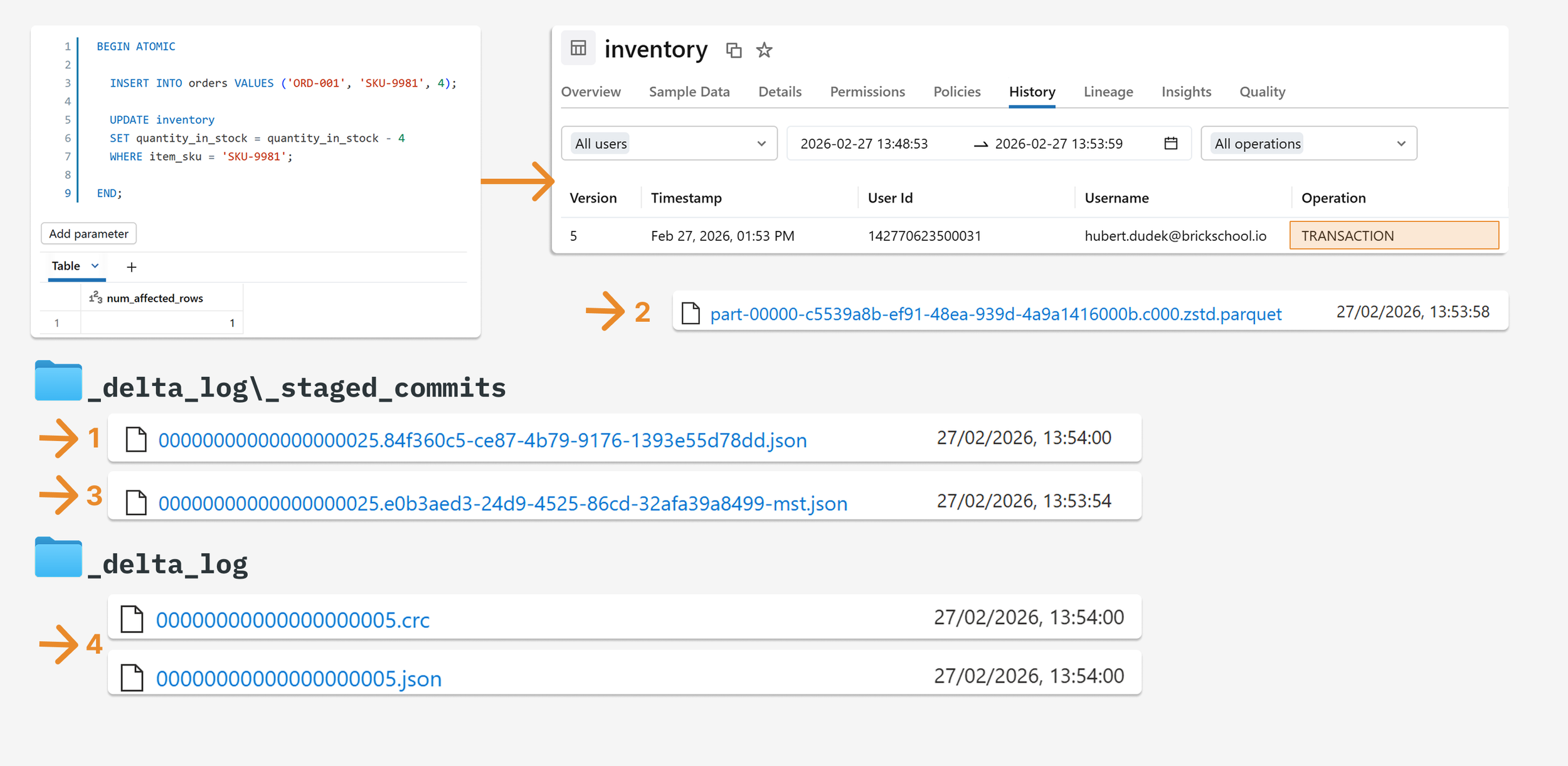
Once execution is completed successfully, we can see the new version in the table history, and the operation is marked as a transaction. In the delta log, we see that the JSON file was first saved to the staged commits directory as <v>.<uuid>mst.json before a Parquet file was created. Once the commit is successful, the commit is published to the _delta_log and represents the latest version of the table. A new commit JSON file was created in the staged commits directory and moved to commit number 5. The file's content is the same as the file in the staged commits directory.
*mst: Shortcut from multi-statement transaction. Thanks to the mst shortcut, you can recognize files easily.
Failure path
Ok, let’s do something nasty and force the second query to fail, so the first one will need to be rolled back. Until a commit file is published to the _delta_log, it does not define the table’s state. Rolling back means that any intermediate operations that staged commits (e.g. DML like INSERT, MERGE, etc.) would not be published. Only the mst.json file is created in the orders staged commits directory, which points to the parquet file. A Parquet file was also created but was never attached to the final commit, so it is not included in the delta history. The Parquet files are available for debugging, validation, or processing, and will be cleaned during the next file deletion.
FAQs
Do transactions work on DataFrames? Can I wrap PySpark in a transaction? No. Transactions here are an SQL feature. You get transactional behavior by executing SQL transaction blocks (BEGIN ATOMIC ... END) inside pyspark.sql() , not by wrapping DataFrame operations.
Does this make Databricks SQL suitable for OLTP use cases? No. Multi-statement transactions are tied to lakehouse SQL execution surfaces (SQL warehouses) and target data-warehousing-style pipelines and migrations. For OLTP workloads, Databricks positions Lakebase — its Postgres-based offering — as the right tool.
Are transactions available in open‑source Spark? No. This is a Databricks-only feature.
What this changes
Multi-statement transactions aren't a flashy feature: they're a reliability feature. They close a gap that has forced data engineers to work around the Lakehouse for years: writing compensating logic, building custom rollback mechanisms, or simply accepting that a failed pipeline might leave tables in an inconsistent state.
MSTs mean fewer defensive workarounds in your pipeline code, cleaner separation between business logic and failure handling, and data that your downstream consumers can actually trust.
That said, it won't replace every architectural pattern. However, for teams building serious data pipelines on Databricks, it's a meaningful step toward treating the Lakehouse as a proper transactional system.