Not so long ago, a schedule was the only starting point for Databricks orchestration. Run ingestion at midnight, wait an hour, and then refresh the reporting tables. If the source was late, the schedule didn’t know.
What has changed is how much of the dependency we can now express directly in Lakeflow Jobs: a file arrived, a table changed, or another job finished.
We can also give one job several triggers. And the Summit demo by Saad Ansari and Gabor Ratky showed the next step: a change can wake up the scheduler, while a SQL condition decides whether there is enough work to start the job.
As Saad Ansari says:
“We’re making Lakeflow Jobs smarter about when and how workloads run. By using context from code, lineage and run history, we can help teams run jobs only when they’re needed, avoid unnecessary compute and spend less time coordinating workflows manually.”
In this article, we’ll cover all the ways to trigger Lakeflow Jobs.
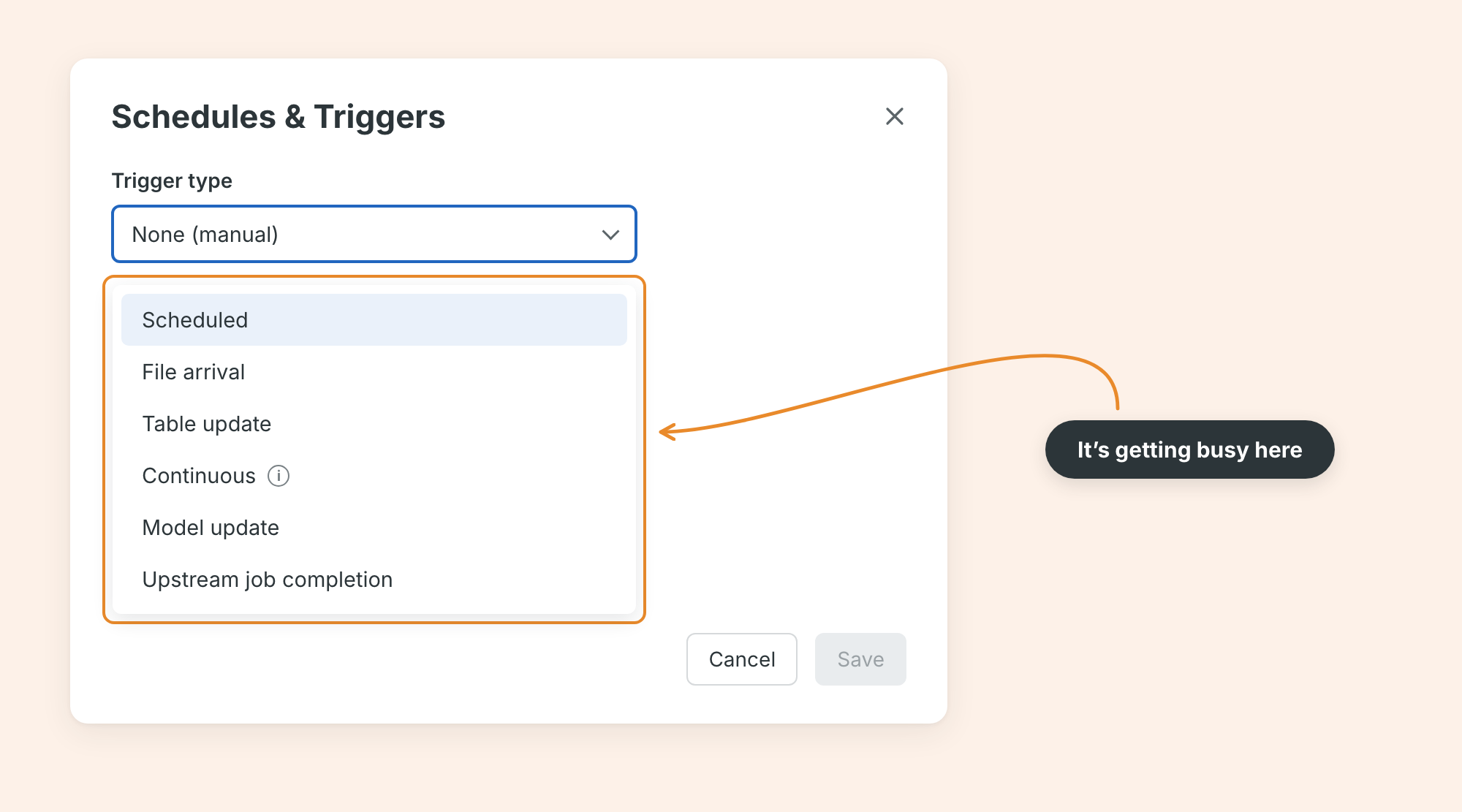
A schedule still has a place
A report that must be ready by 07:00 has a time requirement, and a schedule fits that well.
Continuous jobs solve another problem: they start a new run when the previous one finishes or fails. That is useful for work that should keep going. It is a job scheduling mode, separate from a Spark-based streaming trigger.
For external orchestration, Run now and the Jobs API remain available. The question is which event best represents “ready” for this particular job.
New files: start after the delivery
Imagine a retailer receiving order files throughout the day. A file-arrival trigger can start ingestion when files arrive in a Unity Catalog volume or external location. This removes the need to keep running an empty polling job.
Two timing controls are useful here. A minimum interval limits how often the job starts. A quiet period waits after the latest arrival and resets when more files arrive.
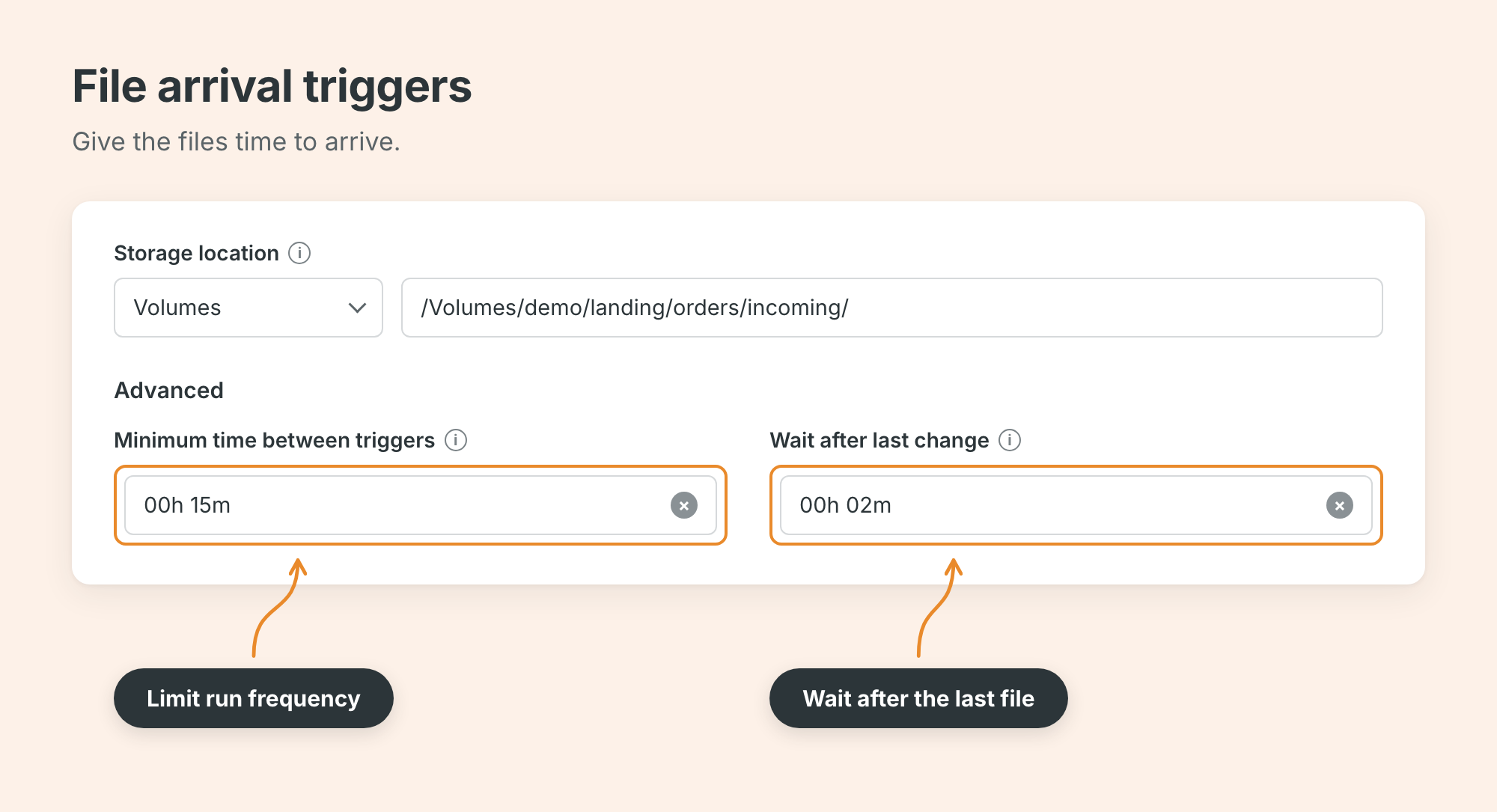
In DABs (Declarative Automation Bundles), the same settings look like this:
trigger:
  file_arrival:
    url: /Volumes/demo/landing/orders/incoming/
    min_time_between_triggers_seconds: 900
    wait_after_last_change_seconds: 120
You can combine the trigger with Auto Loader and a checkpoint. The trigger starts the job; the ingestion process still needs to remember what it has processed.
Updated tables: wait for the inputs
For a sales mart, useful events may be updates to orders and customers. Table-update triggers let us choose whether any monitored table is enough, or whether every monitored table must change.
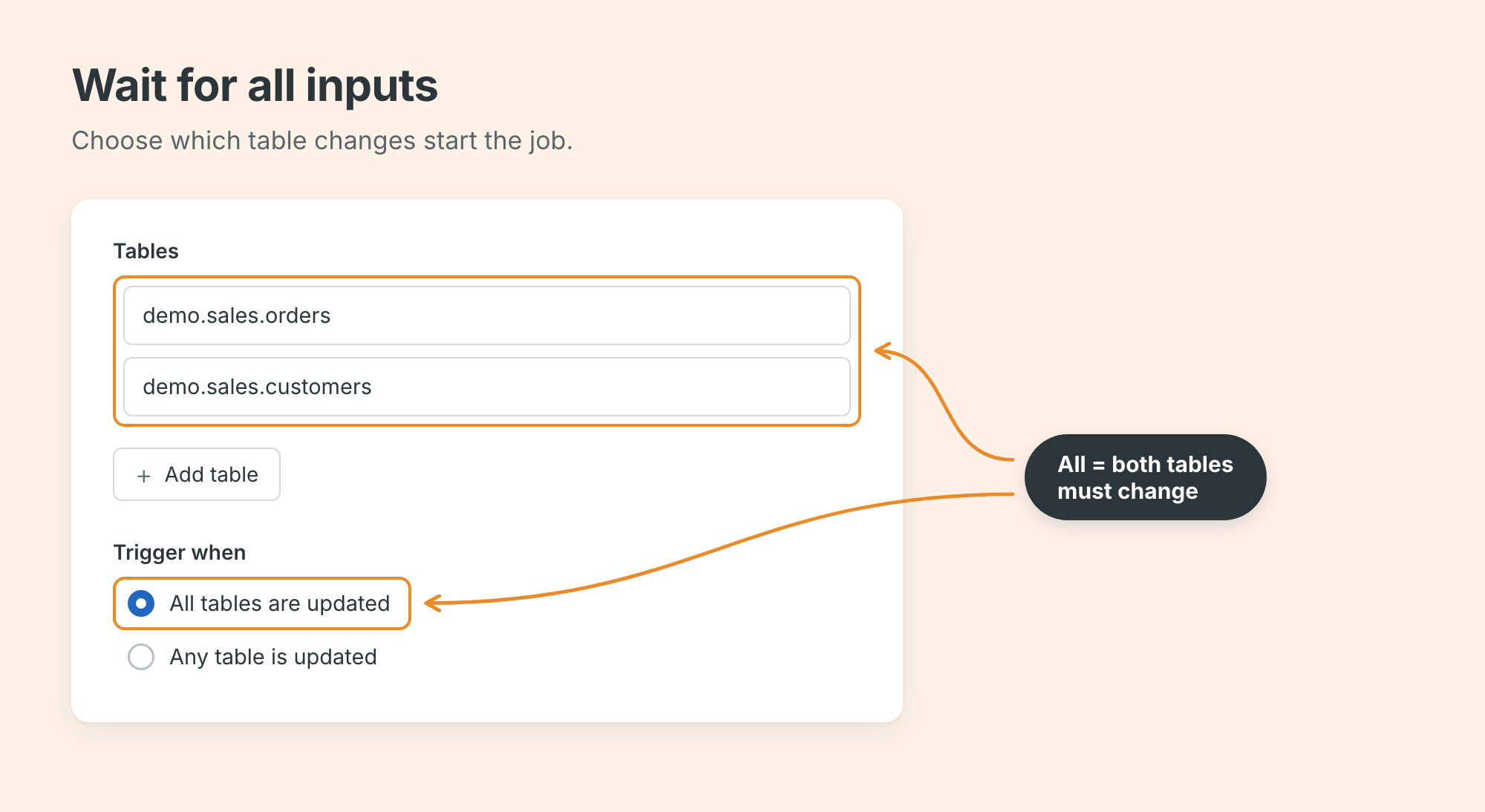
trigger:
  pause_status: PAUSED
  table_update:
    table_names:
      - demo.sales.orders
      - demo.sales.customers
    condition: ALL_UPDATED
    min_time_between_triggers_seconds: 900
    wait_after_last_change_seconds: 120
ANY_UPDATED is useful for a refresh that works even when just one source was updated. ALL_UPDATED is useful when all inputs must have changed.
Supported sources include Delta and Iceberg tables, plus views, materialized views, streaming tables, OpenSharing tables, and system tables.
One use case is reacting to changes in system tables. Another is processing a supplier’s shared data when it changes.
One job, several reasons to run
Multiple triggers entered Beta on 5 October 2026. A job can have up to five triggers, each of which can be paused separately.
Separate triggers are combined with OR. A table update can start the job, and the morning schedule can start it too. The schedule does not check whether the earlier event-driven run succeeded.
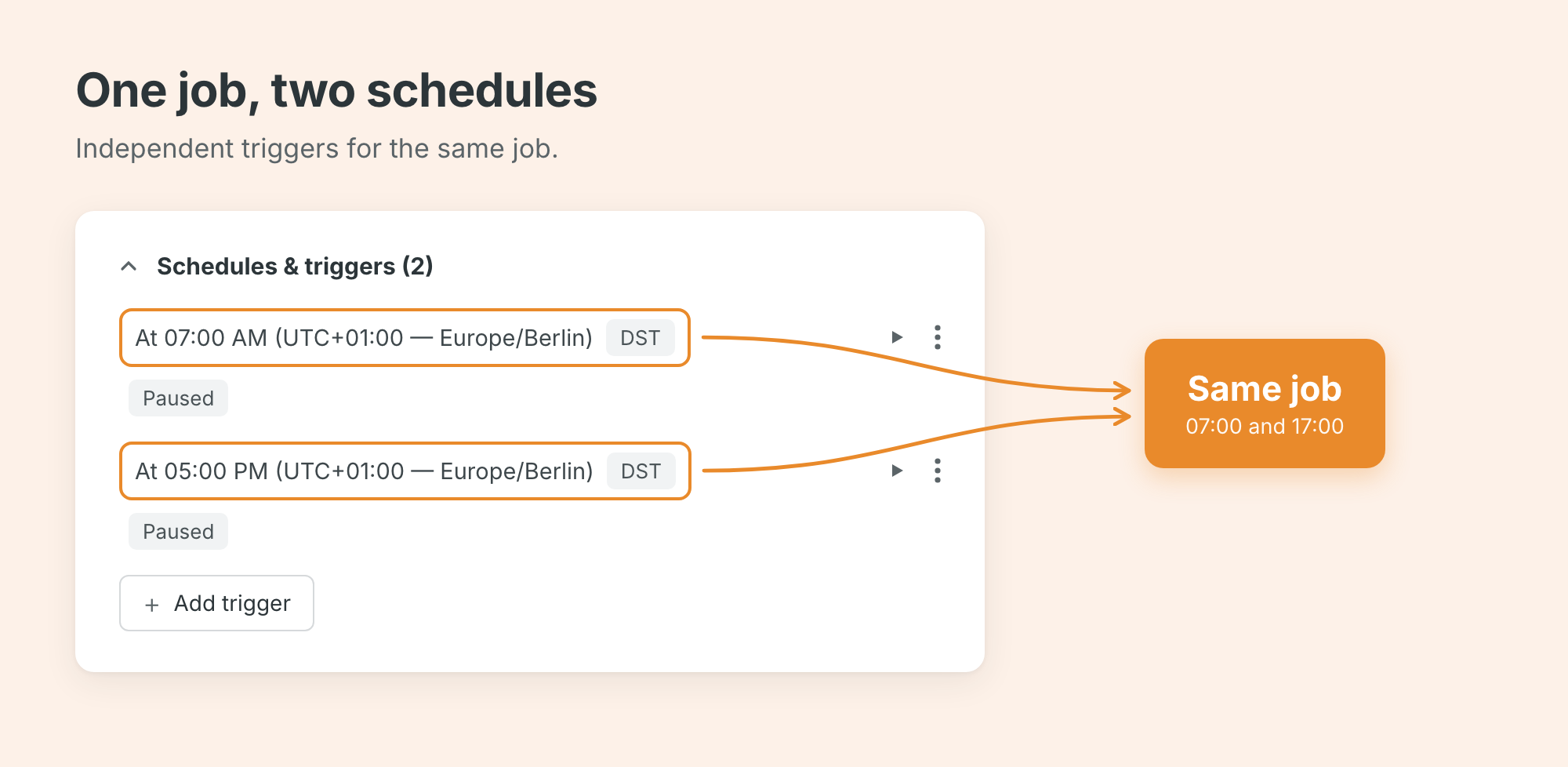
For example, refresh the sales report when either source table changes, and reconcile it again at 07:00. One job definition can handle both paths.
max_concurrent_runs: 1
queue:
  enabled: true
triggers:
  - pause_status: PAUSED
    table_update:
      table_names:
        - demo.sales.orders
        - demo.sales.customers
      condition: ANY_UPDATED
  - pause_status: PAUSED
    schedule:
      quartz_cron_expression: "0 0 7 * * ?"
      timezone_id: Europe/Berlin
The concurrency and queue settings also matter when two events arrive close together. In this example, only one run executes at a time, and another eligible run can queue.
Upstream jobs: let the downstream team own the dependency
Job-completion triggers are the most interesting change for teams with separate workflows and workspaces. The downstream job subscribes to upstream completions.
A common scenario is a separate ingestion team loading data in an ingestion workspace. Once their job finishes, other workspaces that generate silver and gold data can continue processing.
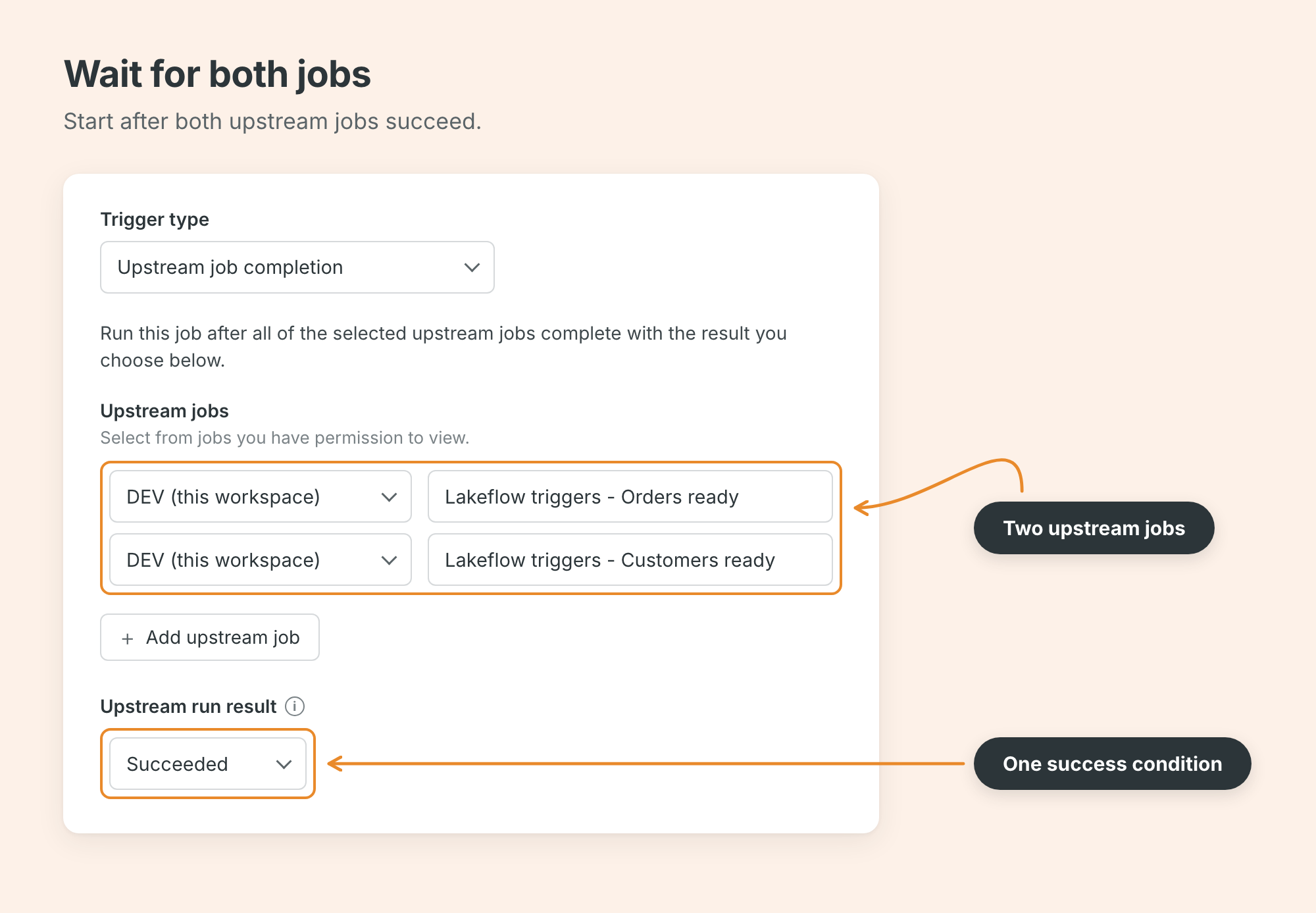
Cross-workspace dependencies require one shared Unity Catalog metastore. The downstream job’s run-as identity needs workspace access and CAN VIEW permission on the upstream jobs.
The documented DAB shape uses workspace and job IDs:
triggers:
  - pause_status: PAUSED
    job_completion:
      jobs:
        - workspace_id: "${var.ingestion_workspace_id}"
          job_id: "${var.orders_job_id}"
        - workspace_id: "${var.customer_workspace_id}"
          job_id: "${var.customers_job_id}"
      if_status: SUCCESS
Conditions: a change doesn’t always mean ready
A trigger can tell us that something changed. It doesn’t necessarily tell us there is enough data, that quality checks passed, or that all inputs describe the same batch. However, a SQL condition can check whether a trigger should fire.
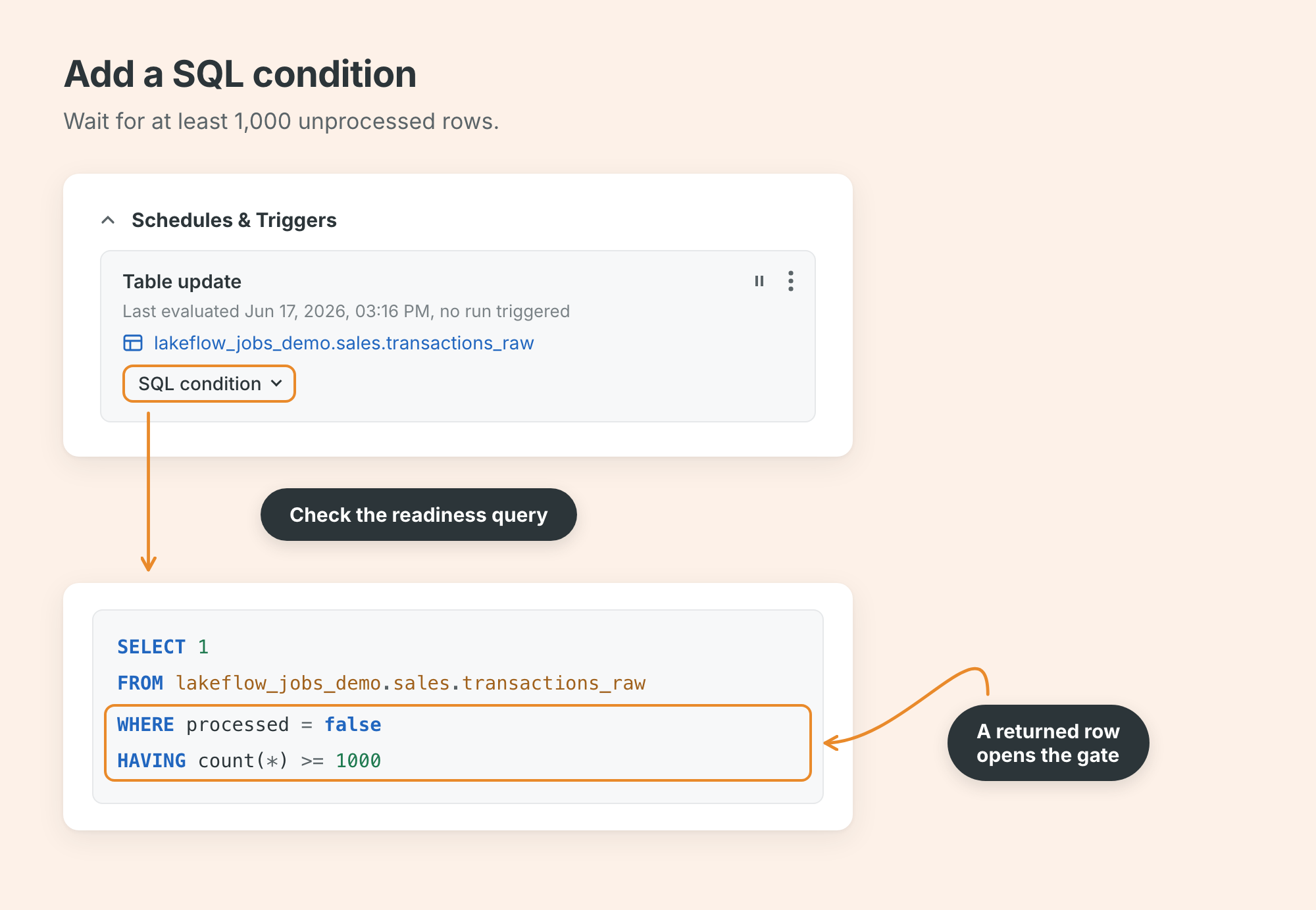
SELECT 1
FROM demo.sales.transactions_raw
WHERE processed = false
HAVING count(*) >= 1000
For QUERY_RETURNS_ROWS, the query must return at least one row to proceed (that’s why the example uses HAVING). The DABs version looks like this:
triggers:
  - pause_status: PAUSED
    table_update:
      table_names:
        - demo.sales.transactions_raw
      condition: ANY_UPDATED
    sql_condition:
      sql_query_id: "${var.readiness_query_id}"
      warehouse_id: "${var.warehouse_id}"
      trigger_mode: QUERY_RETURNS_ROWS
Here, sql_condition sits beside the event configuration. It references a saved query and a SQL warehouse. The alternative is RESULT_VALUE_CHANGES mode, which expects one cell, passes on its first evaluation, and then passes when that value changes.
A condition inside the job is different
In Python code, you can set a task value, pass it back to the orchestrator, and use it later in a condition task.
dbutils.jobs.taskValues.set(
    key="ready_batches",
    value=1
)
Here is the DABs orchestration that uses the ready_batches value set above.
tasks:
  - task_key: ready
    depends_on:
      - task_key: inspect_batches
    condition_task:
      left: "{{tasks.inspect_batches.values.ready_batches}}"# here we refer it
      op: GREATER_THAN
      right: "0"
  - task_key: publish
    depends_on:
      - task_key: ready
        outcome: "true"
    notebook_task:
      notebook_path: ../src/publish.py
Add the inspect_batches notebook task to the same job. The snippet shows the branch, not the complete task list. Run if handles task outcomes, such as running a cleanup task after failures. If/else handles an expression such as a readiness count.
Models can trigger work too
A new model, a ready model version, or an alias change can start a job. The monitored scope can be a model, a schema, or a metastore.
For a fraud model, I would start validation when a version becomes ready. Setting the champion alias could start a scoring check. This removes another polling notebook, while keeping the validation workflow explicit.
Add a job parameter whose default is {{job.trigger.model.updates}}, then read its event list in the task. Process the list rather than assuming one model event per run. The documented API configuration for a ready version is:
"trigger": {
  "pause_status": "PAUSED",
  "model": {
    "securable_name": "demo.ml.fraud",
    "condition": "MODEL_VERSION_READY"
  }
}
What’s next in Lakeflow
Soon I will publish another article about triggers, because a lot is coming on the roadmap:
AI triggers
Triggers from external systems like Slack
Trigger parameters
Activation window
TL;DR
For files, I would start with file arrival plus checkpointed ingestion. For a data product, I would use table updates and an explicit readiness check. For independently owned workflows, job completion keeps the dependency with the consumer.
Soon, eligible triggerless jobs will be able to receive AI trigger recommendations based on code, lineage, and run history. It will be part of the “AI-optimized schedules” roadmap.
The practical improvement is that we can stop guessing how much time to leave between jobs. We can express the relevant event and keep the business condition visible in the workflow.