How to Pass Terraform Outputs to Databricks’ DABS
Most teams hit the same wall at the same moment: Terraform has just provisioned an Azure Key Vault, and now someone needs to get the DNS name and resource ID into a DAB. The "solution" is usually a Slack message, a copy-paste into a config file, and a quiet prayer that nobody fat-fingers the subscription ID.
It works. Until it doesn't. And when it doesn't, it fails silently, a bundle that validates cleanly but points at the wrong Key Vault in production.
Bundles are getting better fast. Secret scopes, catalogs, and external locations, things you used to define in Terraform, you can now define directly in your bundle. But Terraform isn't going anywhere. It still owns the Azure layer: Key Vaults, resource groups, networking. The question isn't Terraform or bundles. It's how to make them talk to each other without a human in the middle.
The Cost of Inaction
Here's a common composite: a data engineering team maintains two environments, dev and prod. Terraform manages the Azure infrastructure for both. Bundles manage the Databricks layer. The Key Vault resource IDs are different across environments, so someone maintains a mental map of which ID goes where, updates the bundle config manually before each deploy, and occasionally forgets.
The result isn't a loud failure. It's a secret scope that points at the dev Key Vault in a prod bundle. Pipelines run. Credentials resolve. The wrong ones. The debugging session that follows takes longer than the original deployment, because nothing obviously broke.
This is a decision latency problem wearing the costume of a configuration problem. The fix doesn't require new tooling. It requires connecting the tools you already have.
The Technical Frame
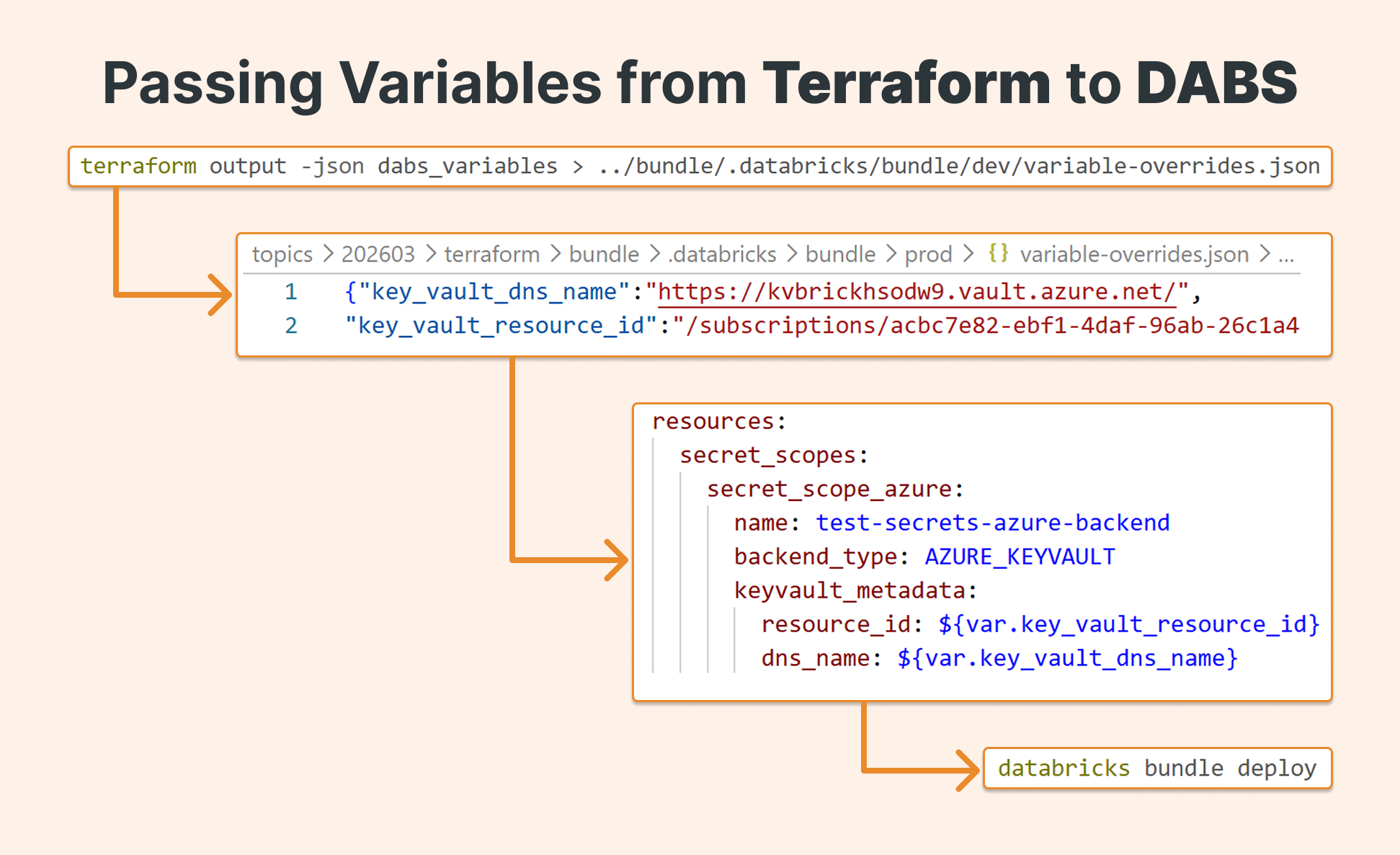
Declarative Automation Bundles support three ways to override variables at deploy time. One of them (variable-overrides.json) accepts a JSON file dropped into a specific directory. Terraform, for its part, can emit its outputs as clean JSON via terraform output -json.
These two facts are the whole solution. Terraform writes the file. The bundle reads it. No manual steps, no environment-specific config files checked into source control, no humans as the integration layer.
How It Works
Repo structure
Start with a clean separation between infrastructure and bundle concerns:
|
|-infra      # Terraform lives here
|-bundle     # Declarative Automation Bundle lives here
This isn't just organizational preference, it enforces a clear handoff point between the two tools and makes the CI/CD pipeline easier to reason about.
Step 1: Define Terraform outputs in bundle-friendly shape
At the end of your main.tf, define an output block that maps the values your bundle needs. Use a single structured output so you get one clean JSON object instead of multiple separate values:
output "dabs_variables" {
  value = {
    key_vault_dns_name    = local.key_vault_dns_name
    key_vault_resource_id = azurerm_key_vault.kv.id
  }
}
The key names here matter — they need to match the variable names you'll declare in databricks.yml.
Step 2: Read the Terraform state
Once infrastructure is deployed, read the outputs from state:
terraform output -json dabs_variables
This reads from state, not from a live deployment — so the infrastructure doesn't need to have just been created. Any previously deployed environment works. The output looks like this:
{"key_vault_dns_name":"<https://kvbrickhsodw9.vault.azure.net/>",
"key_vault_resource_id":"/subscriptions/acbc7e82-ebf1-4daf-96ab-26c1a4cb38be/resourceGroups/brickster_westus2/providers/Microsoft.KeyVault/vaults/kvbrickhsodw9"}
Step 3: Write the override file
Bundles look for variable-overrides.json at .databricks/bundle/<target>/ inside your bundle directory. Create the directory and pipe the Terraform output directly into it:
mkdir -p ../bundle/.databricks/bundle/prod
terraform output -json dabs_variables > ../bundle/.databricks/bundle/prod/variable-overrides.json
One important call: do not commit this file. It's environment-specific and contains infrastructure IDs that will change across deployments. Generate it fresh from state in every CI/CD run. Your repo stays clean, and the file is always authoritative.
Step 4: Declare variables in databricks.yml
In your bundle configuration, declare the variables and reference them where needed. The bundle will substitute values from variable-overrides.json at deploy time:
bundle:
  name: azure-keyvault-secret-scope-bundle

# Declare the variables — values will be injected from variable-overrides.json
variables:
  key_vault_dns_name:
    description: Azure Key Vault DNS name (e.g. https://my-kv.vault.azure.net/)
  key_vault_resource_id:
    description: Azure Key Vault resource ID

resources:
  secret_scopes:
    secret_scope_azure:
      name: test-secrets-azure-backend
      backend_type: AZURE_KEYVAULT
      keyvault_metadata:
        resource_id: ${var.key_vault_resource_id}  # injected from variable-overrides.json
        dns_name: ${var.key_vault_dns_name}          # injected from variable-overrides.json

targets:
  prod:
    mode: production
    default: true
Step 5: Wire it into CI/CD
The full pipeline sequence looks like this. The Terraform step runs first and writes the override file; the bundle step validates and deploys against it:
- name: Create bundle variable overrides from Terraform
  run: |
    mkdir -p bundle/.databricks/bundle/dev
    cd infra
    # Read from Terraform state and write to the bundle override location
    terraform output -json dabs_variables > ../bundle/.databricks/bundle/dev/variable-overrides.json

- name: Validate and deploy bundle
  working-directory: bundle
  run: |
    # Validate first — this confirms variable substitution resolved correctly
    databricks bundle validate -t dev
    databricks bundle deploy -t dev
Before promoting to production, you can inspect exactly what the bundle resolved by running:
databricks bundle validate --output json
This outputs the full bundle configuration with all variable substitutions applied, useful for catching environment mismatches before they reach a live cluster.
A note on Terraform and the bundle deployment engine
One background detail worth knowing: Declarative Automation Bundles were originally built on top of the Databricks Terraform provider. Databricks has since introduced a direct deployment engine that removes this dependency, and migration is now actively underway, the databricks bundle migrate command is available to move existing bundles to the new engine.
The Terraform in this pattern is separate from that. It's the Terraform managing your Azure infrastructure, not anything inside the bundle itself. Bundles maintain their own state regardless of which deployment engine they use.
The Business Payoff
What this pattern actually buys you is reliable environment promotion. Once it's in place, the path from terraform apply to databricks bundle deploy has no manual steps, no environment-specific config files to maintain, and no dependency on anyone's memory of which Key Vault belongs to which environment.
The override file is generated fresh from state on every run. If the Key Vault changes, the bundle picks it up automatically on the next deploy. If someone spins up a new environment, the same pipeline handles it without a new config file.
For teams running multiple environments in parallel (dev, staging, prod) this compounds quickly. Every environment gets the right infrastructure IDs, every time, from a single source of truth.
Conclusion
If you're already using Terraform for Azure infrastructure and Declarative Automation Bundles for your Databricks layer, this pattern takes an afternoon to implement and eliminates an entire class of environment-related bugs.
Start with a single resource (a Key Vault secret scope is a good first candidate) and validate the substitution with databricks bundle validate --output json before deploying. Once you've seen it work end-to-end, extending it to additional resources is straightforward.