Full-text search index on Databricks. How we cut search time by 400x.
Thanks to Yu Xu and Kaitlin Baumgardner for your help in writing the article.
What is the full-text search problem?
The problem is simple: you have a big table, you want to find a specific text value, and the engine may need to scan many or all files just to say “found it” or “not found.” Databricks describes full-text search indexes as a way to accelerate substring and word lookups by skipping files that are guaranteed not to contain a match.
When I asked Yu Xu, the product manager behind Databricks Full-Text Search, why this feature matters, he explained:
“Finding a few rows among billions should be fast. Full-text search indexes let Databricks pinpoint the relevant data files, so these searches run much faster while the SQL stays simple.”
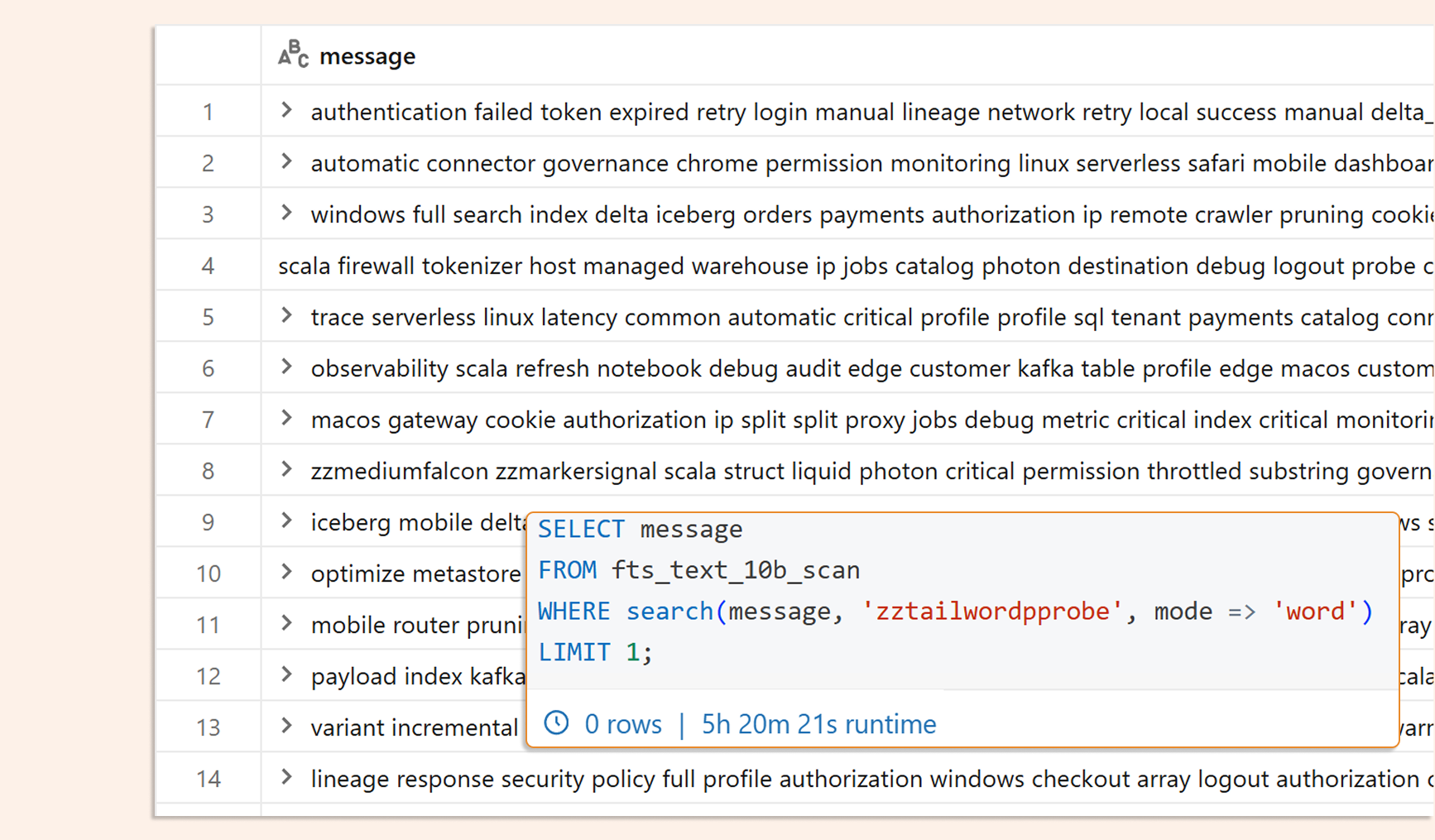
There are even jokes about analysts who run a text search for a whole day and, in the end, see no rows. Imagine having 10 billion rows like the one below, a query that runs forever, and the only thing you want to do is just find a single word.
Technology
Databricks added full-text search indexes for Unity Catalog-managed Delta Lake and managed Iceberg tables. Below is Databricks ' image of what is under the hood. Without an index, Databricks must scan all or most files to find the requested text. With a full-text search index, it first checks which files may contain the text and skips the others. It then reads only the matching candidate files, which can make the query much faster.
The index is in open format residing in your storage account as a separate Databricks Table, but catalog-managed. You can see how it looks by previewing parquet and also find some interesting information in the delta_log JSONs:
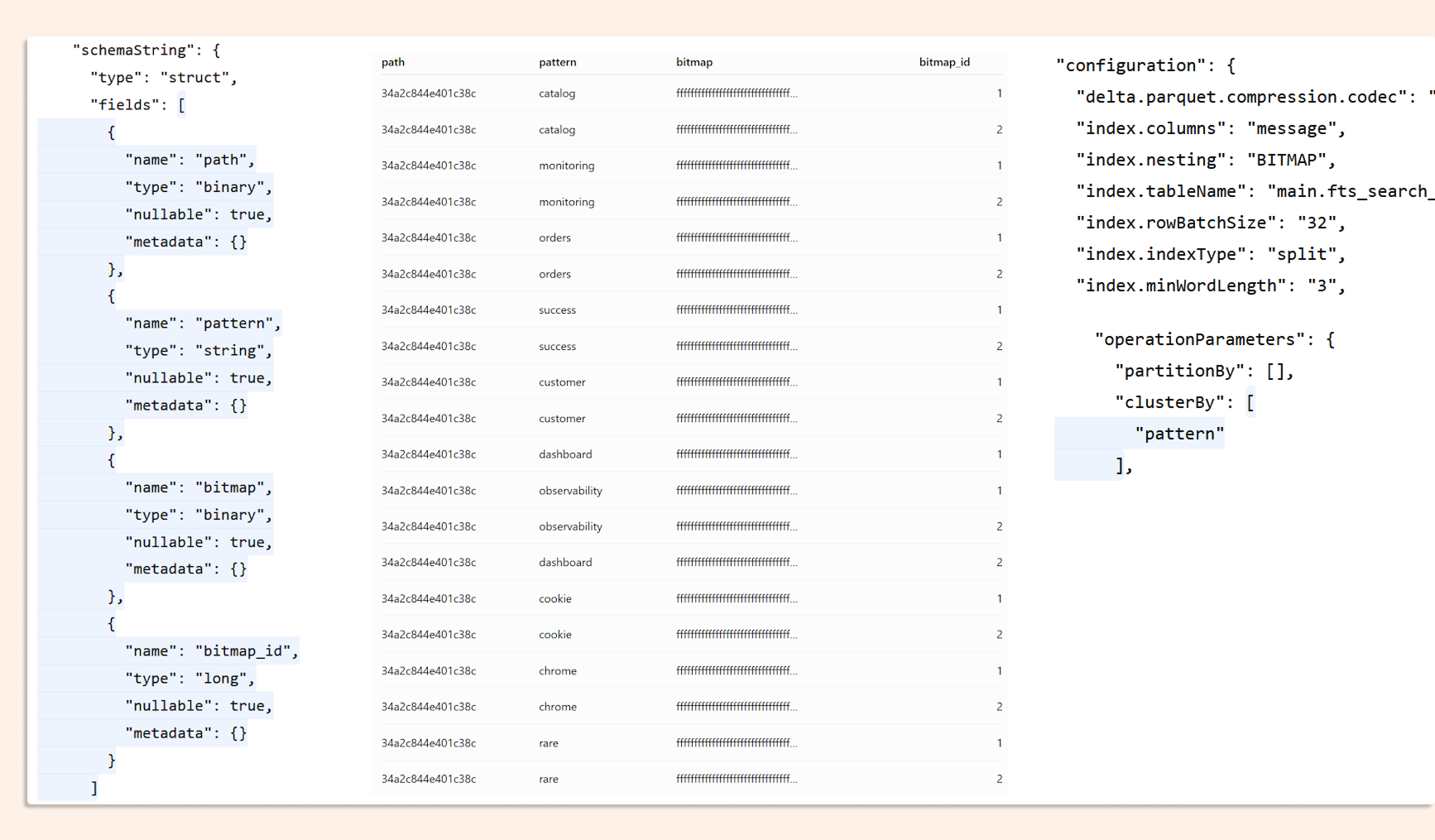
The index is created with CREATE SEARCH INDEX, and then Databricks uses it when you query with search() or isearch(). Databricks also says this works without query hints or application changes, other than using the search functions. After creating the index, we can see it as well in the table details (TBLPROPERTIES)

There are two tokenizer choices:
ngram for substring matching.
split for whole-word containment checks.
Defaults matter:
ngram is the default tokenizer.
Default ngram_size is 5.
Default min_token_length for split is 3.
Main requirements from the docs:
Databricks Runtime 18.2+ for the index feature.
The table must be in the same catalog and schema as the index.
The table must be a managed Delta or Iceberg table.
Row tracking must be enabled.
Indexed columns must be STRING, VARIANT, STRUCT, or ARRAY of searchable types.
You can create up to four search indexes on one table, and each must be on a different column.
A useful detail: if the index is not updated, correctness is still preserved. It can use the index for indexed data and scan the non-indexed part when needed.
How to create an index
Substring test index: ngram tokenizer
CREATE SEARCH INDEX ftsbench_si_500m_message_ngram_v1
ON fts_text_500m_ngram (message)
OPTIONS (tokenizer = 'ngram');
Word test index: split tokenizer
CREATE SEARCH INDEX ftsbench_si_500m_message_split_v1
ON fts_text_500m_split (message)
OPTIONS (tokenizer = 'split');
Useful commands as well:
REFRESH INDEX ftsbench_si_500m_message_ngram_v1 FULL;
REFRESH INDEX ftsbench_si_500m_message_split_v1 FULL;
DESCRIBE INDEX ftsbench_si_500m_message_ngram_v1;
DESCRIBE INDEX ftsbench_si_500m_message_split_v1;
Why REFRESH matters:
Indexes do not update automatically when the table changes, but an option to enable automatic updates is coming.
REFRESH INDEX is incremental and append-only.
REFRESH INDEX ... FULL also removes deleted rows, but costs more compute.
If you want to clean up later:
DROP INDEX IF EXISTS ftsbench_si_500m_message_ngram_v1;
DROP INDEX ftsbench_si_500m_message_split_v1;
How to use it
We have two SQL functions:
search(...) = case-sensitive.
isearch(...) = case-insensitive.
The syntax is:
search ( column [, ...], search_pattern [, mode → mode] )
isearch( column [, ...], search_pattern [, mode → mode] )
Important behavior from the docs:
search_pattern must be a constant string (it means it has to be known before reading the table, so it can not be a reference to another field in SQL)
mode → 'substring' is the default.
mode → 'word' matches the words in the pattern, regardless of order.
In my experience during benchmarking, it is important to remember which index you are creating and which mode you are using.
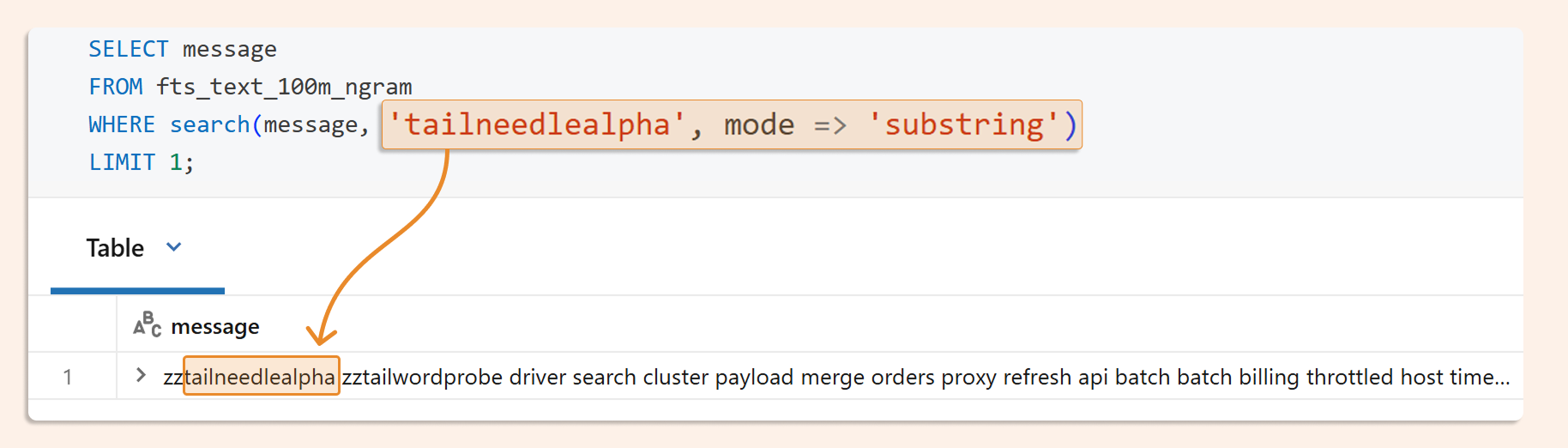
Here we are looking for a substring (so any part of the whole string):
SELECT message
FROM fts_text_100m_ngram
WHERE search(message, 'tailneedlealpha', mode → 'substring')
LIMIT 1;
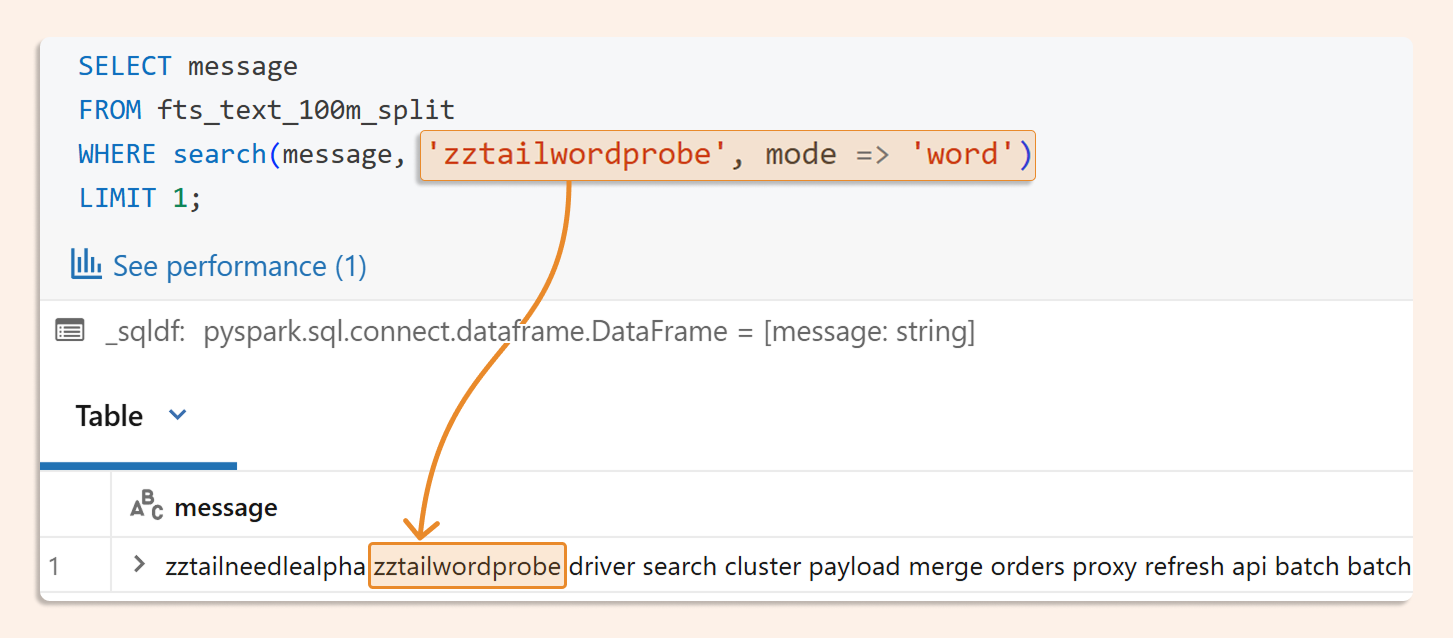
Here we look for the whole word:
SELECT message
FROM fts_text_100m_split
WHERE search(message, 'zztailwordprobe', mode => 'word')
LIMIT 1;
A few small notes that are easy to miss:
In 'substring' mode, Databricks says the behavior is similar to contains, but the index can make it much faster when it applies.
In 'word' mode, "user admin login" can match even if the words appear in a different order in the text.
use isearch() for case-insensitive
Results
What I see:
The pattern is very clear on bigger tables: the index helps more as the table size grows.
In my tests, word search was usually stronger than substring search.
There was one negative case: a 100m substring on serverless_sql_warehouse_2xs_preview was slower with the index.
On very large tables, the gains became huge.
Benchmark highlights from your workbook
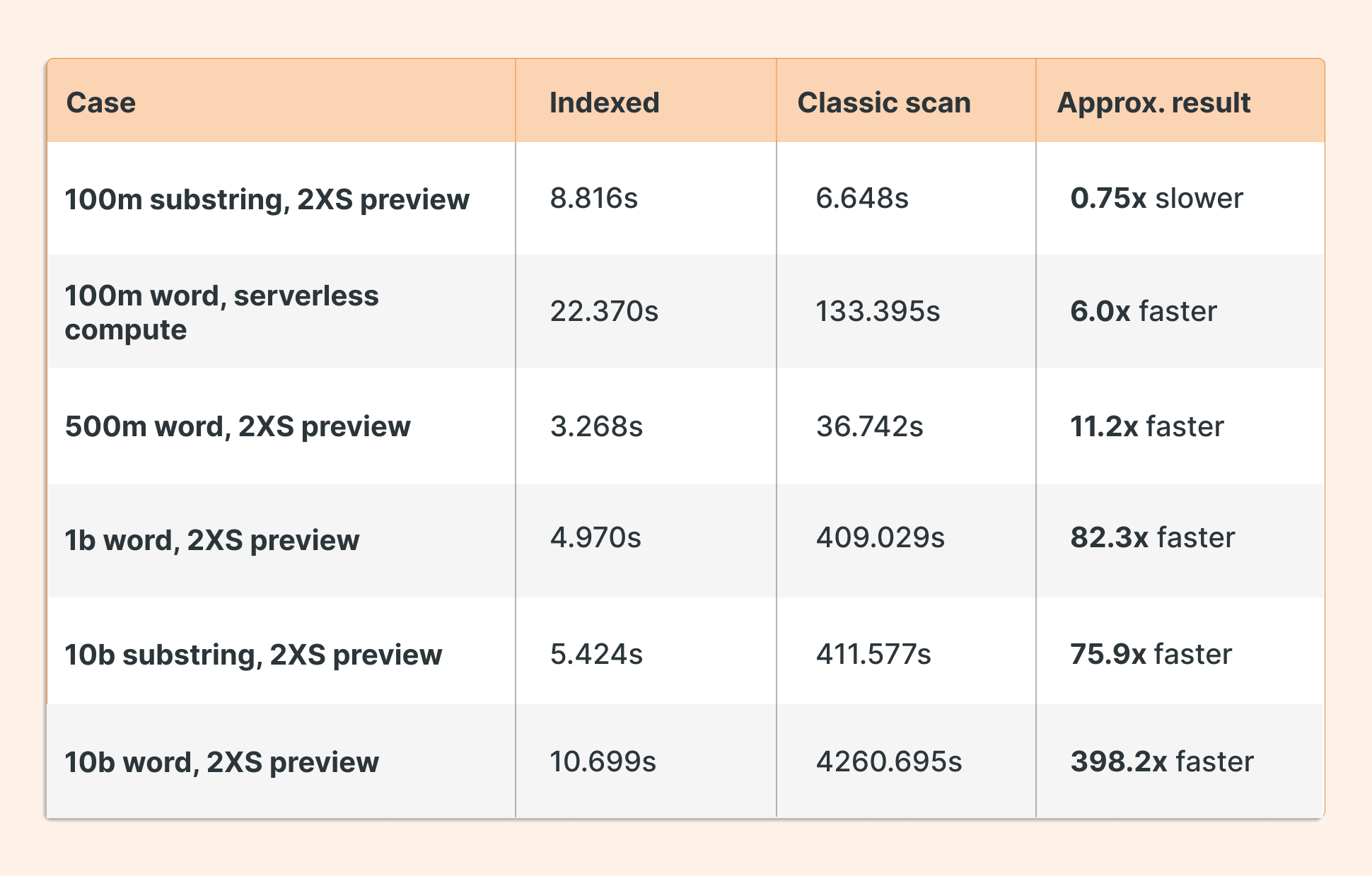
A short read of the benchmark:
100m is mixed:
A substring can be only a small win, or even a loss.
Word search is already clearly useful.
500m starts to look good.
1b is very good.
10b is where the index really shines.
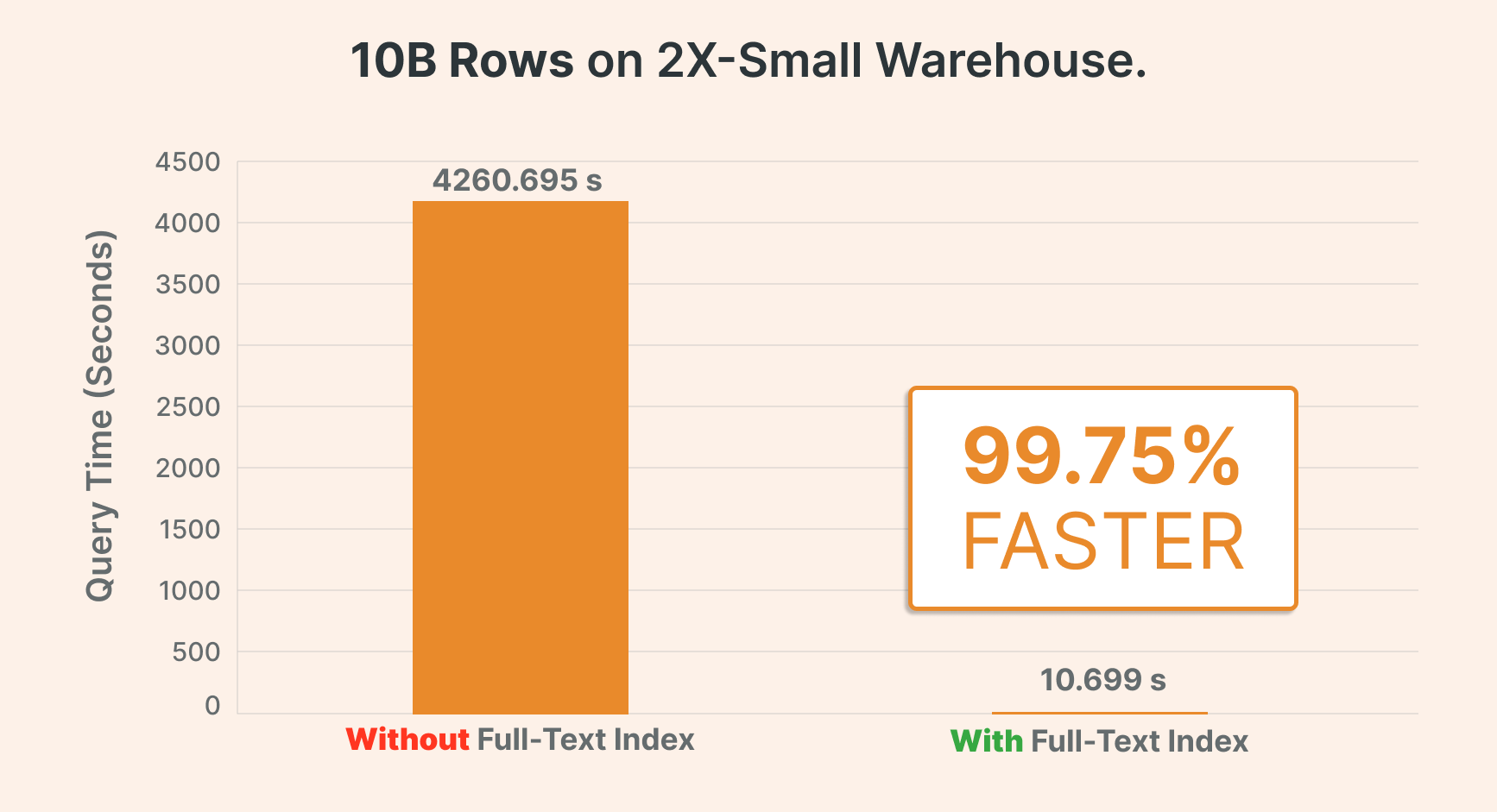
That matches the product design in the docs: full-text search indexes are most helpful when Databricks can skip many files for a selective lookup. Databricks also says teams have seen 100x+ substring speedups in production-scale workloads. So my 400-meter result confirms it!
Small Tables
For small tables, especially those that fit into very few files or even a single parquet file, a full-text index often does not make much sense.
Tables with a few million rows showed no improvement and could even worsen.
That is believable for this feature, because the main win comes from skipping files. If there are only a few files to begin with, there is much less to skip. That part is an inference from how Databricks documents the feature.
So the rule is simple:
large table + selective text lookup = good candidate.
small table + cheap scan already = maybe no benefit, maybe some overhead.
TL; DR
Full-text search is a real problem because plain-text lookup in a large table can end up scanning many files just to find one row, or no row at all. Databricks' full-text search indexes fix this by enabling the engine to skip files that cannot be matched.
On Databricks, use:
tokenizer = 'ngram' for substring and then mode => substring during search
tokenizer = 'split' for word search and then mode => word during search
Query with:
search(...) for case-sensitive
isearch(...) for case-insensitive.
In my benchmarks, the index became much more useful as data grew. The best case was a 10b word search on the 2XS preview warehouse: 10.699s indexed vs 4260.695s scan, about 398x faster.
For small tables, the index can be useless or even slower, so this is mostly a feature for big text tables and selective lookups.
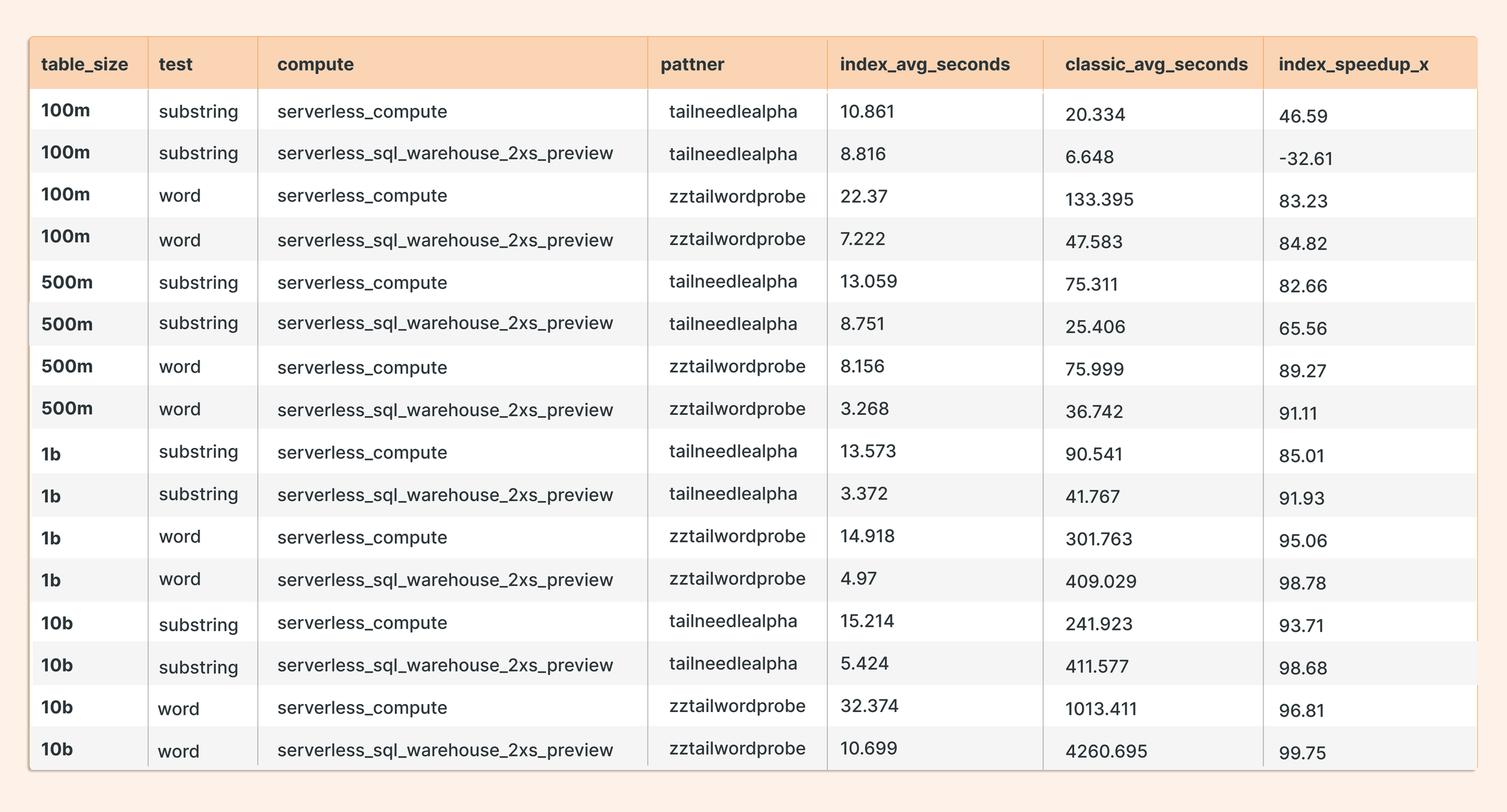
Appendix. Table with full results
Git repo with test notebooks: https://github.com/hubert-dudek/medium/tree/main/topics/202606/fts-search-benchmark-sql-onecol-cell-timing-dab