BigQuery to Databricks: What the Migration Actually Looks Like
The decision to migrate a data platform is rarely made lightly. It usually follows months of friction: pipelines that are harder to debug than they should be, ML workflows that don’t fit the warehouse model, or engineering teams spending more time working around a platform than with it. The question of whether to migrate eventually gives way to a more practical one: how.
This blog is a retrospective account of migrating from BigQuery to Databricks. It’s not a recommendation to switch. It does not declare a winner. What it offers is an honest look at the decisions, tradeoffs, and pitfalls that teams might encounter along the way, organized around the areas that matter most: how to move the data, how to rebuild governance, and how to think about cost.
BigQuery is a fully managed, serverless analytics engine built on Google’s Dremel query engine and Colossus storage. Its core strength is simplicity: no clusters to manage, no infrastructure to tune, SQL as the primary interface. It’s optimized for analytical queries at scale and integrates naturally with the broader Google Cloud ecosystem.
Databricks is a Spark-native lakehouse platform designed to unify data engineering, analytics, and machine learning across a single architecture. It runs on Delta Lake, supports Python, Scala, and SQL natively, and operates across AWS, Azure, and GCP. Where BigQuery abstracts compute entirely, Databricks exposes it, giving teams more control and more responsibility.
The philosophical gap between the two is real, and it shapes every aspect of a migration.
1. Planning the Migration: Plan by Domain, Not by Layer
Before choosing a migration approach, there is a more fundamental planning decision that shapes how quickly the migration delivers value, and how aggressively costs can be reduced. That decision is: which are the phases of the migration?
Most teams default to one of two approaches:
a. Plan by technical layer or even domain: Ingest everything first, then rebuild transformations, then rebuild serving.

b. Plan by source system: migrate source A, then source B, then source C.
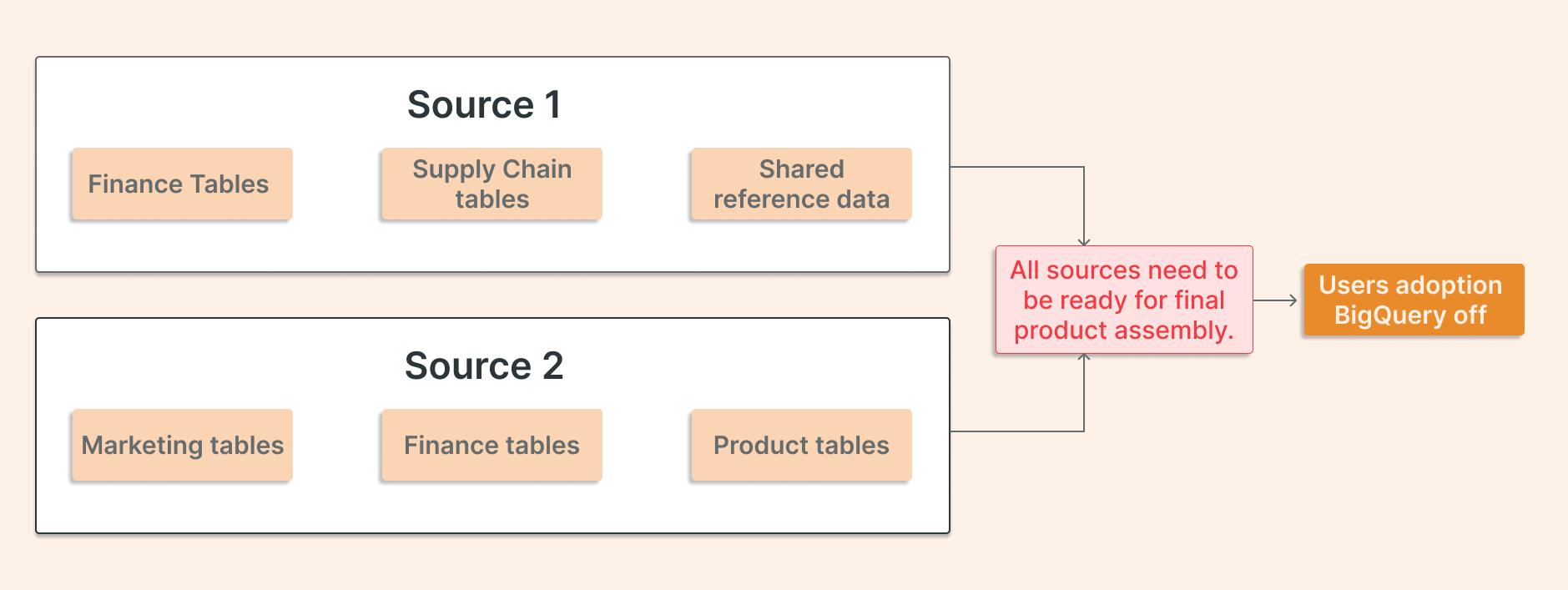
While this might sometimes be more straightforward, let's evaluate a different approach instead.
The “Domain + Data Product” Approach
A data domain is a functional area of the business with a coherent set of data assets (Finance, Marketing, Supply Chain, Customer, Product). Within each domain, there are distinct use cases or data products: a revenue reporting pipeline, a customer churn model, a campaign performance dashboard.
The key insight is that a fully migrated use case (where data is ingested, transformed, governed, and served on Databricks end-to-end) allows two things to happen simultaneously: users start consuming on the new platform, and the corresponding BigQuery resources can be decommissioned. Lights off. Costs stop.
Development time also improves with scale. The first product has the steepest learning curve; each subsequent one benefits from accumulated experience and moves faster.
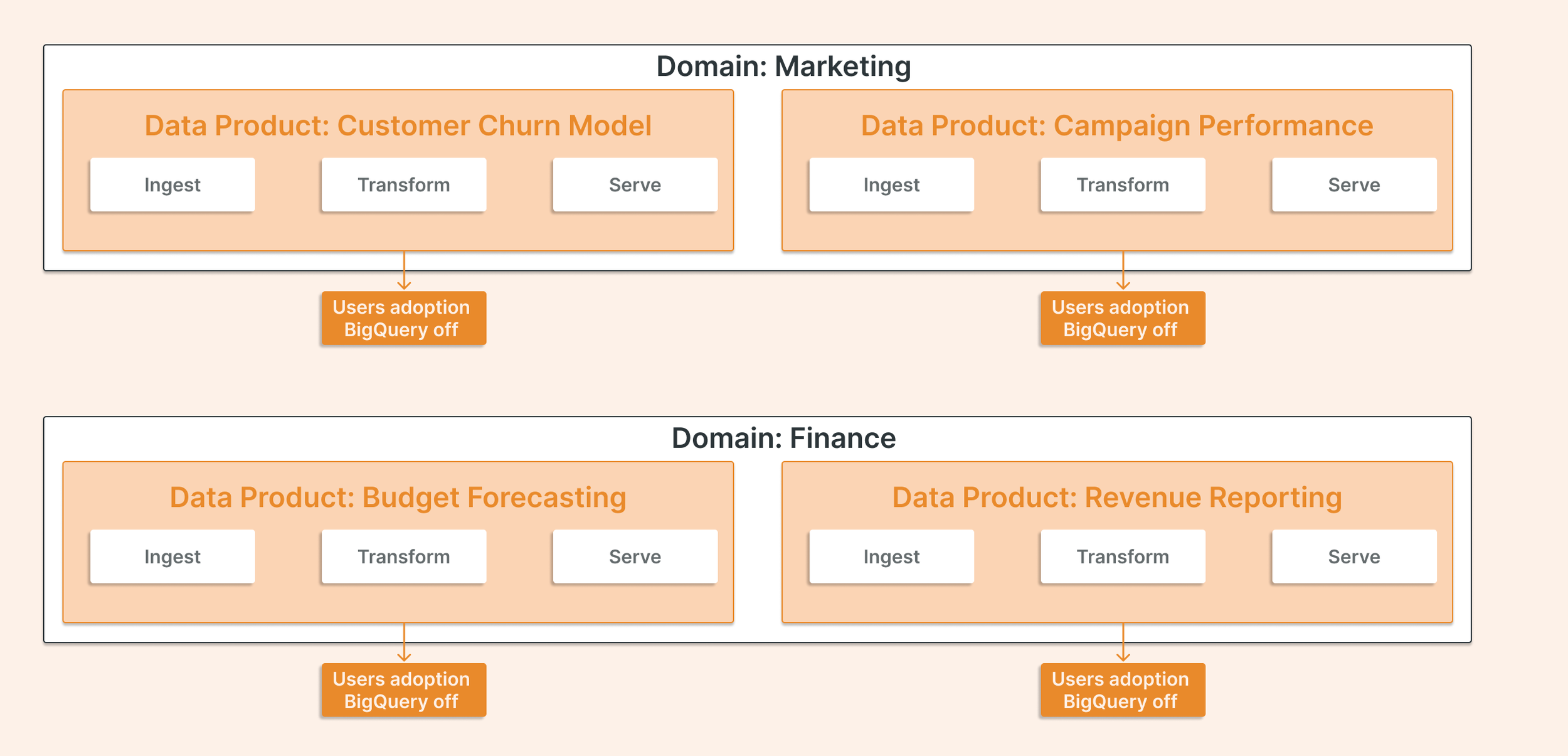
A layer-by-layer migration can’t do this, or it makes progress look slower.
Each wave should complete a full vertical slice: ingestion → transformation → governance → serving. At the end of each wave, users in that domain have been onboarded to Databricks with a clear and governed data product.
Why This Matters for Cost
Running two platforms in parallel is expensive. BigQuery costs don’t shrink until resources are actually decommissioned, not when data is copied, not when pipelines are rebuilt, but when the datasets and scheduled queries are turned off, and users stop querying them.
It also accelerates adoption. When a domain’s users see their dashboards and pipelines working on Databricks before the migration is complete, organizational momentum builds. Teams that migrate layer by layer often face adoption resistance at the end because users have had no exposure to the new platform throughout the project.
“Planning by domain and use case is not just a cost optimization strategy. It is a change management strategy. Each completed wave is a proof point (for the engineering team, for business stakeholders, and for the broader organization) that the migration is delivering rather than just progressing.”
1. Moving the Data: Three Approaches
The most consequential early decision in any BigQuery-to-Databricks migration is not which tables to move first but which approach to use at all. Three patterns emerge consistently, each suited to different constraints.
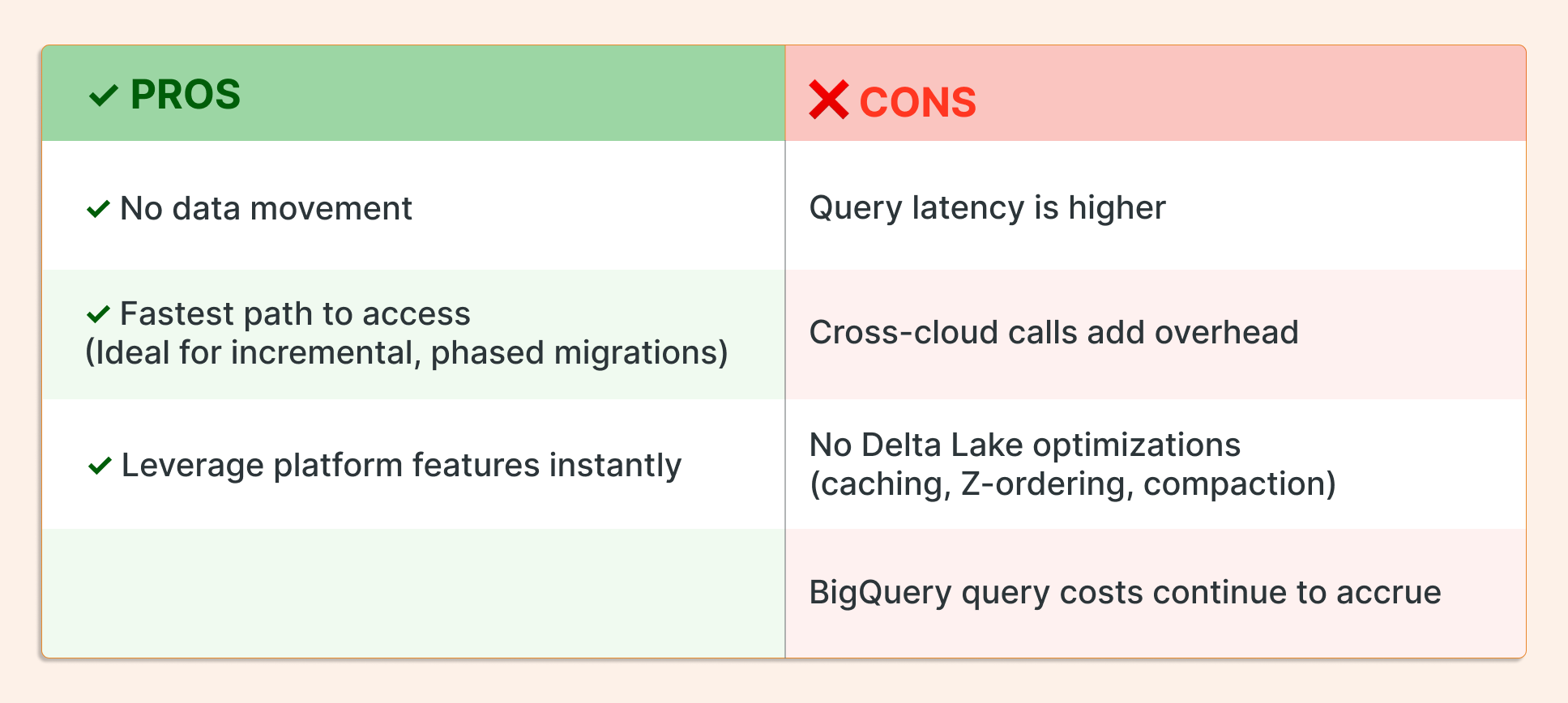
A. Lakehouse Federation (Zero Data Movement)
Federation allows Databricks to query BigQuery data without moving it. Using Unity Catalog, teams create a connection to BigQuery and expose it as a foreign catalog - BigQuery datasets appear as schemas, tables remain in place, and Databricks issues federated queries across the wire.
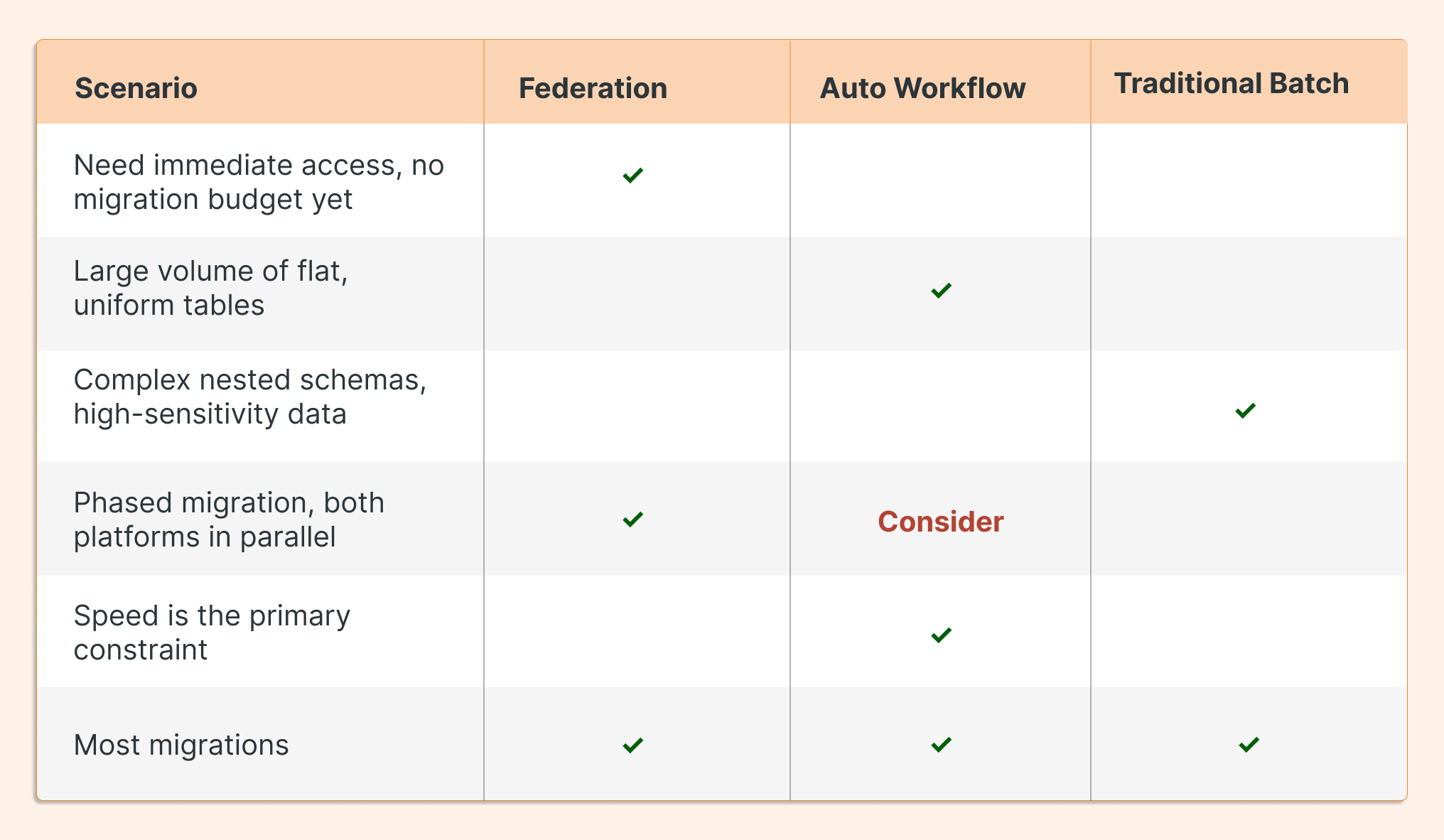
When to use it: Federation is most useful as a bridge when access is needed immediately, when both platforms need to run in parallel during a phased migration, or when the volume of data movement isn’t yet justified. Also, it helps to adopt some Databricks features, unavailable in other platforms, earlier.
B: Automated Workflow Migration
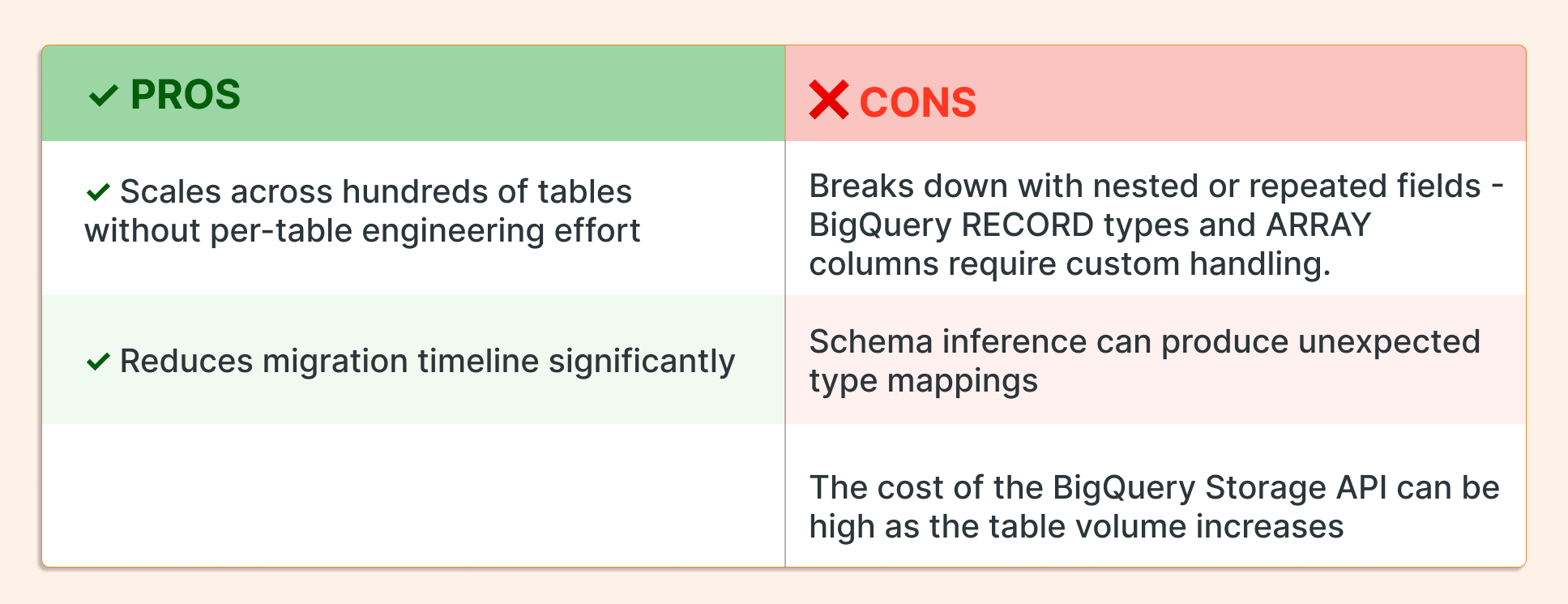
For organizations with large numbers of tables and relatively uniform, flat schemas, Databricks Workflows offers an automated path. The “For Each” task construct allows a single workflow to iterate dynamically over a list of BigQuery tables, load them into Delta Lake, and handle schema inference at scale.
This approach involves accessing BigQuery datasets with compute running in Databricks. It triggers full table scans over targeted tables, which introduces two cost components: the Databricks cluster and the BigQuery Storage API. The latter is significantly more expensive, nearly 10x the cost of the Databricks compute.
When to use it: This approach works well when the table count is high, schemas are predictable, and migration speed is the primary constraint.
Approach C: Traditional Batch Migration
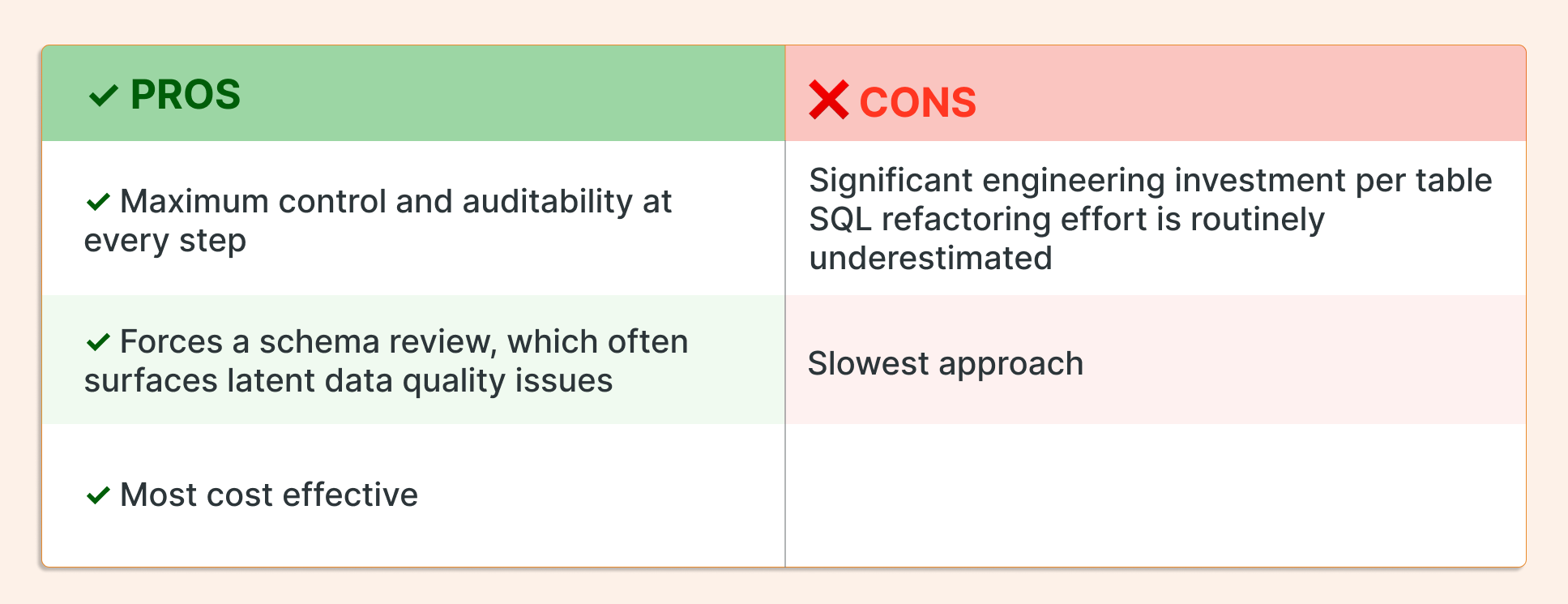
The most controlled path is also the most labor-intensive. Tables are exported from BigQuery to Google Cloud Storage in Parquet format, SQL is refactored for Spark compatibility, data is loaded into Delta Lake, and row-level consistency is validated before cutover. For object storage services, Databricks offers a great connector: Autoloader.
The steps in practice:
Inventory: Catalog all datasets, map inter-table dependencies, and explicitly flag tables with nested schemas, STRUCT columns, or ARRAY fields — these drive the majority of refactoring effort.
Export: Use the BigQuery CLI or Storage API to export to GCS in Parquet format. Parquet natively supports nested and repeated fields, is columnar and compressed (reducing storage and egress costs), and is read far more efficiently by Spark than JSON or CSV. Avoid CSV — it silently flattens or drops complex fields.
Refactor: Replace BigQuery-specific SQL constructs with their Spark SQL equivalents.
Ingest: Set up an autoloader instance in a Databricks pipeline to ingest from cloud storage.
How to Choose
In practice, most migrations use all three. Federation maintains access during transition. Automated workflows handle the bulk of flat tables. Traditional batch covers the complex or sensitive ones.
3. Governance Is a Redesign, Not a Migration
Governance is the area where teams most consistently underestimate scope. The instinct is to treat it as a migration task: map existing permissions, recreate them in the new system, and move on. In practice, it is an architectural redesign.
BigQuery’s governance model is built on GCP IAM. Access is granted at the project, dataset, or table level through IAM roles. Column-level security is implemented through policy tags in the Data Catalog. Lineage and metadata management live in Knowledge Catalog (formerly Dataplex). The model works, but governance is distributed, spread across IAM, Data Catalog, and Knowledge Catalog as separate control planes.
Databricks Unity Catalog takes a different approach: a single control plane for all data assets, including tables, views, ML models, notebooks, dashboards, and code. Access is governed by a three-tier namespace (catalog, schema, and table) with built-in column-level security, row-level filters, and audit logging. Lineage is captured automatically from Spark and SQL operations, not managed as separate metadata.
The practical consequence is that GCP IAM roles do not map cleanly to Unity Catalog privileges. A BigQuery editor role at the dataset level has no direct equivalent in Unity Catalog. Column-level security policies that were implicit in BigQuery views often need to be explicitly reconstructed using Unity Catalog’s column masks, leveraging ABAC. Data stewardship roles that existed informally within IAM groups need to be formalized as Unity Catalog principals.
“If your governance model was built around GCP IAM and Knowledge Catalog (formerly Dataplex), plan for a redesign of access control patterns, not a migration.”
One area where Unity Catalog represents a genuine operational improvement is lineage. Unity Catalog captures lineage automatically from compute operations. Teams that previously maintained lineage documentation manually often find this to be the most welcome change of the migration.
4. What the Pricing Comparison Won't Tell You
No honest migration retrospective skips pricing, and no honest pricing comparison gives a direct answer to “which one is cheaper.” The cost of each platform depends entirely on workload patterns, which differ for almost every team.
BigQuery’s cost model is query-driven. On-demand pricing charges per terabyte of data scanned. Capacity pricing (slot reservations) charges for fixed compute capacity, which is predictable for high-volume, consistent workloads, but wasteful for bursty or sporadic ones. Storage is cheap. The primary cost lever is the amount of data your queries access, which is why partitioning and clustering are treated as first-class engineering concerns in BigQuery.
Databricks’ cost model is compute-driven. The unit of cost is the DBU (Databricks Unit), an abstract measure of compute consumption that varies by workload type (interactive notebooks, batch jobs, SQL warehouses, ML compute). DBU costs are layered on top of underlying cloud infrastructure costs, the VMs, storage, and networking are billed separately by the cloud provider — two bills, not one.
Databricks offers a range of compute options to match different workload profiles. For controlled, predictable workloads, dedicated clusters provide fixed capacity with tunable auto-termination policies. For uncontrolled or bursty queries —such as ad hoc SQL exploration or sporadic jobs— serverless compute eliminates idle cost by provisioning on demand. Choosing the right compute flavor for each workload type is the primary cost control lever in Databricks.
Cost matters, but cost-driven migrations often underdeliver because they optimize for the wrong things. The more durable justification is capability: what workflows become possible, what bottlenecks are removed, and what teams can build that they couldn't before. A platform that costs slightly more but removes friction from the ML lifecycle or enables self-serve analytics at scale can deliver more value than a cheaper one that doesn't. The pricing comparison is worth doing. It just shouldn't be the only one.
5. Four Things We'd Tell Every Team Before They Start
Every migration surfaces a version of the same hard-won insights. These four appear consistently enough to be worth naming explicitly.
1. Governance redesign takes longer than anyone budgets.
The instinct to treat governance as a migration task is almost universal, and it almost always causes delays. Mapping GCP IAM roles to Unity Catalog privileges is not a translation exercise; it’s a redesign. Establishing catalog naming conventions, rebuilding column-level security, and defining data stewardship roles in the new model add weeks to production readiness timelines in most migrations. The teams that budget for this explicitly are the ones that hit their go-live dates.
2. SQL refactoring is the most underestimated technical effort.
BigQuery SQL is not standard SQL. UNNEST, ARRAY_AGG, STRUCT field access, date and timestamp functions, and window function syntax all have Spark SQL equivalents, but identifying them, testing edge cases, and validating correctness at scale take significantly longer than initial estimates suggest. A simple-looking table often contains a query that took a day to rewrite correctly. Multiply that by hundreds of tables.
AI-assisted tooling significantly accelerates this process. Configuring it with the right skill set and strict conversion standards reduces token usage while improving translation accuracy and consistency.
3. Pricing only becomes predictable after a tuning period.
Early cost signals from Databricks are not representative. Clusters are over-provisioned during the learning period, auto-scaling is misconfigured until teams develop intuition, and workload patterns change as migration progresses. The first two to three months should be treated as a calibration period rather than a steady-state cost signal. Teams that lock in budget expectations based on early Databricks spend without accounting for the tuning period consistently face uncomfortable conversations.
4. The platform is only as good as the discipline around it.
The platform is only as good as the discipline around it. BigQuery's serverless model enforces operational discipline by design, compute scales automatically, query costs are bounded by data scanned, and there is no cluster management to neglect.
Databricks offers a serverless option as well, but its fuller value is often realized through configurations that require active exercise: cluster policies, auto-termination settings, job scheduling hygiene, and Unity Catalog access governance are not concerns the platform handles automatically in every deployment model. Organizations that migrate without establishing these operational disciplines first find that costs and complexity grow faster than the value the migration was meant to deliver.
6. Where to Go From Here
A migration from BigQuery to Databricks is not a technical project with a defined end state. It’s an organizational transition from one set of tradeoffs to another. The teams that navigate it most successfully are the ones that understand what they are giving up (the simplicity of fully managed serverless infrastructure, the seamlessness of Google ecosystem integration, the SQL-first culture) and what they are gaining.
The right platform is the one that matches the team’s dominant workloads and existing capabilities, governed and optimized with the discipline the platform requires.
If your team is at the early planning stage, download our migration checklist and platform capability reference, two practical references drawn from real implementation experience.