5 Databricks Patterns That Look Fine Until They Aren't
These aren't beginner mistakes. They're patterns that ship to production, pass code review, and then quietly break — on serverless, during migration, or the moment Databricks updates something undocumented.
The data teams we work with on first engagements are usually competent. Their notebooks run. Their jobs fire. Their pipelines produce data. The problems surface later: a serverless migration stalls because half the codebase calls an undocumented internal API. A new engineer spends three hours debugging auth that's tangled into notebook logic. A job breaks in production because someone copy-pasted a Spark config from a 2019 Stack Overflow answer that no longer applies.
Each of the five patterns below has the same underlying issue: an engineer reached for a workaround instead of the native Databricks way. The platform has matured significantly. A lot of the community's tribal knowledge hasn't caught up.
1. Pulling job metadata through dbutils.notebook.entry_point

Why it breaks
This chain — dbutils.notebook.entry_point.getDbutils().notebook().getContext().something().get() — is undocumented. Databricks can change or remove it at any time, and in practice, they have: toJson() isn't whitelisted on some runtimes, and currentRunId() doesn't work on serverless. The moment you migrate a job to serverless compute, you're debugging a cryptic failure instead of shipping features.
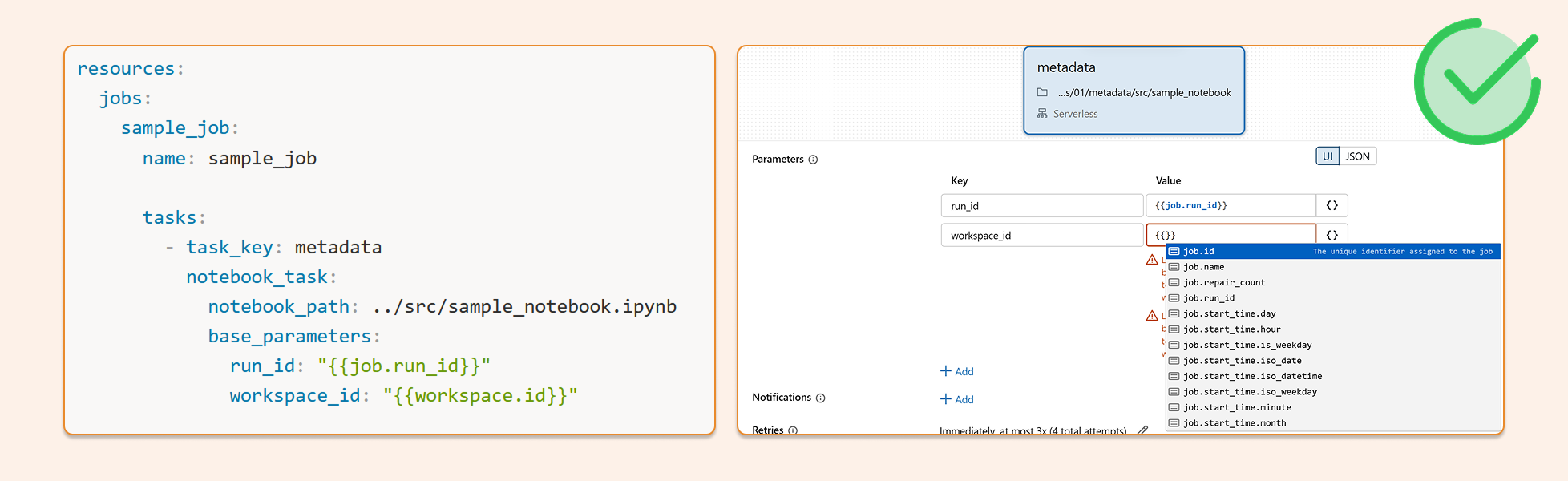
The right way
Databricks supports dynamic value substitution in job parameters. Pass metadata like workspace_id, job_id, and run_id directly into task parameters — either through the Jobs UI or in your DABS bundle config. The values resolve at runtime, your notebooks stay clean, and nothing breaks on serverless.
Jobs UI example
Go to Jobs & Pipelines
Open your job
Edit parameters
Click {} to browse all available metadata parameters
DABS example
resources:
  jobs:
    sample_job:
      name: sample_job

      tasks:
        - task_key: metadata
          notebook_task:
            notebook_path: ../src/sample_notebook.ipynb
            base_parameters:
	            run_id: "{{job.run_id}}"
              workspace_id: "{{workspace.id}}"
2. Extracting the access token from the notebook context
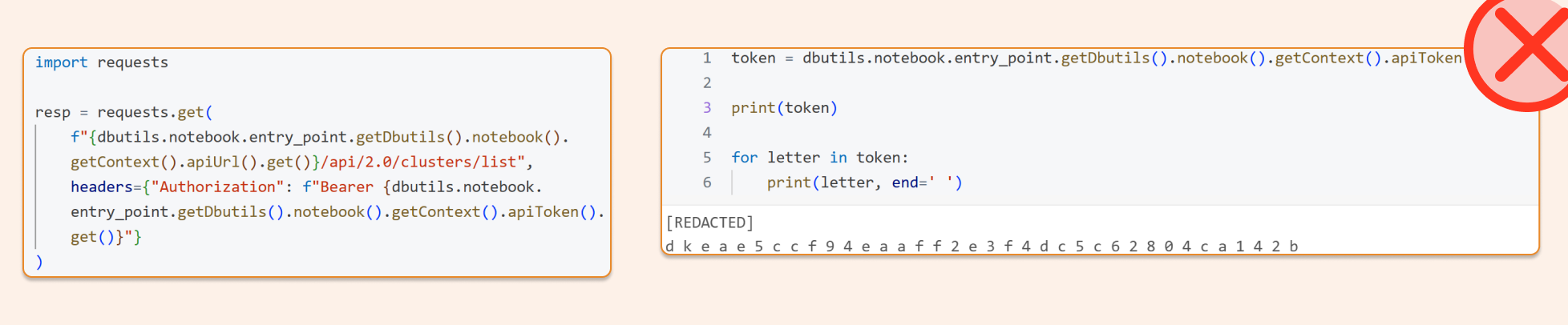
Why it breaks
Same family of problems. Pulling the token via .apiToken().get() is undocumented, mixes auth internals into your notebook logic, and makes the token visible to anyone reviewing that code. It's also unnecessary — there's a clean, supported path that handles auth automatically.
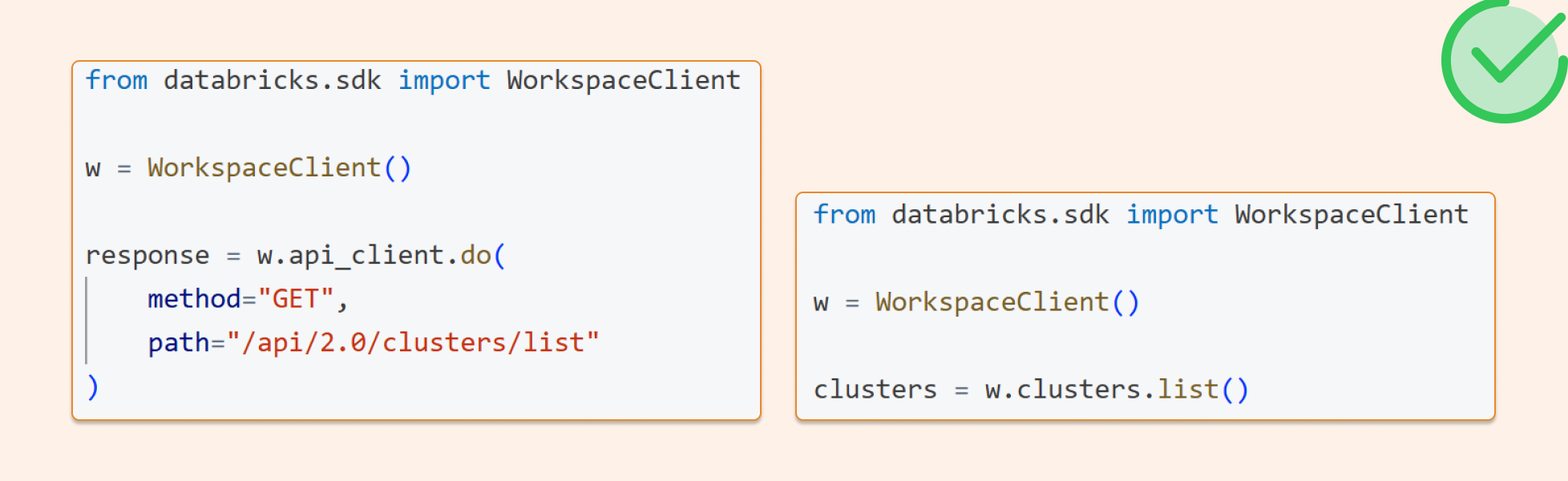
The right way
Use the Databricks SDK. WorkspaceClient() picks up notebook-native authentication automatically — no token extraction, no manual headers. You get the same auth for REST API calls via api_client.do(). One client, everything authenticated, nothing hard-coded.
from databricks.sdk importWorkspaceClient

w = WorkspaceClient()

me = w.current_user.me()
Raw REST API call with the same SDK auth
from databricks.sdk importWorkspaceClient

w=WorkspaceClient()

response=w.api_client.do(
	method="GET",
	path="/api/2.0/clusters/list"
)
The SDK exposes api_client.do(...) with full support for method, path, query, headers, and body — it sends the request using whatever Databricks auth the client was initialized with. No token plumbing required on your end.
3. Detecting the Git branch with subprocess Python inside a notebook
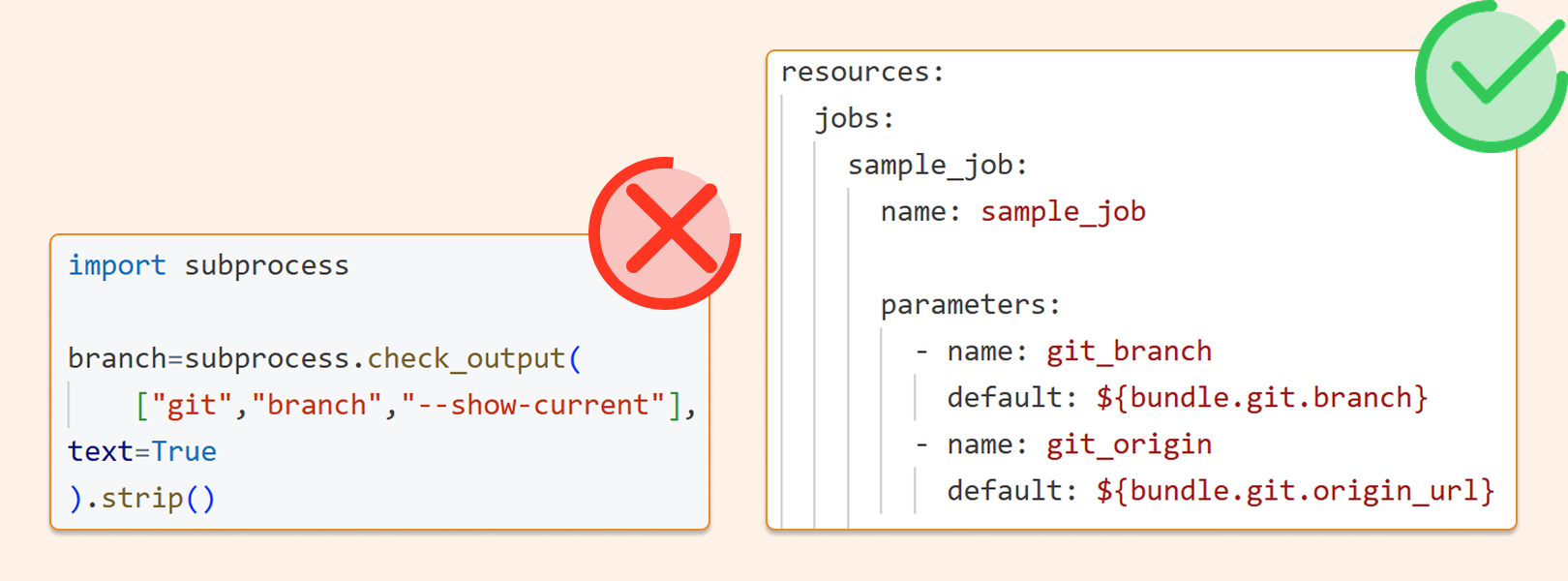
Why it breaks
This approach depends on the notebook's location and the local repo state — neither of which you control reliably in production. You're also writing infrastructure-level code inside a notebook, which makes audit trails and environment tracing harder than they need to be. Your deployment already knows what branch it's on. The notebook shouldn't have to figure it out.
The right way
Pass the branch from DABS. Databricks Asset Bundles auto-populate bundle.git.branch and bundle.git.origin_url when your bundle lives inside a Git repo. Set them once in your bundle config, and they flow through cleanly to every task that needs them.
The bad version, fragile and unnecessary
import subprocess

branch=subprocess.check_output(
    ["git","branch","--show-current"],
text=True
).strip()

print(branch)
The right version: DABS config
resources:
  jobs:
    branch_job:
      name: branch_job

      parameters:
        - name: git_branch
          default: ${bundle.git.branch}
        - name: git_origin
          default: ${bundle.git.origin_url}

      tasks:
        - task_key: main
          notebook_task:
            notebook_path: ../src/main
4. Instantiating SparkSession in a Databricks notebook
Why it breaks
In an attached Databricks notebook, spark already exists. Databricks explicitly advises against creating SparkSession, SparkContext, or SQLContext in notebooks — it can lead to inconsistent behaviour. It's also a reliable signal to anyone reviewing your code that the pattern was borrowed without understanding the environment it's running in.
The right way
Just use spark. The session is already there.
Don’t do this
from pyspark.sql import SparkSession

spark=SparkSession.builder.getOrCreate()
df=spark.table("main.default.some_table")
display(df)
Do this
df=spark.table("main.default.some_table")
display(df)
5. Overwriting spark.conf to tune shuffle partitions
Why it breaks
Hardcoding Spark config values treats dynamic data as if it were static — a config that works today for today's data volume is a liability when volume changes next quarter. Most spark.conf settings don't apply on serverless at all. And we frequently see teams copy-pasting old Spark configs during a migration to Databricks that are simply no longer relevant on the current runtime.
The right way
Start with the defaults. If you're seeing skewed partitions after a join, investigate the data and logic first — fix the skew at the source rather than tuning around it. Reserve spark.conf overrides for genuinely exceptional situations, and document why when you use them. Adaptive Query Execution handles more than people realise.
The thread connecting all five
Every one of these patterns is a workaround for something Databricks now handles natively. The platform has matured considerably (DABS, the SDK, AQE, dynamic job parameters), but a lot of the code in the wild was written before those capabilities existed, and it hasn't been updated. When you're inheriting a codebase or ramping a new engineer, these are the first things to look for.
They're also a useful diagnostic: if you see them in a project, it usually means the team is treating Databricks like a generic Spark cluster rather than a managed platform with its own opinions about how things should be done. Closing that gap tends to make everything else easier — deployments, migrations, serverless adoption, and maintenance over time.
In our next post, we'll look at how to deploy code to Databricks without touching secrets, another area where the community's default approach creates more risk than it needs to.
You can find the Notebooks with all the experiments in this post here: https://github.com/hubert-dudek/medium/tree/main/topics/202603/5things