From Model to Production: Building a Governed ML Lifecycle on Databricks
Most ML teams can train a model. Far fewer can operate one.
The notebook works. The metrics look good. The data scientist is happy. Then someone asks: "Can we run this weekly? What happens when it degrades? How do we know which version is live in production?" And the team goes quiet.
"We trained it in dev last quarter. We're not sure exactly what data was used."
"We pushed the new version manually. The old one might still be running somewhere."
"The model performance dropped. We're not sure when it started or why."
This is not a model problem. It is a lifecycle problem. Training a model is 10% of the work. The other 90% is governance, traceability, automation, and the infrastructure to sustain it in production over time.
Databricks gives you all the tools to close that gap. The question is whether you use them together, or in isolation.
The Gap Between Experimentation and Production
The typical ML journey starts in a notebook. Someone runs a training loop, tunes hyperparameters, evaluates results, and declares success. Then it gets "productionized”, which usually means scheduled on a cluster, output written to a table, and a Slack message sent when it finishes.
That is not production. That is a scheduled experiment.
A governed production ML system has five non-negotiables:
Every model version is registered and versioned: you know exactly what is running and when it was promoted.
Every training run is reproducible: you can re-run any experiment and get the same artifact.
Validation is automated: no model reaches production without passing a defined quality gate.
Promotion is explicit: something decides whether the new model is better than the current one, and that decision is logged.
Inference is always tied to a registered artifact: you never score against a local file or an untracked model.
MLflow, Unity Catalog, Declarative Automation Bundles, and Workflows give you exactly these five properties. What follows is a pattern we apply to wire them together into a complete lifecycle.
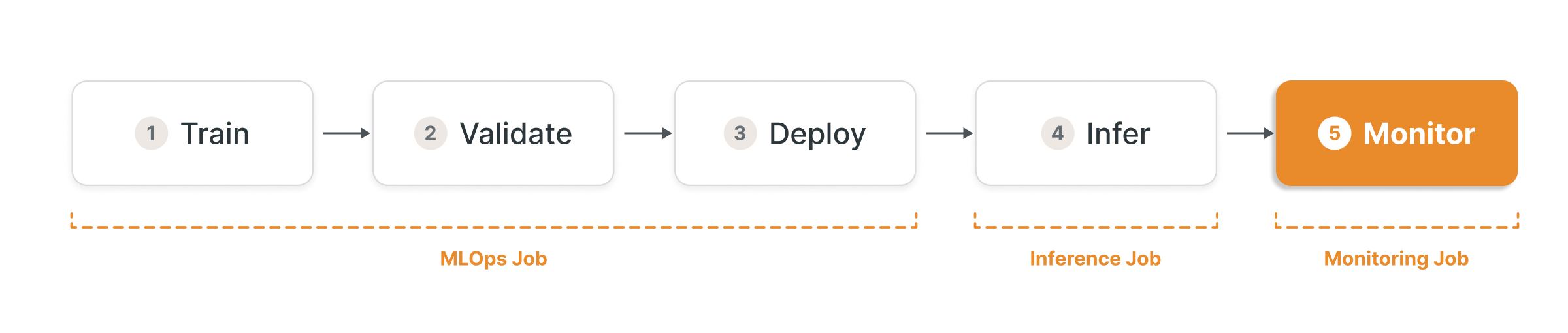
The Lifecycle Across Three Jobs and Five Stages
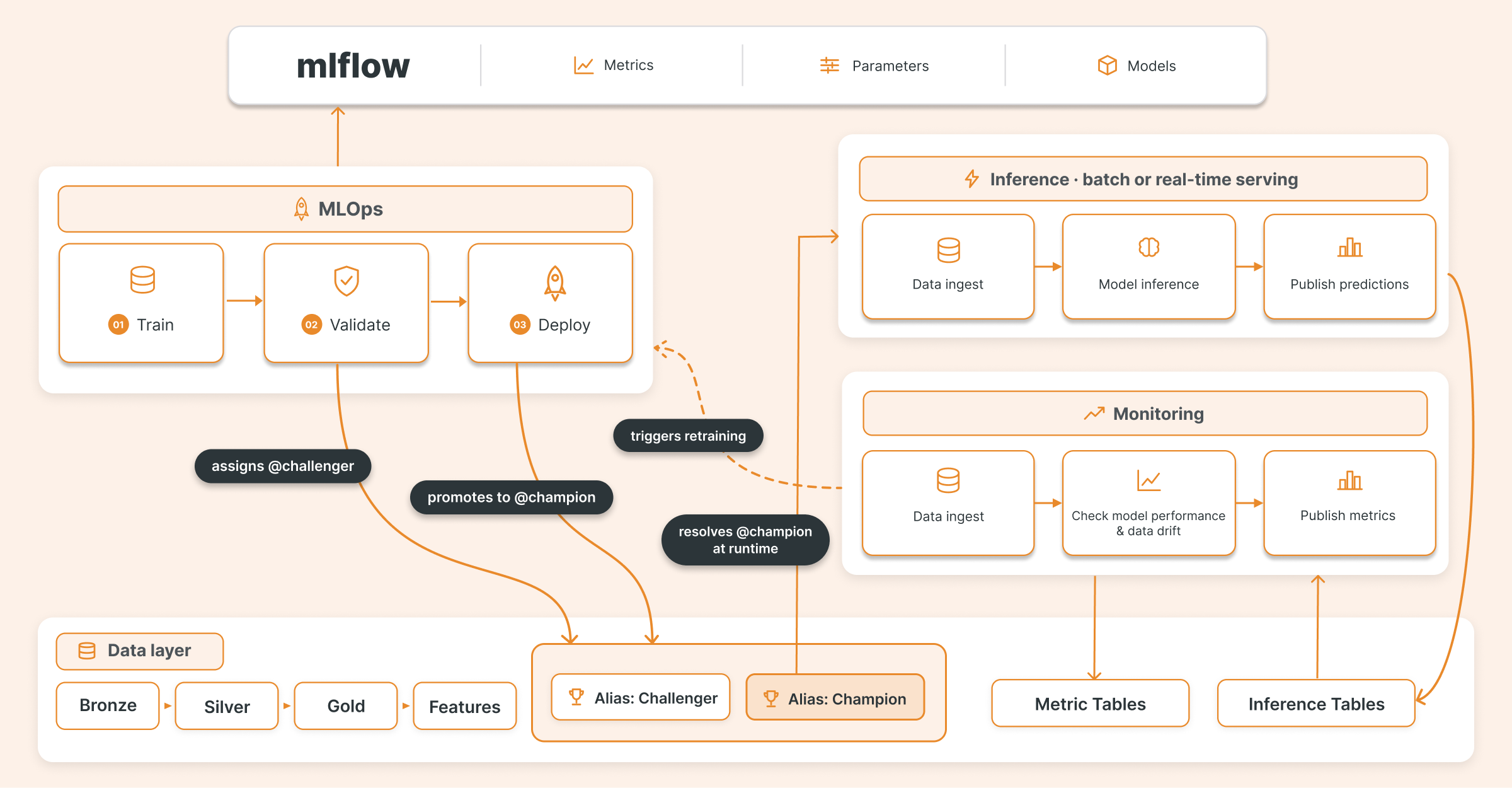
The lifecycle is split across three Databricks Jobs, each with a distinct responsibility:
MLOps Job: runs three sequential stages: Train, Validate, Deploy. Each stage passes structured outputs to the next via task values. No stage runs if the previous one fails.
Inference Job: resolves the current production model from the registry at runtime and scores data at scale. Runs on its own schedule, independent of training.
Monitoring Job: reads inference outputs, detects drift or degradation, and triggers a new run of the MLOps Job when the production model needs to be replaced.
The model registry is the connective tissue across all three jobs. Rather than coupling any stage directly to another through shared state or hardcoded paths, each job communicates through the registry: writing versions, tags, and aliases on one side, and reading them on the other. You can retrain, validate, and promote a new model without touching the inference job. You can evolve your monitoring logic without touching anything upstream.
Each stage has a defined input, a defined output, and writes structured metadata that the next stage consumes. Nothing is implicit. Nothing is passed through environment variables or hardcoded paths. The pipeline is deterministic.
Stage 1: Training With Experiment Tracking Built In

The training stage fits a model for a given dataset and registers the result as a versioned artifact directly in Unity Catalog via MLflow. The specifics of the algorithm or framework matter less than the discipline: every run is tracked, every artifact is registered, and every outcome is reproducible.
The first thing the training job does is tell MLflow to use Unity Catalog as its registry backend:
import mlflow

# Route all model registrations to Unity Catalog.
# On Databricks Runtime 13.0+ with UC enabled this is the default,
# but setting it explicitly makes the intent clear in any environment.
mlflow.set_registry_uri("databricks-uc")
This is what separates a tracked experiment from a governed artifact. Without it, mlflow.register_model writes to the legacy workspace registry. With it, every registered model version lands in Unity Catalog, inheriting its access controls, lineage tracking, and audit log.
The experiment is set before any run starts, so the active experiment context is always explicit:
# UC model name format: catalog.schema.model_name
model_name = "catalog.schema.my_model"
experiment_path = f"/Shared/ml-experiments/{model_name}"

mlflow.set_experiment(experiment_path)

with mlflow.start_run() as run:
    model = train_model(training_data, params)
    # use the appropriate mlflow flavor for your framework:
    # mlflow.sklearn, mlflow.xgboost, mlflow.pytorch, mlflow.pyfunc, etc.
    mlflow.sklearn.log_model(model, artifact_path="model")
    mlflow.log_metrics({"f1": f1_score, "accuracy": accuracy})
    mlflow.log_params(params)
create_model_version is preferred over the higher-level mlflow.register_model because it accepts the physical artifact URI directly (more reliable in distributed environments) and await_creation_for=60 ensures the version reaches READY state in Unity Catalog before downstream tasks try to read it:
from mlflow.tracking import MlflowClient

def register_model_in_uc(run_id: str, model_name: str, artifact_path: str = "model") -> str:
    client = MlflowClient()
    artifact_uri = client.get_run(run_id).info.artifact_uri
    model_version = client.create_model_version(
        name=model_name,
        source=f"{artifact_uri}/{artifact_path}",
        run_id=run_id,
        await_creation_for=60,  # wait for UC to confirm the version is READY
    )
    return model_version.version

model_version = register_model_in_uc(run_id=run.info.run_id, model_name=model_name)
Every run is logged in MLflow with its parameters, metrics, and artifacts. After registration, the model is tagged with structured metadata before anything else happens:
client = MlflowClient()
client.set_model_version_tag(model_name, model_version, "owner", "ml-team")
client.set_model_version_tag(model_name, model_version, "purpose", "propensity-to-purchase")
client.set_model_version_tag(model_name, model_version, "training_run_id", run.info.run_id)
client.set_model_version_tag(model_name, model_version, "primary_metric", primary_metric)
client.set_model_version_tag(model_name, model_version, "retrain_date", str(date.today()))
These tags are not decorative. They become the contract that the next stage enforces.
The stage outputs three values passed downstream via Databricks task values: run_id, model_version, and model_uri. No files. No global state. Structured outputs only.
# In train_model.py - write outputs for downstream tasks
dbutils.jobs.taskValues.set(key="run_id", value=run.info.run_id)
dbutils.jobs.taskValues.set(key="model_version", value=model_version)
dbutils.jobs.taskValues.set(key="model_uri", value=f"models:/{model_name}/{model_version}")
This is the inter-task contract. Each stage knows exactly what it receives and what it must produce. The pipeline cannot advance if a required value is missing.
Dataset Versioning: Knowing What Trained the Model
Registering the model artifact is not enough. To make a training run truly reproducible, you also need to know what data produced it. MLflow supports this directly through dataset logging: you can attach a reference to the training dataset to any run, including its hash, schema, and source path.
import mlflow
from mlflow.data.spark_dataset import from_spark
dataset = mlflow.data.from_spark(
    training_df,
    table_name="catalog.schema.training_data",
    version="2024-01-15",  # snapshot date, Delta version, or any stable identifier
)
with mlflow.start_run() as run:
    mlflow.log_input(dataset, context="training")
    # ... rest of training
This ties the model version in Unity Catalog to a specific snapshot of the input data. When Unity Catalog builds lineage for that model version, the dataset reference is part of it. The question "what data trained the model currently in production?" becomes answerable without reconstructing it from memory or documentation.
The same pattern applies to validation and monitoring: log the evaluation dataset and the inference table as inputs to their respective runs. When something goes wrong in production, you can trace the full chain (training data, model version and inference inputs) from a single lineage view.
Stage 2: Automated Validation Before Any Alias Is Assigned

A freshly registered model is not a validated model. Those are different things.
The validation task receives the model coordinates from the training task via task values:
# In validate_model.py - read outputs from the training task
run_id = dbutils.jobs.taskValues.get(task_key="train_model", key="run_id")
model_version = dbutils.jobs.taskValues.get(task_key="train_model", key="model_version")
model_uri = dbutils.jobs.taskValues.get(task_key="train_model", key="model_uri")
Before a model can be promoted to any environment, it goes through a validation gate. The gate checks four things:
Artifact integrity. The model can actually be loaded.
Tag completeness. All required governance tags are present and non-empty:
REQUIRED_TAGS = ["owner", "purpose", "training_run_id", "primary_metric"]

def validate_tags(model_tags: dict[str, str]) -> list[str]:
    missing = [t for t in REQUIRED_TAGS if t not in model_tags or not model_tags[t]]
    return [f"missing required tag: {t}" for t in missing]
If a tag is missing, the model fails. No exceptions.
Signature presence. MLflow model signatures define the expected input and output schema. Without one, the model is not safe to serve at scale.
Output correctness. The model is run against a holdout evaluation dataset and the predictions are checked:
from pyspark.sql import DataFrame

def validate_predictions(sdf: DataFrame) -> list[str]:
    issues = []
    if "prediction" not in sdf.columns:
        issues.append("missing prediction column")
    if sdf.filter(sdf.prediction.isNull()).count() > 0:
        issues.append("null values in predictions")
    # adjust bounds for your problem type:
    # [0, 1] for probability outputs, unbounded for regression
    if sdf.filter((sdf.prediction < 0) | (sdf.prediction > 1)).count() > 0:
        issues.append("predictions outside expected range [0, 1]")
    return issues
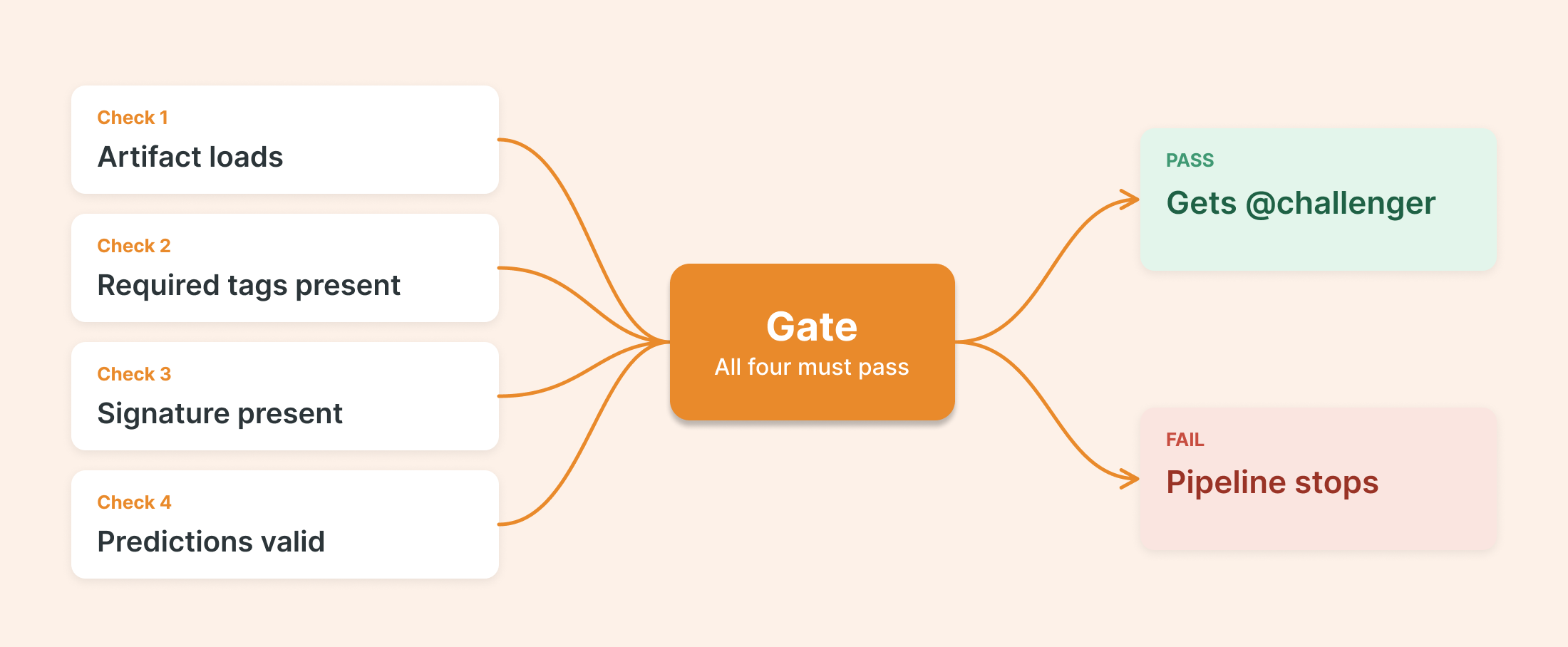
The entire validation run is logged as a separate MLflow experiment, including the list of issues found, so failures are fully traceable. If the model passes all checks, it receives the challenger alias in the registry:
client = MlflowClient()
client.set_registered_model_alias(model_name, "challenger", model_version)
client.set_model_version_tag(model_name, model_version, "validation_status", "passed")
If it fails, it gets tagged validation_status=failed and the pipeline stops. Nothing broken reaches the deployment stage.
The checks shown above are starting points. A validation stage that only checks whether the artifact loads is not a governance gate. It is a health check.
Stage 3: Deploying to Production With a Defined Promotion Policy

Passing validation does not mean a model gets deployed. It means it earned the right to compete against what is already in production. The promotion policy decides what happens next.
The policy answers a single question: is this new model good enough to replace what is currently running?
The simplest policy is a direct threshold check: if the new model's primary metric exceeds a minimum floor, promote it. More robust policies compare it against the current production model, incorporating statistical significance or business-defined minimum improvements.
The example below uses a model metric (F1) as the promotion criterion, which is a reasonable starting point. In practice, the right criterion depends on the use case: a cost-sensitive model might weight false negatives differently, a real-time system might factor in latency or memory footprint, and some teams gate promotion on a downstream business metric entirely (conversion rate, churn reduction or revenue impact).
The framework is the same regardless of what you measure, the definition of “better” is a decision for the team, not the pipeline.
def deploy_model(
    new_version: str,
    new_metric: float,
    current_version: str | None,
    current_metric: float,
    threshold: float = 0.01,
) -> dict[str, bool | str]:
    if current_version is None:
        # No model in production yet: promote directly
        promote_to_production(new_version)
        return {"promoted": True, "reason": "first_deployment"}

    if new_metric >= current_metric + threshold:
        # New model is meaningfully better: swap it in
        archive_current(current_version)
        promote_to_production(new_version)
        return {"promoted": True, "reason": "metric_improvement"}

    # New model does not meet the bar: keep the current one
    reject_candidate(new_version)
    return {"promoted": False, "reason": "no_improvement"}
Every decision, whether a promotion or a rejection, is logged on the model version itself. You always know why each version is where it is.
A common approach: the Champion-Challenger pattern
One widely-used implementation of this policy is the Champion-Challenger model. The current production model holds the champion alias in the MLflow registry. Any candidate that passes validation is assigned the challenger alias. The deployment step reads both from Unity Catalog and applies the promotion policy.
What makes this pattern work cleanly is that all the information needed to make the promotion decision is already in Unity Catalog from the previous stages. primary_metric (the string name of the metric used across training, validation, and deployment) flows as a bundle variable declared once and resolved at deploy time:
# databricks.yaml
variables:
  primary_metric:
    description: "Primary metric used for model evaluation and promotion decisions"
    default: "f1"
By the time the deployment step runs, it only needs to read what is already in the registry:
import mlflow.exceptions
from mlflow.tracking import MlflowClient

def get_metric_for_alias(
    client: MlflowClient, model_name: str, alias: str, metric: str
) -> tuple[str, float] | tuple[None, None]:
    try:
        model_info = client.get_model_version_by_alias(model_name, alias)
    except mlflow.exceptions.MlflowException:
        # alias does not exist yet: no champion or no challenger
        return None, None
    run_metrics = client.get_run(model_info.run_id).data.metrics
    return model_info.version, run_metrics.get(metric, 0.0)

client = MlflowClient()
challenger_version, challenger_metric = get_metric_for_alias(client, model_name, "challenger", primary_metric)
champion_version, champion_metric = get_metric_for_alias(client, model_name, "champion", primary_metric)
get_model_version_by_alias raises MlflowException when the alias does not exist; it does not return None. The try/except block handles the first-run case where no champion has been established yet.
No recomputation, no external lookups. The metric used for the promotion decision is the same one logged during training, stored in the MLflow run that Unity Catalog already tracks as lineage for that model version.
If the challenger wins, the aliases are swapped and the decision is written back to Unity Catalog as tags on the model version, making the full promotion history auditable:
# Challenger beats champion: swap aliases and record the decision
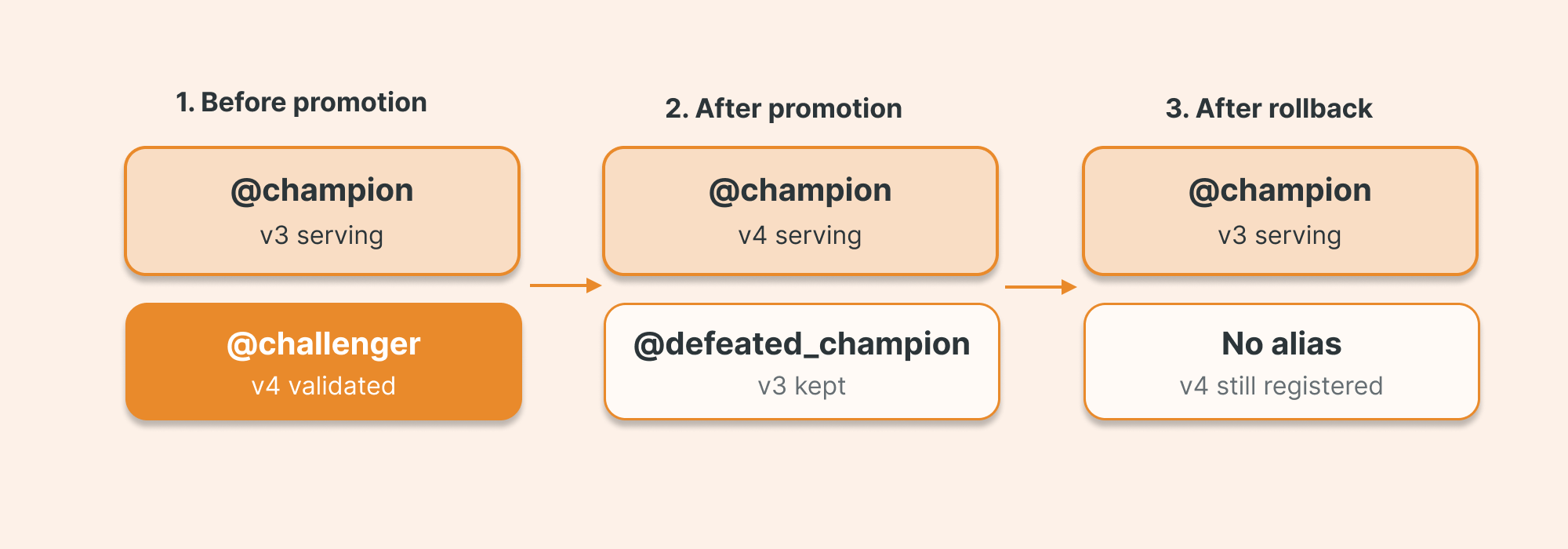
client.set_registered_model_alias(model_name, "defeated_champion", champion_version)
client.set_registered_model_alias(model_name, "champion", challenger_version)
client.delete_registered_model_alias(model_name, "challenger")

client.set_model_version_tag(model_name, challenger_version, "policy_decision", "promoted")
client.set_model_version_tag(model_name, challenger_version, "policy_details", f"gain={challenger_metric - champion_metric:.6f}")
If the challenger loses, it is rejected and the current champion stays untouched:
# Challenger does not improve: reject and tag the reason
client.delete_registered_model_alias(model_name, "challenger")
client.set_model_version_tag(model_name, challenger_version, "policy_decision", "rejected")
client.set_model_version_tag(model_name, challenger_version, "policy_details", "no_metric_improvement")
The previous champion is preserved under defeated_champion, making rollback a single alias reassignment rather than a redeployment. Every version in Unity Catalog carries its full history: when it was trained, what metric it achieved, what decision was made, and why.
Rollback
If a promoted model causes issues in production, restoring the previous version is two lines:
# Rollback: restore the defeated champion to production
client.set_registered_model_alias(model_name, "champion", defeated_champion_version)
client.delete_registered_model_alias(model_name, "defeated_champion")
No redeployment. No hotfix. No rollback runbook. The previous champion was never deleted, only demoted. Promoting it back takes seconds.
Stage 4: Inference Always Against a Registry Alias

Once a model is promoted to @champion, there are two ways to put it to work: batch scoring over large datasets on a schedule, and real-time serving for synchronous, low-latency requests. Both patterns share the same principle, never reference a specific model version directly, always resolve from the registry alias at runtime.
Batch
The batch inference job resolves the current champion at runtime from Unity Catalog and applies it at scale using a Spark udf, which distributes scoring across the cluster without pulling data to the driver:
import mlflow
from pyspark.sql import SparkSession

spark = SparkSession.builder.getOrCreate()

model_uri = f"models:/{model_name}@champion"

predict_udf = mlflow.pyfunc.spark_udf(spark, model_uri=model_uri, result_type="double")

predictions = input_df.withColumn("prediction", predict_udf(*input_df.columns))

predictions.write.format("delta").mode("append").saveAsTable(inference_table)
Promote a new champion in Stage 3 and the next scheduled run picks it up automatically, no changes to the inference job's code or configuration.
Every run logs its metadata back to MLflow so it remains traceable:
with mlflow.start_run(run_name="batch_inference"):
    mlflow.log_param("model_uri", model_uri)
    mlflow.log_param("input_table", input_table)
    mlflow.log_param("inference_table", inference_table)
    mlflow.log_metric("rows_scored", predictions.count())
    mlflow.set_tag("phase", "batch_inference")
If something looks wrong in the predictions six weeks from now, you can trace it back to the exact model version, the exact input dataset, and the exact run that produced those outputs.
Real-time serving
For use cases that require a synchronous response (recommendation APIs, fraud detection, dynamic pricing) the same registry and alias system extends directly to Databricks Model Serving.
You can configure the endpoint programmatically via the Databricks SDK, pointing directly at the registry alias so promotion is automatically reflected in serving:
from databricks.sdk import WorkspaceClient
from databricks.sdk.service.serving import (
    EndpointCoreConfigInput,
    ServedEntityInput,
)

w = WorkspaceClient()

w.serving_endpoints.create(
    name="my-model-endpoint",
    config=EndpointCoreConfigInput(
        served_entities=[
            ServedEntityInput(
                entity_name=model_name,     # catalog.schema.model_name
                entity_version="champion",  # alias, not a pinned version number
                workload_size="Small",
                scale_to_zero_enabled=True,
            )
        ]
    ),
)
Because entity_version points to the champion alias rather than a specific version number, the endpoint automatically serves whatever model holds that alias at any given time. Promoting a new champion in Stage 3 is all it takes to update what the endpoint serves, no endpoint reconfiguration required.
For A/B testing, add a second ServedEntityInput pointing to challenger and split traffic by percentage:
ServedEntityInput(
    entity_name=model_name,
    entity_version="challenger",
    workload_size="Small",
    scale_to_zero_enabled=True,
    traffic_percentage=10,   # 10% to challenger, 90% to champion
),
This can be wired into the deploy stage: when a challenger is promoted to the registry, the deployment task updates the endpoint's traffic split automatically, runs the A/B test, and collapses traffic back to 100% champion once the test concludes.
Once the endpoint is ready, scoring a record is a standard HTTP POST. The Databricks sdk provides a typed client so you do not have to construct the request manually:
from databricks.sdk import WorkspaceClient

w = WorkspaceClient()

response = w.serving_endpoints.query(
    name="my-model-endpoint",
    dataframe_records=[
        {"feature_1": 0.5, "feature_2": 1.2, "feature_3": 3.0}
    ],
)

print(response.predictions)
The response schema matches the model signature registered in MLflow, so the contract between the endpoint and its callers is enforced at the registry level, not negotiated at runtime.
What Unity Catalog Adds to Governance
The bundle deploys the workflow. But the registry that stores the artifacts, tracks lineage, and enforces access is Unity Catalog, and that layer is what turns a working pipeline into an auditable one.
For this specific pipeline, Unity Catalog automatically builds the following lineage of the artifacts without any additional instrumentation.

When your team asks "what data trained the model currently serving production?" that information is queryable. The answer is not reconstructed from Slack messages or a README someone forgot to update.
Beyond lineage, Unity Catalog enforces who can promote a model to the champion alias. That permission lives at the platform level, not in your application code. A data scientist who accidentally runs the deploy notebook in the wrong environment cannot overwrite a production alias they do not have write access to. Access control as infrastructure, not as convention.
Stage 5: Monitoring Job
A governed lifecycle does not stop at deployment. Once a model is serving predictions, a third job takes over: it reads the inference outputs, profiles the data, and evaluates whether the model is still performing within acceptable bounds.
The monitoring job runs on its own schedule, independent of training and inference. It has one responsibility: detect when the production model needs to be replaced and trigger the retraining cycle.
What to monitor. Three categories cover most use cases: prediction distribution drift (are the outputs shifting over time?), input feature drift (is the incoming data changing?), and business metric degradation (are the model's predictions still producing the expected downstream outcome?). Databricks Lakehouse Monitoring provides a managed layer for this, building statistical profiles and drift metrics directly on Delta tables without additional infrastructure.
How to trigger retraining. Start with threshold-based triggers: retrain when a drift metric crosses a defined boundary. They are the easiest to audit, the easiest to tune, and the easiest to explain to stakeholders. Layer in time-based triggers as a safety net (retrain every N days regardless of drift) and event-based triggers when new labeled data becomes available. Whatever the mechanism, it must be automated and its output observable in MLflow.
The last retraining date is read directly from the champion model's tags in Unity Catalog, so no external state store is needed:
from datetime import date
from mlflow.tracking import MlflowClient

client = MlflowClient()
champion_info = client.get_model_version_by_alias(model_name, "champion")
last_retrain_date = champion_info.tags.get("retrain_date", "2000-01-01")

def should_retrain(drift_metric: float, threshold: float, last_retrain_date: str, max_days: int) -> bool:
    drift_exceeded = drift_metric > threshold
    days_since_retrain = (date.today() - date.fromisoformat(last_retrain_date)).days
    return drift_exceeded or days_since_retrain >= max_days
When retraining is triggered, it launches the MLOps Job again: the same pipeline, the same validation gate, the same promotion policy. The champion is replaced only if the new model is better. If it is not, the current champion continues serving.
The ML Lifecycle Job ID is not hardcoded. In the bundle, the monitoring job receives it as an injected parameter, resolved at deploy time from the bundle's own resource references:
# In mlops-workflow.yaml - the monitoring job receives the lifecycle job ID at deploy time
resources:
  jobs:
    monitoring_job:
      name: "Monitoring Job"
      tasks:
        - task_key: monitor
          notebook_task:
            notebook_path: ./jobs/monitor.py
          job_cluster_key: ml_cluster
          libraries:
            - whl: ../dist/*.whl
      parameters:
        - name: mlops_job_id
          default: ${resources.jobs.mlops_job.id}
from databricks.sdk import WorkspaceClient

def trigger_retraining(job_id: int, reason: str) -> None:
    w = WorkspaceClient()
    run = w.jobs.run_now(
        job_id=job_id,
        job_parameters={"trigger_reason": reason},
    )
    print(f"Retraining triggered: run_id={run.run_id}, reason={reason}")

mlops_job_id = int(dbutils.widgets.get("mlops_job_id"))

if should_retrain(drift_metric, threshold=0.05, last_retrain_date=last_retrain_date, max_days=30):
    trigger_retraining(job_id=mlops_job_id, reason="drift_threshold_exceeded")
WorkspaceClient resolves credentials automatically when running inside a Databricks Job. The job_parameters pass context downstream, and the training job logs the trigger reason as a tag on the model version, keeping the full retraining history traceable in Unity Catalog.
The champion is always the best model seen so far that passed validation. You cannot monitor what you cannot trace, and you cannot trace what you did not register.
Orchestration: Declarative Bundles and Multi-Task Workflows
All stages are wired together in a Declarative Automation Bundle. The bundle is YAML-first, version-controlled, and resolves environment targets at deploy time.
# databricks.yaml - the root contract for all environments
bundle:
  name: mlops-project

include:
  - resources/*.yaml

artifacts:
  wheel_files:
    type: whl
    build: uv build

variables:
  primary_metric:
    description: "Primary metric used for model evaluation and promotion decisions"
    default: "f1"

targets:
  dev:
    mode: development
    default: true
    workspace:
      host: <dev-workspace-url>
  prd:
    mode: production
    workspace:
      host: <prd-workspace-url>
The workflow defines the task dependency chain and installs the packaged wheel on every task so business logic stays out of notebooks:
resources:
  jobs:
    mlops_job:
      name: "MLOps job"
      job_clusters:
        - job_cluster_key: ml_cluster
          new_cluster:
            # Cluster definition here
      tasks:
        - task_key: train_model
          job_cluster_key: ml_cluster
          libraries:
            - whl: ../dist/*.whl
          notebook_task:
            notebook_path: ./jobs/train_model.py
        - task_key: validate_model
          job_cluster_key: ml_cluster
          depends_on:
            - task_key: train_model
          libraries:
            - whl: ../dist/*.whl
          notebook_task:
            notebook_path: ./jobs/validate_model.py
        - task_key: deploy_model
          job_cluster_key: ml_cluster
          depends_on:
            - task_key: validate_model
          libraries:
            - whl: ../dist/*.whl
          notebook_task:
            notebook_path: ./jobs/deploy_model.py
depends_on is not a convention. It is a hard guarantee: validate_model will not run unless train_model succeeds, and deploy_model will not run unless validation passes. The pipeline cannot silently skip a stage.
Deploying to a new environment is a single command:
# Validate before touching anything
databricks bundle validate -t prd --profile your-profile

# Deploy to production
databricks bundle deploy -t prd --profile your-profile
The same bundle. The same code. Different target. No manual reconfiguration. No environment-specific scripts. The bundle is the IaC contract for your ML system.
Repository Structure and Packaging
The pattern described in this post only holds if the code is organized to support it. Here is the structure we use:
mlops/
├── databricks.yaml   # Bundle root: targets, variables, artifact build
├── pyproject.toml    # Python package definition
├── uv.lock           # Locked dependency graph - commit this to version control
├── resources/
│   └── mlops-workflow.yaml   # Job definitions for all three jobs
├── jobs/             # Databricks notebook entry points - thin wrappers only
│   ├── train_model.py
│   ├── validate_model.py
│   ├── deploy_model.py
│   ├── batch_inference.py
│   └── monitor.py
├── src/
│   └── mlops/        # Packaged Python library installed on each task
│       ├── common/
│       │   ├── client.py         # MLflow / Unity Catalog operations
│       │   ├── constants.py      # Tags, aliases, experiment parameter names
│       │   └── tables.py         # Delta table read/write abstraction
│       ├── models/
│       │   ├── train.py          # Trainer class
│       │   ├── validate.py       # Validator class
│       │   ├── deploy.py         # Deployer class
│       │   └── infer.py          # Inferer class
│       └── tasks/
│           ├── tasks.py     # Abstract Task base class with task value helpers
│           ├── training.py       # Training task wiring
│           ├── validation.py     # Validation task wiring
│           ├── deployment.py     # Deployment task wiring
│           └── inference.py      # Inference task wiring
└── tests/
    └── common/
        └── test_*.py
The key separation is between jobs/ and src/. The notebooks in jobs/ are entry points: they import the packaged library and delegate immediately. Business logic lives in src/mlops/. This means the validation rules, the promotion policy, and the inference pipeline are all unit-testable Python, not notebook cells.
Packaging with uv
The library in src/ is packaged as a Python wheel and installed on every Databricks task at runtime. We use uv to build it, declared directly in the bundle:
# databricks.yaml
artifacts:
  wheel_files:
    type: whl
    build: uv build
Committing uv.lock ensures that every databricks bundle deploy builds the wheel from an identical dependency graph, regardless of what has changed upstream in any package. No surprises between dev and prd builds.
When databricks bundle deploy runs, it builds the wheel with uv build and uploads it to the workspace. Each task installs it via the libraries block in the job definition.
# Build and deploy in one step
databricks bundle deploy -t prd --profile your-profile
The result is that from mlops.models import train inside a notebook works exactly as it does in a local unit test. Same code, same package, different runtime.
What Comes Next
This pattern covers the core of a production ML system: governed training, automated validation, controlled promotion, batch and real-time inference, and continuous monitoring. It is the foundation. The natural layers on top are:
Feature Engineering via Databricks Feature Engineering decouples feature computation from model training and guarantees that online inference uses the exact same feature logic as training (eliminating training-serving skew at the platform level). This pattern assumes features are already materialized in Delta tables; Feature Engineering is what manages that materialization and makes it reusable across models.
Multi-model orchestration (ensembles, cascade models, routing across use cases) builds on the same alias and tag system but requires additional coordination between model versions. The registry infrastructure shown here is the prerequisite. Each model in the ensemble follows its own lifecycle; the orchestration layer reads their respective @champion aliases at runtime.
LLM integration and compound AI systems increasingly sit alongside traditional ML models in the same pipeline. Databricks supports deploying LLMs via Model Serving using the same endpoint and alias pattern described here, which means governance, rollback, and traffic splitting apply equally to fine-tuned language models. For compound systems (where an LLM calls a retrieval model, a classifier, or a scoring function) the registry becomes the coordination layer across model types.
CI/CD for ML extends the bundle pattern into a full pull-request workflow: validate the bundle on every PR, run unit tests against packaged library code, deploy to a staging environment automatically, and gate production deployment on a passing integration test. The Databricks CLI and GitHub Actions or Azure DevOps integrate directly with databricks bundle deploy, making the pipeline reproducible from source control to production without manual steps.
Each of these is a layer. This post is the ground floor.
The Discipline Is the Differentiator
MLflow, Unity Catalog, Declarative Automation Bundles, and Workflows are all available to every team. Most teams use some of them. Few use them as a coherent system.
The pattern above is not complex. It is disciplined.
Every model is registered. Every decision is tagged. Every promotion is explicit. Every inference is traceable. Every environment is deployed from the same bundle. And if something goes wrong, rollback is an alias swap, not a three-hour incident.
That is what it means to operate an ML model in production. Training the model was the easy part.