Snowflake and Databricks: How to balance compute
Snowflake and Databricks are two leading cloud data platforms, each offering scalable compute separate from storage. As data workloads grow, a common challenge is balancing compute resources to meet performance needs without overspending. In this blog, we’ll explore how to effectively manage and scale compute on both Snowflake and Databricks, compare their approaches, and provide strategies for cost optimization. In this blog, I’ll help you understand Snowflake vs. Databricks compute and how to strike the right balance.
Compute Models: Snowflake & Databricks
Both Snowflake and Databricks decouple storage from compute, but their compute models differ fundamentally:
Snowflake - Virtual Warehouses
Snowflake uses independent and fully managed virtual warehouses, which are essentially compute clusters of varying “t-shirt” sizes (X-Small to 6X-Large) that you allocate for running queries.
💡 Snowflake is introducing Adaptive Compute. With this feature activated minimal configuration is required as Snowflake will automatically select the appropriate cluster size(s), the number of clusters, and auto-suspend/resume duration for jobs on your behalf. At the moment of publishing this blog, Adaptive Compute is available in private preview.
Each warehouse has a fixed amount of resources (transparent to users) and operates in isolation with its own local cache (with a shared result cache for eligible results). You can run multiple warehouses for different workloads to avoid resource contention. Snowflake virtual warehouses can be resized on the fly and can also run in parallel as multi-cluster warehouses for scale-out under high concurrency. Compute usage is billed in Snowflake credits per second, with a 60-second minimum each time a warehouse starts or resumes.
Databricks - Spark Clusters
Databricks is built on top of Apache Spark and uses clusters (consisting of a driver and worker nodes) to execute code. Clusters can be configured for specific needs (memory-optimized, GPU-enabled, etc.) and support multiple programming languages in the same environment. Databricks clusters can be persistent or ephemeral. They can be classic, pro or serverless; serverless behaves more like Snowflake’s warehouses (it scales under the hood). Compute usage is measured in Databricks Units (DBUs) per second, which vary by instance type and size, and you also pay the underlying cloud VM costs separately.
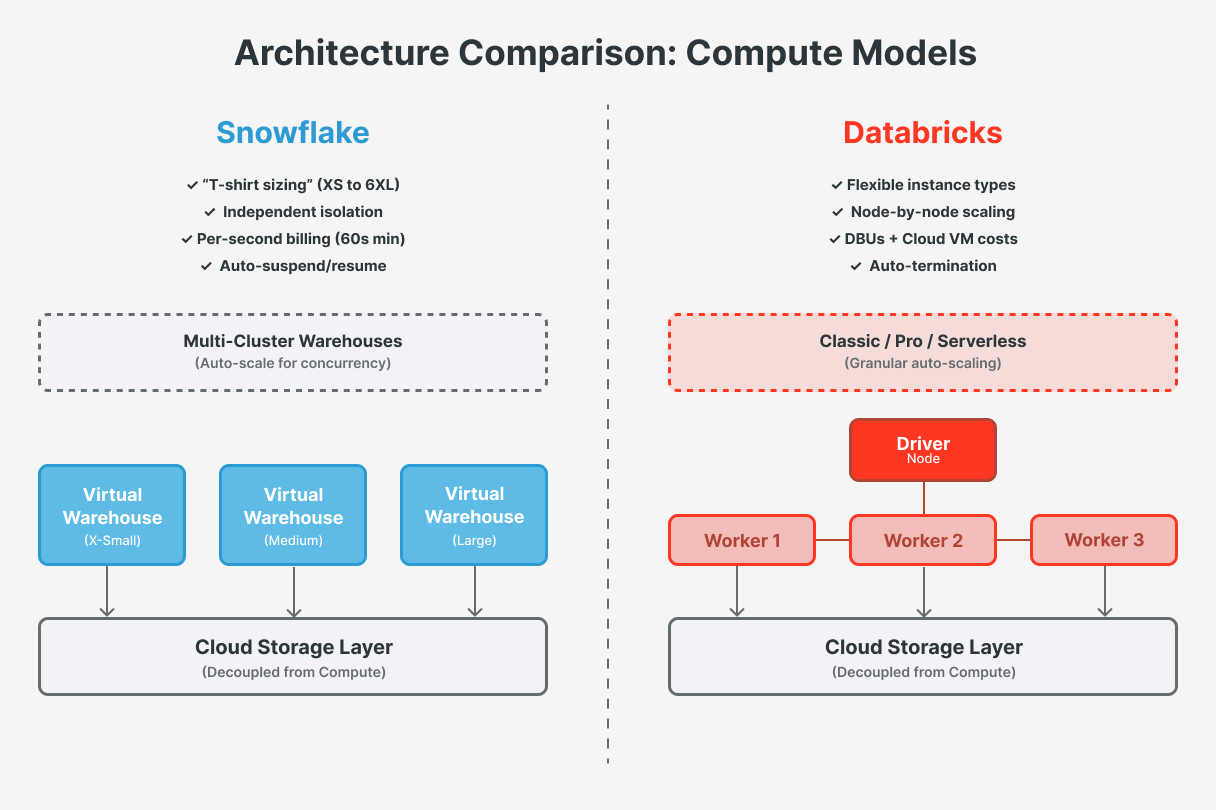
💡 Basically, Snowflake’s model provides very predictable performance for concurrent SQL queries, while Databricks offers more flexibility for diverse workloads like streaming or machine learning.
Scaling and Elasticity
Both platforms can scale compute resources on demand, but they do so differently.
Databricks Auto-Scaling and Flexibility
Databricks clusters support auto-scaling, which adds or removes worker nodes based on workload demand. Unlike Snowflake’s doubling of capacity by whole clusters, Databricks can scale more granularly (e.g., one node at a time) up to the max you specify. As jobs or queries ramp up (more tasks waiting in Spark), the autoscaler provisions extra workers; as load drops, it removes workers to shrink the cluster and lower costs. This dynamic scaling is very useful for Spark workloads where different stages have different resource needs. For example, a complex ETL job might scale up to 10 nodes during a heavy join, then scale to 2 nodes during lighter processing or waiting periods, all within one job run.
Key Databricks scaling tips
Configure Auto-Scaling Policies: Simply turning on autoscaling isn’t enough, you should configure min and max cluster sizes. For instance, set a minimum of 1–2 nodes and a maximum that covers your peak needs (say, 10). This gives headroom for spikes without paying for 10 nodes when only 1 is needed. Monitor how quickly your clusters scale up and down. Databricks autoscaling has cooldowns and won’t remove nodes too rapidly, so in steady low usage a fixed small cluster might cost slightly less than autoscaling overhead. In short, test and optimize autoscaling parameters; they should save cost by reducing idle capacity, but verify the benefit for your specific jobs.
Use Auto-Termination: Always enable auto-termination on interactive clusters to shut them down after X minutes of inactivity. This is analogous to Snowflake’s auto-suspend. For example, if your data science team’s cluster is idle overnight, auto-termination will shut it off and stop billing. For scheduled batch jobs, prefer job clusters rather than keeping an all-purpose cluster running 24/7. This practice can significantly cut costs by avoiding idle compute time.
{
  "cluster_name": "etl-job-cluster",
  "spark_version": "16.4.x-scala2.12",
  "node_type_id": "m5d.xlarge",
  "autoscale": {
    "min_workers": 2,
    "max_workers": 10
  },
  "autotermination_minutes": 30
}
Databricks Serverless Warehouses: In response to Snowflake’s ease of use, Databricks introduced Serverless SQL Warehouses (and serverless compute for notebooks/jobs in supported regions) that start very quickly and auto-scale under the hood. These are ideal for BI dashboards and quick queries because they provide near-instant compute availability and scale down aggressively when idle, similar to Snowflake’s behavior. A classic cluster might take minutes to start (leading some users to leave it running and pay for idle time), whereas a serverless one can start in seconds, allowing you to terminate it between bursts without sacrificing user experience. If fast query response and minimal manual management are priorities, serverless warehouses for SQL analytics are a great way to balance performance with cost. For longer-running pipelines or ML training: use classic clusters with autoscaling and tune them for your workload.
If Serverless Compute isn’t supported in your region/workspace, use Cluster Pools and Spot Instances: To reduce startup latency and costs, Databricks offers cluster pools, a pool keeps a set of idle VM instances ready to attach to clusters, cutting start times from minutes to seconds (handy for ad-hoc use). Additionally, if your cloud and workload allow, consider spot instances for worker nodes. These are cheaper than on-demand VMs, at the risk of occasional interruption. You can see savings by using spot for non-critical or easily retryable jobs. Ensure your job is resilient to losing a worker mid-run (Spark will retry tasks).
💡 If your workload supports serverless compute, Databricks recommends using serverless compute instead of pools to take advantage of always-on, scalable compute.
Snowflake’s Auto-Scaling and Concurrency
Snowflake does not automatically auto-resize a single warehouse’s size per se (Adaptative Compute will offer this), but it can scale out using multi-cluster warehouses (available in Enterprise edition and above). In Auto-scale mode, Snowflake will automatically start additional warehouse clusters to handle increased concurrent queries, then shut them down as load decreases. This transparent concurrency scaling means that, if 50 users run queries at once, Snowflake can spin up extra clusters to prevent queues without manual provisioning. For example, if you set a warehouse to min=1, max=3 clusters, Snowflake will use 1 cluster under light load and up to 3 when queries pile up, then scale back down to 1. This eliminates the need to start/stop extra warehouses for peaks, the platform handles it within your limits, balancing performance and cost.
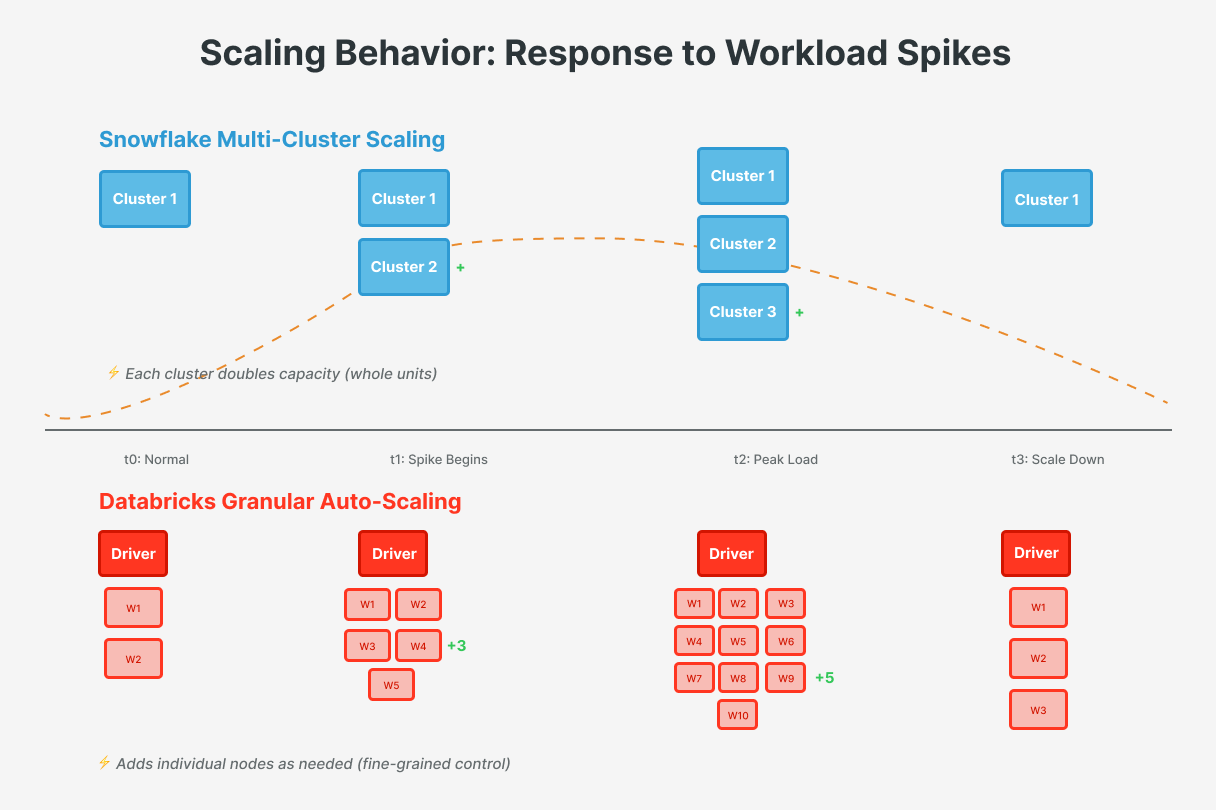
Key Snowflake scaling tips
Choose Warehouse Size Appropriately: Right-size your warehouse to the workload. Each size increase (Small → Medium → Large, etc.) doubles the compute power and the credit cost. Run tests on different sizes; a larger warehouse isn’t always faster for small queries. For heavy data loads or complex queries, a larger warehouse may be worth the cost; for simple or light queries, stick to a smaller size to avoid unnecessary spend.
Use Multi-Cluster for Concurrency Peaks: If you experience spikes in concurrent usage (e.g., EOM dashboards), configure multi-cluster warehouses in Auto-scale mode rather than using one giant warehouse. For instance, instead of one 4XL running all the time, you might use a Medium warehouse that auto-scales. This can handle bursts while potentially using fewer credits during idle periods. Start with a low minimum and a moderate maximum number of clusters, then adjust as you observe patterns. Remember, multi-cluster scaling is about serving more concurrent queries, not speeding up a single long query. A slow query may need a bigger warehouse or query optimization, since additional clusters only help when there are multiple queries.
⚠️ Avoid using multi-cluster warehouses in Maximized mode (min clusters = max clusters, e.g., min=3 & max=3). In my experience, it's better to define a low minimum instead of having all clusters running constantly. Only use this approach when you're sure that the capacity is consistently needed.
Enable Auto-Suspend and Auto-Resume: Snowflake warehouses can suspend when idle to avoid charges. Because Snowflake bills per second with a 60s minimum (each time you start/resume a warehouse), you can auto-suspend after a short idle period to save credits. For example, setting auto-suspend to 5 minutes is often recommended. The warehouse will pause, releasing compute resources, and auto-resume ensures the next query wakes it up almost instantly. This is great for irregular workloads; you only pay when queries are running. (If queries arrive every minute or two, a too-short suspend time could lead to repeated start/stop overhead. Tune the threshold to your typical gaps to avoid unnecessary restarts.) Snowflake’s fast startup and result caching mitigate the impact on user experience. Trust me, it’s a game-changer.
-- Set auto-suspend to 5 minutes (300 seconds)
ALTER WAREHOUSE my_wh SET AUTO_SUSPEND = 300;

-- Ensure auto-resume is enabled
ALTER WAREHOUSE my_wh SET AUTO_RESUME = TRUE;

-- Quick check of current settings
SHOW WAREHOUSES LIKE 'MY_WH';
Use QAS for Large Queries: Snowflake offers Query Acceleration Service (QAS) (Enterprise edition and above) to enhance the performance of long-running queries, particularly those involving large table scans or unpredictable data volumes. QAS identifies eligible queries and offloads portions of processing to shared compute resources. By running these portions in parallel, it reduces processing time and improves efficiency. There’s no upfront cost to enable QAS, you pay the credits consumed by the leased compute resources that QAS uses.
Cost Considerations and Optimization
Balancing compute isn’t just about performance, cost optimization is equally important. Both Snowflake and Databricks are usage based, but their pricing models and cost levers differ.
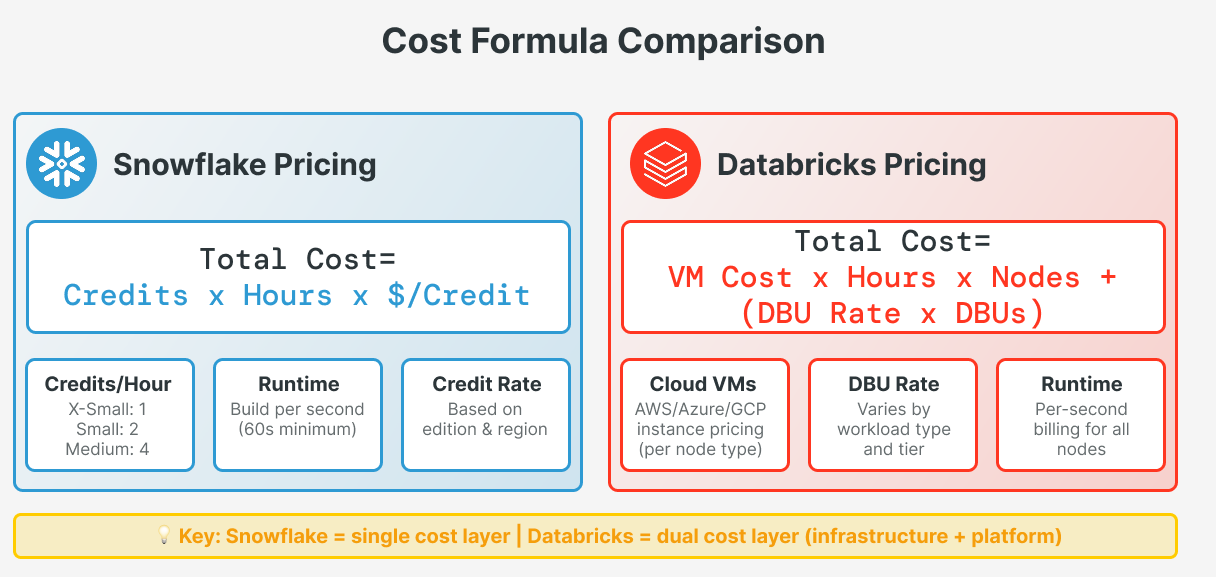
Snowflake Pricing
Snowflake bills you for compute using credits. Each warehouse size costs a set number of credits per hour (charged by the second). A X-Small warehouse costs 1 credit/hour, a Small costs 2 credits/hour, and so on. If you run two Small warehouses at the same time, you'll pay for 4 credits/hour. Storage and network costs are separate.
cost = credits_per_hour(size) x hours_active x credits_rate(pro-rated by second)
Snowflake includes Cloud Services usage up to 10% of your daily compute credits at no extra cost. If you go over this limit, you'll pay additional credits.
To keep costs down, the main rule is: don't keep warehouses running when you don't need them. You can:
Use auto-suspend to automatically shut down idle warehouses
Schedule warehouses to run only when needed
Use a larger warehouse if you need more compute power, then switch to a smaller one or turn it off
Use multi-cluster only during busy periods, as each extra cluster adds to your bill
Snowflake offers Resource Monitors that can warn you or even stop warehouses when you reach your credit budget, helping you avoid unexpected costs.
-- Step 1: Create a resource monitor with a monthly credit quota
CREATE RESOURCE MONITOR my_rm
  WITH CREDIT_QUOTA = 500
  TRIGGERS
    ON 80 PERCENT DO NOTIFY
    ON 100 PERCENT DO SUSPEND;

-- Step 2: Attach the monitor to a specific warehouse
ALTER WAREHOUSE my_wh SET RESOURCE_MONITOR = my_rm;
Databricks Pricing
Databricks pricing has two components: cloud infrastructure costs (paid to your cloud provider) and DBU costs (paid to Databricks). A DBU is a normalized unit of processing power per hour. The mapping of VM size to DBUs is defined by Databricks (bigger instances consume more DBUs/hour). Your cluster cost is basically
cost = (VM_hourly x hours x nodes) + (dbu_rate x consumed_dbus)Don’t forget that Serverless Compute isn’t charged with infrastructure costs
This can make direct comparisons tricky, but one implication is that well-optimized clusters on cost-effective instances can yield significant savings. For example, using spot VMs or reserved instances can lower the cloud-cost portion. Additionally, Databricks has different workloads rated at different DBU prices, and typically enterprise plans offer discounts for committed use. To optimize costs:
Use the Right Cluster: Don’t use a large all-purpose cluster for a small ETL job, spin up a smaller job-specific cluster. Similarly, don’t use an interactive cluster for automated jobs (all-purpose clusters are costlier and often run longer). Also, segment workloads by cluster and shut them down when done.
Photon and Performance Tuning: The Databricks Photon engine (vectorized execution) can dramatically speed up operations. It may change how many DBUs you consume, but completing jobs much faster often lowers total cost. It’s worth A/B testing Photon on heavy workloads to see if speed gains outweigh the per-hour rate. Many users find Photon reduces both runtime and cost for intensive analytics. Likewise, optimize your Spark code to finish with less compute time, the faster your jobs finish, the less you pay.
Plan for Concurrency and Workload Patterns: If you have many concurrent users, compare strategies: Snowflake’s multi-cluster concurrency scaling will handle it seamlessly at the cost of more credits when active. Databricks, on the other hand, might handle many short queries by starting with a Serverless SQL Warehouse (often a good default for BI) or by scaling up a single cluster to a large number of nodes, but Spark clusters excel at batch throughput more than ultra-low latency concurrent queries. In practice, if ultra-low latency BI with high concurrency is your main use case, Snowflake’s design may have more predictable performance. If your workloads are a mix (ETL, streaming, ML, and some BI), Databricks flexibility lets you tailor clusters to each task for efficiency. You could even use both: Snowflake for BI and Databricks for data engineering/ML.
Monitor and Iterate: Cost optimization is not one-and-done. Use each platform’s monitoring tools, Snowflake Query History and Warehouse Metering views, and Databricks system tables and cost reports to find underutilized resources. Maybe you’ll find a Snowflake warehouse running Large but only with 10% utilization (hint to downsize), or a Databricks cluster that never auto-scales above 4 nodes (cap max at 4 and save on provisioning). Both platforms provide usage logs that FinOps teams can analyze. Ultimately, the team’s expertise in tuning and management can influence costs as much as the platform choice itself. Differences in cost often come down to how well each platform is utilized and managed, in other words, waste is the real enemy. A well-architected solution on either platform can be cost-effective.
👉 It’s key for both platforms to optimize data loading. Ensure files are optimally sized before loading, and consider using techniques like compression to improve load times. Databricks Predictive Optimization feature does this automatically. This is enabled by default for all Unity Catalog Managed tables
Conclusion
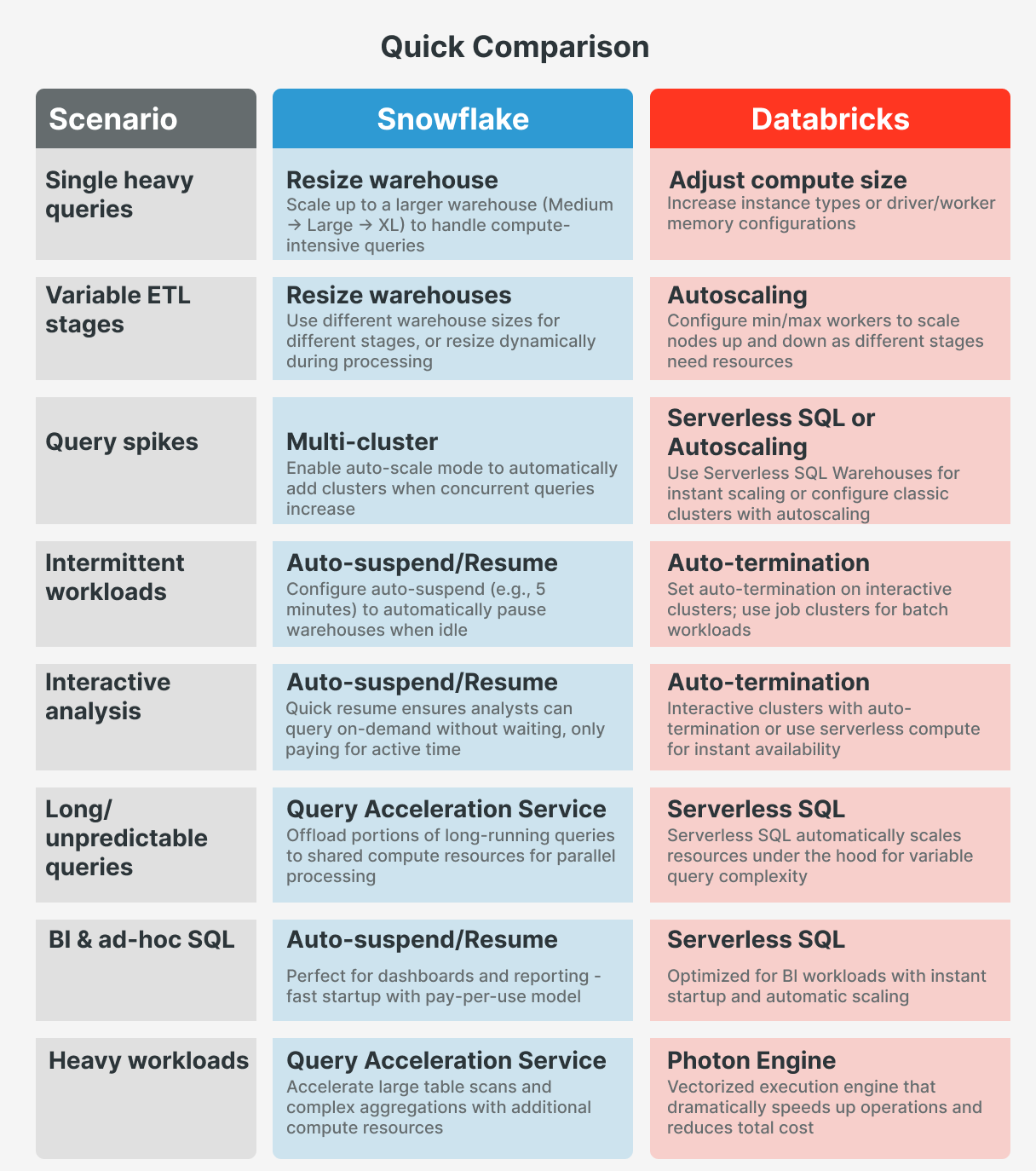
In summary, to balance computing on these platforms:
On Snowflake, take advantage of auto-suspend and multi-cluster warehouses to dynamically adjust to demand, and choose warehouse sizes deliberately to match your workload profile. Snowflake’s per-second billing and quick scaling encourage a “start big when you need to, pay only for what you use” approach.
On Databricks, use autoscale clusters with sensible limits, auto-terminate to kill idle clusters, and newer features like serverless compute and Photon to get more done with less infrastructure. It requires a bit more tuning, but it rewards you with a tailored environment that can handle anything from SQL analytics to ML/AI training.