Watermark-Based Incremental Ingestion (Lakeflow Connect query-based capture)
Recently, I wrote a lot about change data capture and the amazing AUTO CDC functionality. But what if we want to ingest data incrementally without CDF? than we have new functionality from Databricks “query-based capture,” which is nothing less than watermark-based incremental ingestion. That functionality is part of the Lakeflow Connect offering, which also supports CDC ingestion.
“Our goal is to make incremental processing the default, not a specialized pattern reserved for a few expert teams. As many teams want CDC but get stuck waiting for permissions or working off a read replica, we’ve added optionality for incremental ingestion to our database connectors through both CDC and query-based capture. This provides teams with a flexible path to incremental ingestion that meets the needs of their database.”
What is query-based capture?
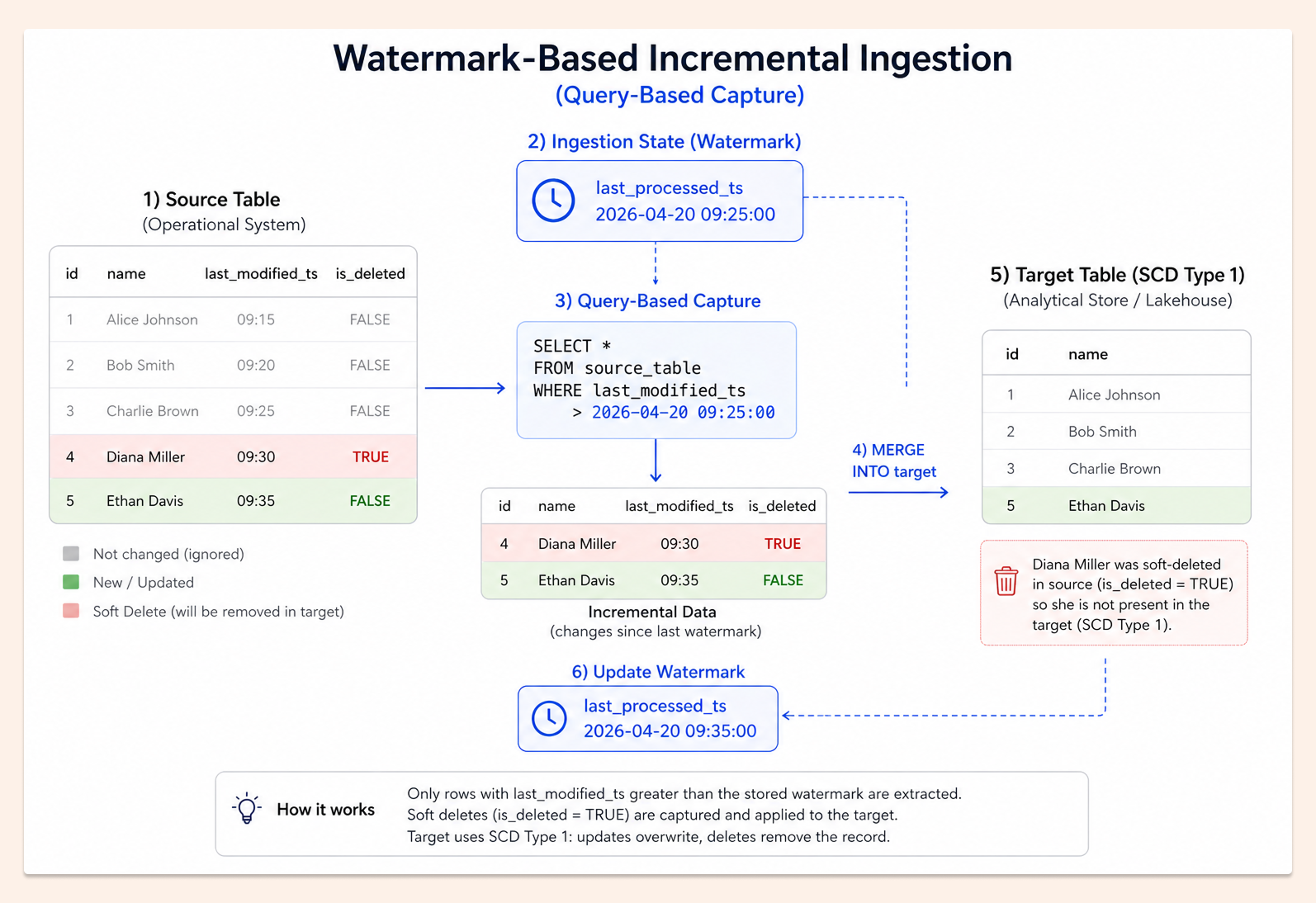
It’s a popular ingestion pattern like good old SQL. Basically, we have a timestamp of when the column was last modified (in SQL, this is usually done using an auto-generated column - TIMESTAMP DEFAULT CURRENT_TIMESTAMP ON UPDATE CURRENT_TIMESTAMP). Additionally, the best approach is to have an is_deleted column, called a “soft delete” column, that removes records from the target.
Our source table looks like the following:

and the image below with our process (Slowly Change Dimension Type 1) - we don’t keep history in the target (although SCD TYPE 2 is also possible). Remember that we need to keep the state/watermark - last ingestion timestamp from the last run to make it incremental (that watermark is kept automatically by the Lakeflow Connect pipeline).
Why without CDF?
Change Data Feed is a different ingestion pattern that records all operations on the table (like a log with DELETE, INSERT, UPDATE_PRE, and UPDATE_POST), and it is now becoming the industry’s golden standard for incremental data ingestion.
First of all, we don’t always have access to CDF, or the database version does not support it. Sometimes, admins don’t want to set it, as it is overhead or just too complicated. And lastly, I had situations when, because of frequent full table replace, the change data feed was not usable due to a high amount of INSERT and DELETE operations (in some extreme scenarios, CDF ingestion can be slower than full replacement)
Databricks way for Query-Based Capture
In Lakeflow Connect UI we can now choose ingestion based on CDF or on query-based capture from SQL databases (like Postgres, Azure SQL, MySQL and others)
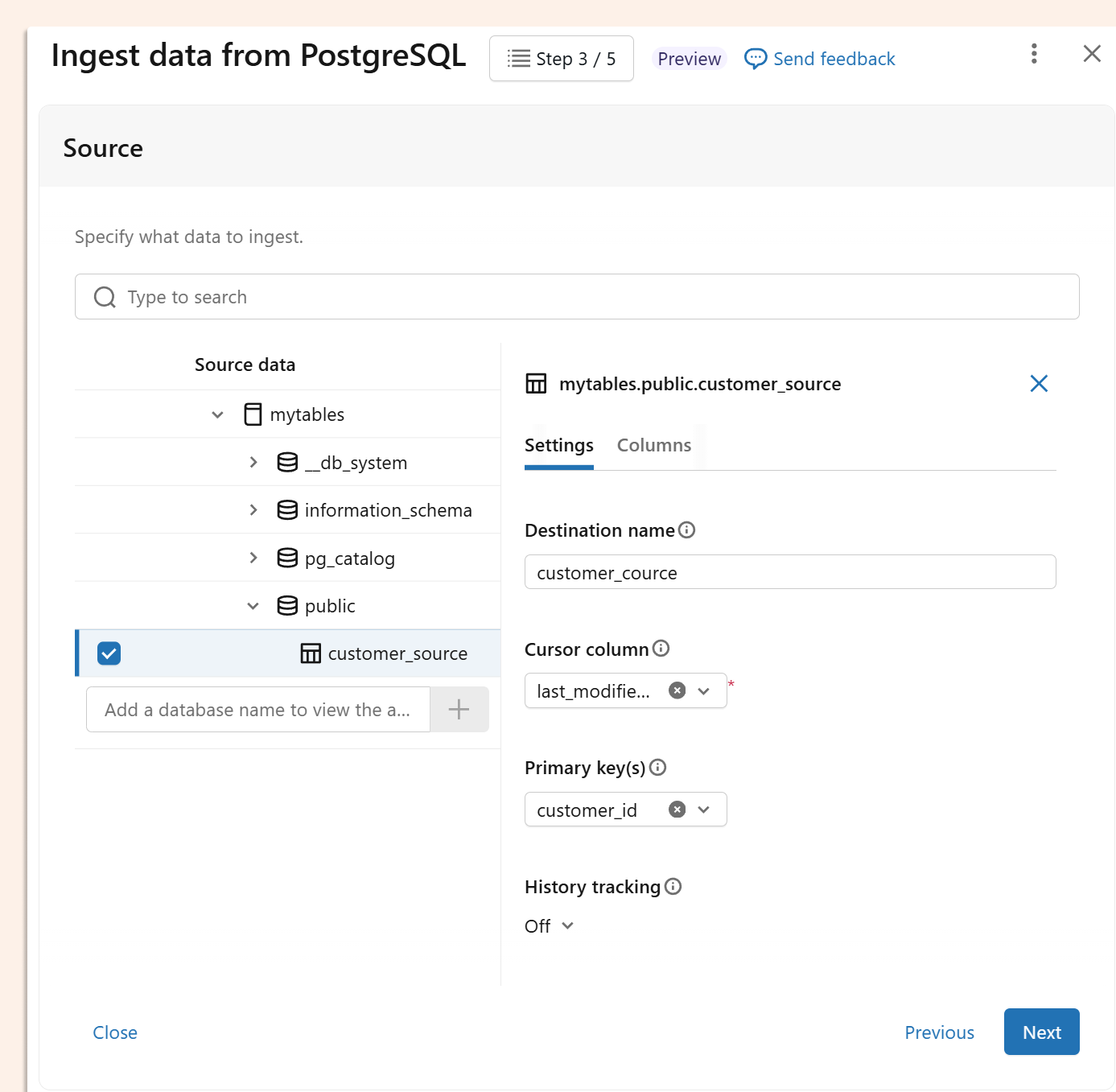
On that image, all clear, the cursor column is our last modified column. We also need to choose primary keys here, and optionally enable history (SCD Type 2). No soft deletes here, but who needs it here? Anyway, we don’t want to use UI, but our favourite tool for managing everything as code is DABS, and there are even more interesting options we can define as code.
Cursor column
cursor_columns is used for our checkpoints. Can be more than one column. Only remember that if records are modified and the timestamp is lower (decreasing), they will be skipped because they do not meet the condition “modified_time > checkpoint”. That column is used by default for checkpointing, but the order of records (which can be useful for SCD Type 2) can be overwritten by sequence_by option. If the cursor column is not specified, the full batch load of the table will occur.
SOFT DELETES
deletion_condition specifies a SQL WHERE logic condition that decides that the source row has been deleted. This is sometimes referred to as “soft-deletes”. For example: “Operation = ‘DELETE’” or “is_deleted = true”. The condition has to be in Databricks SQL dialect (not remote database SQL dialect).
HARD DELETES
hard_deletion_sync_min_interval_in_seconds by default is not set. Specifies the minimum interval (in seconds) between snapshots on primary keys for detecting and synchronising hard deletions—i.e., rows that have been physically removed from the source table. If we don’t expect hard deletes, we can set it to a really low frequency, like once per month. If we expect frequent hard deletes, that option can be very important. Just keep in mind that this check can be expensive, since it is not incremental and must find deleted records among primary keys on the source and target tables. It is a useful option, as sometimes soft delete can be bypassed (for example, GDPR option, when we have a couple of days to clean personal data). Hard deletions are only supported on SCD Type 1 and not on SCD Type 2.
Late-arriving data
For late-arriving records, if the cursor column used to track changes has already been advanced past their value, those records won't be captured on subsequent reads. To address this, we have a cursorLookbackWindowSeconds (defaulting to 5 minutes), that rewinds the start offset by the given window — meaning we re-read data from the latest ingested cursor minus 5 minutes, so late arrivals within that window are picked up instead of skipped.
DABS
Our final DABS for ingesting our source table with customers:
looks as follows:
resources:
  pipelines:
    pipeline_watermark_pipeline:
      name: watermark_pipeline
      ingestion_definition:
        connection_name: mypostgres
        source_type: POSTGRESQL
        objects:
          - table:
              source_catalog: mytables
              source_schema: public
              source_table: customer_source
              destination_catalog: main
              destination_schema: demo
              destination_table: customer_cource
              table_configuration:
                primary_keys:
                  - customer_id
                # default, we can change to SCD_TYPE_2 to keep hisotry
                scd_type: SCD_TYPE_1
                # it will override cursor_columns to decide which version of record is the latest (rather SCD type 2)
                sequence_by: last_modified_ts
                query_based_connector_config:
                  cursor_columns:
                    - last_modified_ts
                  # soft-deletes logic condition
                  deletion_condition: "is_deleted = TRUE"
                  # hard-deletes, frequency to check primary keys
                  hard_deletion_sync_min_interval_in_seconds: 86400
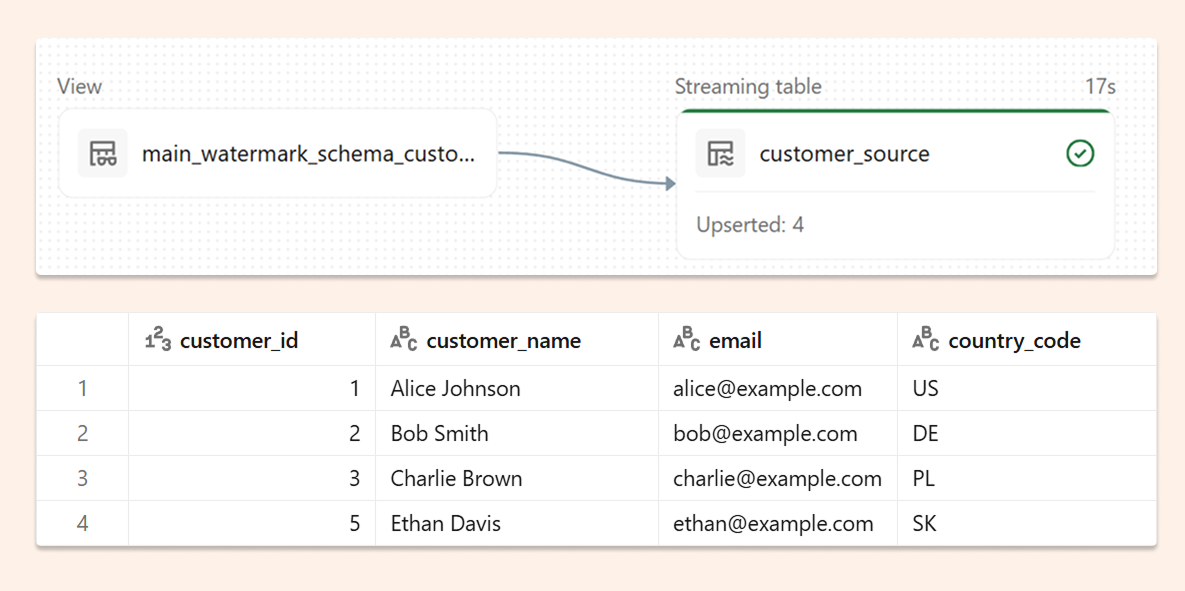
And after ingestion into the Unity Catalogue, we will see 4 records (without one deleted):
In Postgres, we will then update the first record.
UPDATE customers
SET
  customer_name = 'Alice',
  last_modified_ts = CURRENT_TIMESTAMP
WHERE customer_id = 1;
We can see in the pipeline that only one record was updated, so incremental processing is working correctly.

If we repeat all operations as above, but set scd_type: SCD_TYPE_2, we will see data as below, with a full history of every record:

No gateway
It is also worth mentioning that our ingestion didn’t require gateway and direct connection is supported.
Databricks as best platform for best practices in incremental data processing
I always say that if you, instead of a full reload, set up a correct incremental process, that is the best FinOps and optimisation. As a rule of thumb, you can usually reduce costs by 99%. Thanks to four options:
AUTO CDC
Query-based injection with watermark
Materialized Views
Streaming Tables
We can implement the best-in-class incremental data processing.